#1

Overall: 4.3/5
An essentially silent fan is helpful in quiet workspaces, although some buyers find occasional flicker or edge dimming more distracting than any fan noise.
Pros: overall satisfaction, Text fringing
Cons: brightness, Edge dimming behavior
#2
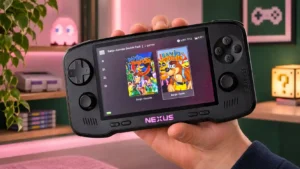
Overall: 4.0/5
Physical cartridges and a deliberately small selection of games encourage focused play without storefronts, subscription prompts, or overwhelming digital libraries.
Pros: controller features, display quality
Cons: TV output connectivity, Suspend and resume
#3

Overall: 4.2/5
Quiet cooling and a tidy one-cable desk keep the working environment relatively unobtrusive.
Pros: refresh rate, HDR performance
Cons: value for money, Device compatibility
#4

Overall: 4.5/5
The curve fills peripheral vision without becoming an attention-grabbing distraction once play begins.
Pros: color gamut, contrast
Cons: value for money, Resolution
#5
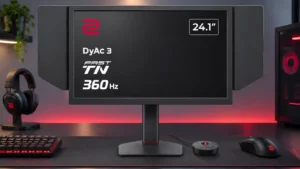
Overall: 3.8/5
The pronounced bezel frame and tournament-oriented shielding can isolate the game from a crowded, visually busy environment.
Pros: competitive gaming suitability, motion clarity
Cons: contrast, overall picture quality
#6
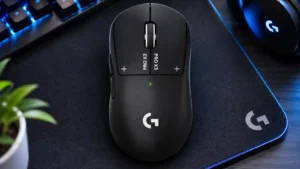
Overall: 3.8/5
Nearly silent main clicks make this a good choice when other people are nearby.
Pros: balance and weight distribution, weight
Cons: Upgrade value, value for money
#7

Overall: 4.2/5
Diffuse reflections can help viewers focus on the content instead of mirror images of lights and windows.
Pros: picture quality, overall satisfaction
Cons: design and appearance, Dolby Vision support
#8

Overall: 4.0/5
The sports-focused interface and limited lifestyle extras appeal to runners who prefer training tools over phone-like distractions.
Pros: GPS accuracy, heart rate accuracy
Cons: value for money, training analysis
#9
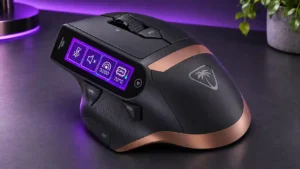
Overall: 3.6/5
Adjustable RGB is praised for staying restrained rather than stealing attention during play.
Pros: charging convenience, battery life
Cons: Touchscreen usefulness, value for money
#10

Overall: 4.4/5
Subtle indicator lighting, a generally quiet fanless design and true-black borders help the screen stay out of the way during normal work and play.
Pros: brightness, value for money
Cons: port selection, built-in speakers
#11

Overall: 4.0/5
Calendar glances help keep a busy day organized without repeatedly reaching for the phone. The benefit comes from quick checks rather than a rich productivity-app ecosystem.
Pros: mapping and navigation, battery life
Cons: value for money, software smoothness
#12

Overall: 4.0/5
The headphones are a good fit for quiet surroundings, where their lack of active noise cancellation is less important.
Pros: Sound quality, Overall recommendation
Cons: Noise isolation (passive), Active noise cancellation
#13
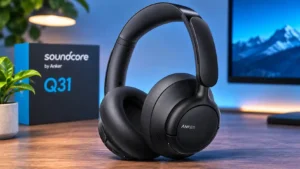
Overall: 3.7/5
Noise cancellation helps reduce distractions enough for focused work in an open office.
Pros: Battery, Active noise cancellation
Cons: Multipoint connectivity reliability, Powered features in wired mode
#14

Overall: 4.4/5
Protective care functions can run subtly, although some automatic light-sensing modes cause noticeable changes.
Pros: refresh rate, Text fringing
Cons: Resolution, GPU demands
#15

Overall: 3.9/5
The limited screen offers a useful middle ground for people wanting time and metrics without constant smartwatch interaction. Those seeking the quietest possible wearable may still prefer a screenless band.
Pros: value for money, design and appearance
Cons: contactless payments, GPS accuracy
#16

Overall: 4.0/5
Noise cancellation helps keep household sounds, office noise, and other distractions out of listening sessions. Hands-on comparisons still find faint residual construction noise that premium rivals eliminate more completely.
Pros: Design and Aesthetics, Repairability
#17

Overall: 4.0/5
Useful for reducing distractions, but not a reliable substitute for complete silence in noisy spaces.
Pros: Battery, Weight comfort
Cons: Premium feel, Included accessories
#18

Overall: 2.9/5
Operating through HDMI can sidestep much of the intrusive onboard smart experience, making it appealing as a simple display.
Pros: value for money, picture quality
Cons: account requirements, gaming performance
#19

Overall: 3.9/5
The relatively understated front and restrained styling suit desks where aggressive gaming aesthetics would feel out of place.
Pros: motion clarity, Backlight strobing
Cons: contrast, HDR performance
#20

Overall: 4.4/5
Mac Focus integration can reduce manual mode changes when switching between work and off-hours.
Pros: port selection, color accuracy
Cons: built-in speakers, speaker quality
#21
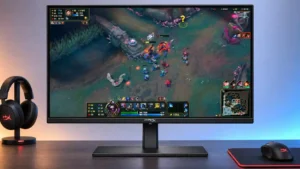
Overall: 4.1/5
The clean finish and lack of flashy RGB create a calmer, more work-friendly desk presence.
Pros: black levels, overall picture quality
Cons: brightness, Gaming feature selection
