
If you want better value for money
Choose Logitech G305 Lightspeed. It scores 4.8 vs 2.1 for value for money, with a 4.3 overall score.

Exceptional adjustable clicks, improved weight balance and longer battery life make this a compelling esports mouse. Its steep price, mediocre stock feet and modest gains over the X2 make it difficult to justify for most existing owners.
Competitive FPS players and technology enthusiasts who want customizable actuation, rapid repeat clicks, precise tracking and better-balanced handling. Claw and many fingertip users are particularly well served.
Budget-conscious or casual gamers who cannot justify a premium for small competitive gains, and left-handed users who need accessible thumb buttons. Palm-grip players seeking dedicated ergonomic support should also consider alternatives.
The G PRO X3 SUPERSTRIKE refines an already excellent competitive mouse rather than reinventing it. Its adjustable inductive triggers and Rapid Trigger system offer unusual control over click depth, reset distance and tactile feedback. Precise tracking and very low latency make it particularly appealing for FPS players, while improved weight distribution makes flicking and lifting feel more natural. Battery life is another meaningful improvement, although high polling rates and stronger haptics reduce endurance. The catch is the roughly $200 price: stock skates, mushy side buttons and a missing dedicated DPI switch fall short of premium expectations. Some testers found real click-speed benefits, while others measured little practical difference. It is a strong choice for competitive players who specifically want HITS, but most X2 owners and budget-conscious gamers have better reasons to keep their current mouse or consider cheaper alternatives.
Compared with other Gaming Mice, this product is above average in software stability, click noise, RGB features, near average in weight, click latency, below average in acceleration control, glide smoothness, value for money.
| Attribute | This product | Category average | Difference |
|---|---|---|---|
| acceleration control | 2.0 | 4.5 | -2.5 |
| glide smoothness | 2.3 | 4.4 | -2.1 |
| value for money | 2.1 | 3.7 | -1.6 |
| feet quality | 2.3 | 3.8 | -1.6 |
| ergonomic design | 2.5 | 4.3 | -1.8 |
| skate durability | 2.0 | 3.7 | -1.7 |
| side button quality | 2.2 | 3.7 | -1.5 |
| Fingerprint and smudge resistance | 2.3 | 4.0 | -1.7 |
Choose Logitech G305 Lightspeed. It scores 4.8 vs 2.1 for value for money, with a 4.3 overall score.
Choose Razer Basilisk V3. It scores 4.9 vs 2.3 for feet quality, with a 4.5 overall score.
Choose Turtle Beach Command Series MC7. It scores 5.0 vs 2.3 for glide smoothness, with a 3.6 overall score.
Choose Logitech G PRO X Superlight 2. It scores 4.7 vs 4.2 for weight, with a 4.0 overall score.
Compared with Logitech G PRO X3 SUPERSTRIKE
Usually not. The biggest practical changes are better weight distribution and longer battery life; the click system and shape are largely unchanged.
It is rated for up to 135 hours under favorable settings. Several users reported days or a week between charges, but 8K polling and stronger haptics reduce runtime substantially.
Shorter actuation and rapid reset can speed up clicks. Tests disagree on how much that improves personal reaction time or actual game results.
The shell is symmetrical, but the thumb buttons are positioned on the left side only. A truly ambidextrous mouse is a better fit if those controls matter.
Yes. The new chipset enables 8K polling through wired and wireless connections, although lower rates may improve battery endurance and avoid stutter in some games.
Opinions vary, but several testers found them scratchy or slow, particularly on textured pads. Some preferred aftermarket skates.
No. Sensitivity is configured in G Hub or by assigning a programmable button to DPI changes.
These are a few of the reviews included in our analysis.

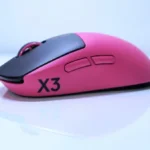



Logitech's PRO X3 SUPERSTRIKE is here and it's looking faster than ever, but is it worth the exorbitant cost? Let's find out.
Can Buy -- the Logitech G Pro X3 Superstrike gaming mouse fixes most of the shortcomings of its predecessor, but it's even more expensive now.
Gaming Gear & Reviews · Logitech G PRO X3 SUPERSTRIKE reputation review: 59 g, 135-hour battery, tunable HITS clicks, 8,000 Hz, $199.99...
Logitech G Pro X3 SUPERSTRIKE review: 59 g ambidextrous wireless mouse on the HERO 2 sensor with adjustable inductive HITS switches. What the...
It's somehow better than the X2 Superstrike, and also not worth the price.

Choose the ROG Harpe II Ace for ultralight FPS play, precise tracking, smooth glide, and web-based tuning. Skip it if you need palm-grip support, MMO buttons, onboard profiles, or long...
Pros: glide smoothness, weight
Cons: handedness options

Excellent tracking, comfortable right-handed ergonomics and a versatile scroll wheel make the Basilisk V3 a strong gaming and productivity mouse. Its substantial weight, fixed cable and sometimes over-sensitive automatic scrolling...
Pros: scroll wheel quality, RGB features
Cons: weight, handedness options

Best for ultra-light, competition-focused speed, precise tracking, stable wireless, and long battery life. Skip it if you need quieter clicks, left-handed support, Bluetooth, more buttons, or better value for casual...
Pros: value for money, weight
Cons: click noise, RGB features

Choose it if you want a premium MMO/productivity mouse with 12 adjustable side buttons, strong battery life, and Stream Deck integration. Skip it if you need an ultralight FPS mouse,...
Pros: button customization, MMO gaming suitability
Cons: FPS gaming suitability