Best for productivity versatility
Dell U4025QW
5.0 attribute score
Highest scored product for this attribute based on supporting review evidence.

Highest scored product for this attribute based on supporting review evidence.
Balances the attribute score, supporting reviews, and overall product strength.
Has the broadest review evidence for this attribute.
Strongest overall product among items with scored evidence for this attribute.

Overall: 4.4/5
From spreadsheets to editing timelines and complex multi-machine desks, the monitor handles many professional workflows on one canvas.
Pros: overall picture quality, color accuracy
Cons: value for money, built-in speakers

Overall: 4.2/5
A wide panel and practical USB-C connectivity make juggling spreadsheets, browsers, terminals, and creative windows straightforward.
Pros: overall satisfaction, screen size
Cons: stand adjustability, Photo editing

Overall: 4.1/5
Writing, browsing and spreadsheets benefit from the generous screen space without feeling awkward on the curve.
Pros: value for money, overall satisfaction
Cons: HDR performance, Headphone output quality

Overall: 4.0/5
Productivity is the clearest strength: the 34-inch ultrawide comfortably holds multiple apps, spreadsheets, editors, and research windows at once. KVM, hub, and layout tools make it especially effective for work-from-home...
Pros: overall satisfaction, productivity versatility
Cons: value for money, reliability over time

Overall: 3.7/5
The wide uninterrupted work area fits several windows or a lengthy timeline, making this more than a gaming-only display.
Pros: ultrawide gaming experience, black levels
Cons: HDR performance, viewing angles

Overall: 4.3/5
Productivity is the overwhelming consensus strength: one seamless 6K canvas can replace multiple displays, reduce window switching, and keep dense workflows visible at once. It is especially effective for trading,...
Pros: productivity versatility, overall satisfaction
Cons: value for money, response time

Overall: 4.2/5
The monitor works particularly well as a central office display, connecting a variety of peripherals and machines. Entertainment is possible, but not every task gets equally strong performance.
Pros: port selection, USB hub functionality
Cons: competitive gaming suitability, motion clarity

Overall: 3.8/5
The strongest combination is sharp work output plus smooth casual gaming and media, rather than excellence at high-end HDR or competitive gaming.
Pros: value for money, Resolution
Cons: port selection, HDR performance

Overall: 4.1/5
The S2725DC covers office documents, coding and light entertainment without needing separate specialist displays, though it is not ideal for demanding creative work.
Pros: USB hub functionality, USB-C power delivery
Cons: speaker quality

Overall: 3.7/5
Multitasking across several large windows works very well, yet the limited connectivity and stand options leave it short of premium office displays.
Pros: value for money, Resolution
Cons: stand adjustability, viewing angles

Overall: 3.9/5
Sharp text, strong brightness and a burn-in-free IPS panel make this a good crossover screen for work and play.
Pros: Resolution, refresh rate
Cons: HDR performance, contrast

Overall: 4.3/5
Productivity versatility was mixed: excellent text clarity helped, but burn-in risk, no KVM, and weak USB-C limited work setups.
Pros: value for money, sharpness
Cons: brightness, USB hub functionality

Overall: 3.6/5
4K density and improved text quality make everyday work far more realistic than with earlier OLEDs. A curved panel, static-content risk and limited docking still restrict all-day office appeal.
Pros: overall satisfaction, brightness
Cons: Dolby Vision support, VRR flicker

Overall: 4.2/5
The display can handle occasional desktop tasks, but OLED wear concerns and text rendering prevent it from being the most comfortable all-day work monitor.
Pros: competitive gaming suitability, color gamut
Cons: brightness, HDMI 2.1 support

Overall: 3.8/5
The panel works for mixed tasks, but text fringing, modest brightness and missing convenience ports make it less ideal as an all-day work screen.
Pros: value for money, panel type
Cons: brightness, port selection
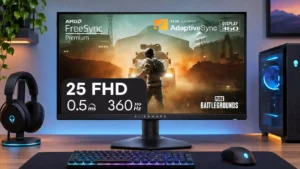
Overall: 3.9/5
The 24.5-inch Full HD canvas feels cramped for spreadsheets, document editing and multiple simultaneous windows.
Pros: competitive gaming suitability, stand adjustability
Cons: color gamut, contrast