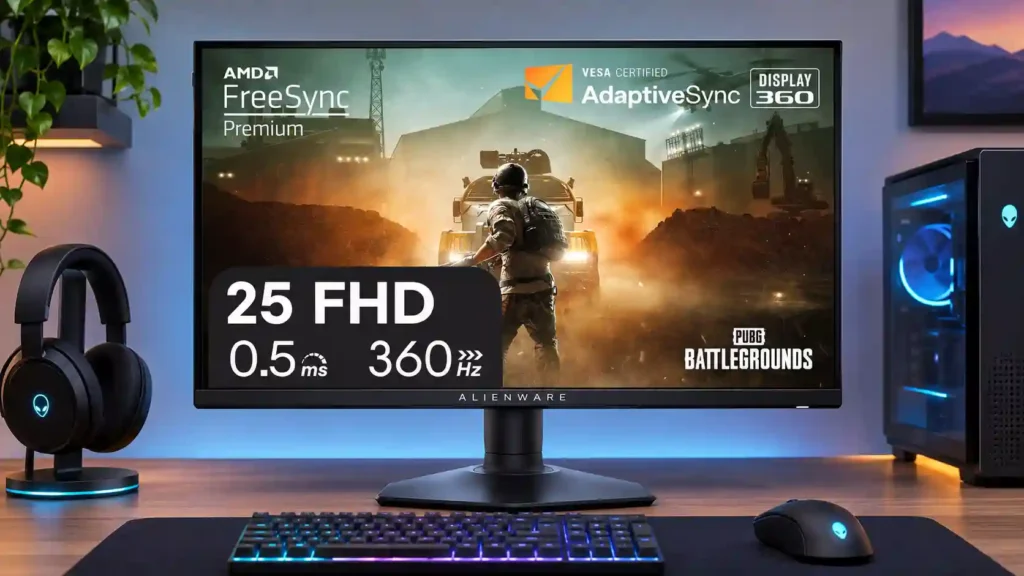
Dell Alienware AW2523HF

Dell Alienware AW2523HF Monitor Review

Brand: Dell
Released: September 7, 2022
Updated: 8 hours ago
3.9
Overall review score
433
Review insights
74
Scored features
15
Expert reviews

Bottom Line

This 360Hz Alienware is compelling for high-frame-rate competitive PC gaming, with fast response, minimal lag and excellent ergonomics. Its 1080p detail, weak HDR and limited dark-scene contrast make it a poor all-purpose upgrade.

Competitive PC gamers playing high-frame-rate tactical shooters and other fast esports titles, especially those who value compact viewing, responsive motion and a deeply adjustable stand.

Players prioritizing cinematic HDR, high-resolution single-player games or modern-console features, as well as color-critical creators and productivity users who need more pixels.

Verdict

The Alienware AW2523HF is built for a particular kind of gamer: someone chasing exceptionally responsive PC play at 1080p. Across the reviews, its 360Hz refresh rate, low input lag and clean high-speed motion are the recurring reasons to buy. The comfortable IPS viewing angles, strong SDR brightness, accessible USB ports and adjustable stand make it easier to live with than a bare-bones esports panel. But the speed comes with compromises. The 24.5-inch Full HD image lacks the fine detail of 1440p, dark scenes look gray, and basic HDR offers little visual payoff. Some reviewers also question how much faster 360Hz feels than 240Hz, especially if a PC cannot maintain very high frame rates. Buy for focused competitive play at a worthwhile discount; look elsewhere for cinematic gaming, serious editing or a versatile console screen.

Feature Scorecards

Summary

74 reviewed features
  • Very positive 4.5-5.0
    24 (32%)
  • Positive 3.5-4.4
    25 (34%)
  • Neutral 2.5-3.4
    11 (15%)
  • Negative 1.5-2.4
    11 (15%)
  • Very negative below 1.5
    3 (4%)

Pros highlights

  • 4.7
    15 reviews strong consensus
    competitive gaming suitability: 4.7, 15 reviews, strong consensus
    Rapid 360Hz refresh, low lag and responsive pixel transitions make this a strong esports specialist, provided the PC can sustain high frame rates.
  • 4.9
    14 reviews strong consensus
    stand adjustability: 4.9, 14 reviews, strong consensus
    Height, tilt, swivel and dual-direction pivot make positioning easy; a tall user found the maximum height insufficient.
  • 4.0
    14 reviews low consensus
    overall satisfaction: 4.0, 14 reviews, low consensus
    Feedback is favorable when the display is judged as a competitive gaming specialist, but a minority question whether 360Hz justifies its compromises and price.
  • 4.6
    13 reviews strong consensus
    refresh rate: 4.6, 13 reviews, strong consensus
    360Hz delivers exceptionally fluid play and a low-latency feel, but several reviewers find the improvement over 240Hz subtle unless frame rates stay very high.
  • 3.9
    13 reviews low consensus
    value for money: 3.9, 13 reviews, low consensus
    Pricing below some premium 360Hz rivals earns praise, particularly on sale; others view a cheaper 240Hz or sharper 1440p monitor as the better use of money.
  • 4.8
    12 reviews strong consensus
    design and aesthetics: 4.8, 12 reviews, strong consensus
    The restrained gray Alienware styling, slim bezels and sculpted rear receive widespread praise without the brash RGB look of some rivals.

Cons highlights

  • 2.8
    12 reviews moderate consensus
    color gamut: 2.8, 12 reviews, moderate consensus
    Standard sRGB performance is adequate for SDR games, while the narrower DCI-P3 and Adobe RGB coverage leaves richly colored and professional work behind wider-gamut alternatives.
  • 3.0
    11 reviews low consensus
    contrast: 3.0, 11 reviews, low consensus
    Contrast earns both above-average-for-IPS praise and clear criticism beside OLED or VA. Dark content still lacks the depth needed for cinematic presentation.
  • 1.9
    10 reviews strong consensus
    HDR performance: 1.9, 10 reviews, strong consensus
    Basic HDR support does not deliver meaningful high-dynamic-range impact. Reviewers repeatedly point to weak contrast, no effective dimming and limited color range.
  • 2.0
    8 reviews strong consensus
    Resolution: 2.0, 8 reviews, strong consensus
    1080p is a deliberate performance trade-off: easier to drive at esports frame rates, but noticeably less crisp than 1440p for games and work.
  • 2.0
    6 reviews strong consensus
    Pixel density: 2.0, 6 reviews, strong consensus
    About 90 pixels per inch makes small text and fine edges visibly coarse, even though many esports players accept the trade-off.
  • 2.3
    6 reviews moderate consensus
    single-player cinematic gaming suitability: 2.3, 6 reviews, moderate consensus
    The narrow gamut, limited resolution and gray blacks reduce immersion in richly detailed or moody single-player titles, although one owner enjoyed the compact view.

Use Cases

Best for

  • 4.7
    7 reviews strong consensus
    SDR gaming: 4.7, 7 reviews, strong consensus
    SDR is the monitor's natural strength: smooth competitive action and solid sRGB color without HDR's disappointing contrast compromises.
  • 5.0
    4 reviews strong consensus
    Tactical shooter gaming: 5.0, 4 reviews, strong consensus
    Fast response and exceptionally low lag feel well suited to Counter-Strike, Valorant and similar shooters, provided frame rates can keep up.
  • 4.8
    4 reviews strong consensus
    Bright-room viewing: 4.8, 4 reviews, strong consensus
    Strong SDR brightness and glare reduction make this an appealing monitor for well-lit gaming rooms short of direct sunlight.

Not ideal for

  • Color-critical work
    2.0
    7 reviews strong consensus
    Color-critical work: 2.0, 7 reviews, strong consensus
    Good basic accuracy cannot fully offset the limited gamut and missing dedicated sRGB mode. Reviewers steer professional grading and editing toward specialist displays.
  • Dark-room viewing
    1.8
    4 reviews strong consensus
    Dark-room viewing: 1.8, 4 reviews, strong consensus
    Limited IPS contrast and sometimes visible glow make shadow-heavy games and films less convincing in a dark room.

Compared With Category Average

Compared with other Monitors, this product is above average in Control button responsiveness, competitive gaming suitability, Headphone jack convenience, near average in refresh rate, motion clarity, below average in Resolution, sharpness, Pixel density.

Comparison summary

70 compared features
  • Above average 0.4+ pts higher
    24 (34%)
  • Same as average within 0.3 pts
    20 (29%)
  • Below average 0.4+ pts lower
    26 (37%)

Largest category differences

Attribute This product Category average Difference
Resolution 2.0 4.4 -2.4
sharpness 2.0 4.4 -2.4
Pixel density 2.0 4.2 -2.2
Shadow detail 1.3 3.6 -2.2
local dimming performance 1.0 3.2 -2.2
productivity versatility 2.0 4.2 -2.2
single-player cinematic gaming suitability 2.3 4.4 -2.0
color gamut 2.8 4.5 -1.7

Consider This Instead

If you want better sharpness

Choose LG 27GR83Q-B. It scores 4.8 vs 2.0 for sharpness, with a 4.2 overall score.

Compare

Compared in Reviews

Products reviewers directly compared with this model, grouped into quick takeaways.

Dell Alienware AW2521H (2020)

  • Alternative: G-SYNC hardware distinction The AW2521H uses native NVIDIA G-SYNC hardware, unlike the AW2523HF’s FreeSync-oriented design.
  • More expensive: launch price versus comparable refresh Reviewed contrasts an early expensive 360Hz Alienware with the far cheaper AW2523HF.
  • Alternative: price and adaptive sync flexibility Tom’s Hardware finds the cheaper AW2523HF closely matches the AW2521H’s gaming experience while adding broader Adaptive-Sync support.

ASUS ROG Swift 360Hz PG259QN

  • Better: backlight insertion and motion clarity The reviewer prefers the ASUS PG259QN because its black-frame insertion makes motion significantly clearer.
  • Compared: competitive 360Hz pricing Custom PC contrasts Alienware’s relatively inexpensive 360Hz offering with the earlier ASUS model.
  • Compared: overshoot and backlight strobing The Dell has less overshoot, while the ASUS offers native G-SYNC and strobing.

Dell Alienware AW2521HF

  • Older model: refresh rate generation The AW2523HF succeeds the earlier 240Hz AW2521HF as a faster esports model.
  • Older model: 360Hz versus 240Hz The AW2523HF moves to 360Hz from the AW2521HF’s 240Hz esports panel.

FAQ

Is 360Hz noticeably better than 240Hz?

It can feel a little smoother and more responsive in fast competitive games, but several reviewers found the jump modest. A PC sustaining very high frame rates is important.

Can the AW2523HF reach 360Hz through HDMI?

The reviews identify DisplayPort as the connection for full 360Hz operation. HDMI 2.0 is limited to a lower refresh rate.

Does it work with NVIDIA G-SYNC?

Reviewers tested G-SYNC-compatible operation successfully over DisplayPort, although the monitor is FreeSync-oriented and lacks native NVIDIA G-SYNC hardware.

Is this a good PS5 or Xbox monitor?

It can display console games, but most reviewers recommend something with sharper resolution, stronger HDR or HDMI 2.1 for modern consoles. Its 360Hz advantage is mainly for PCs.

How good are its colors and HDR?

SDR sRGB colors and basic accuracy are generally good for gaming, sometimes after adjustment. HDR looks unimpressive because of limited contrast, color range and local dimming.

Can I use it for work or video editing?

Yes for everyday tasks and casual editing, and the stand rotates into portrait mode. However, 1080p provides limited workspace and the color gamut is not ideal for serious creative work.

Does it include speakers and USB ports?

There are no built-in speakers. Reviewers like the four USB-A ports, including two easy-to-reach connections, plus the headset hook and headphone outputs.

Sample Expert Reviews We Analyzed

These are a few of the reviews included in our analysis.

Video Reviews

Article Reviews

rtings.com

The Dell Alienware AW2523HF is a 25-inch, 1080p gaming monitor with a 360Hz refresh rate that's part of Dell's Alienware lineup. It replaces...

Review score
4.1
custompc.com

With its 360Hz refresh rate, the Alienware AW2523HF offers blistering gaming performance, though its IPS panel tops out at a modest 1080p...

Review score
3.7

Top Monitors to Consider

#1 Asus ROG Swift 34 QD-OLED PG34WCDN
4.5

This 360Hz QD-OLED ultrawide delivers exceptional gaming motion, vibrant HDR and dramatically cleaner text. Its high price, less-than-perfect bright-room blacks and occasional HDR dimming are the main reasons to hesitate.

Pros: color gamut, contrast

Cons: value for money, Resolution

#2 Dell U4025QW
4.4

A huge, sharp ultrawide workspace and unusually capable Thunderbolt dock make the U4025QW outstanding for demanding productivity and editing. Its high price, modest HDR, and imperfect motion handling keep it...

Pros: overall picture quality, color accuracy

Cons: value for money, built-in speakers

#3 ASUS ROG Strix OLED XG27ACDNG
4.4

Lightning-fast 360Hz OLED gaming, rich color and an unusually flexible USB-C/KVM setup are the big draws. Strong room lighting, limited full-screen HDR brightness and static-content burn-in concerns keep it from...

Pros: color gamut, overall satisfaction

Cons: reflection handling, VRR flicker

#4 ASUS ROG Swift OLED PG27UCDM
4.4

The 27-inch 4K OLED picture is exceptionally crisp and responsive, with useful USB-C and KVM extras. Its high price, oversized stand, and bright-room compromises limit its appeal.

Pros: sharpness, overall satisfaction

Cons: value for money, VRR flicker