If you want better contrast
Choose Samsung Odyssey OLED G80SH S32HG802S. It scores 5.0 vs 1.7 for contrast, with a 4.1 overall score.

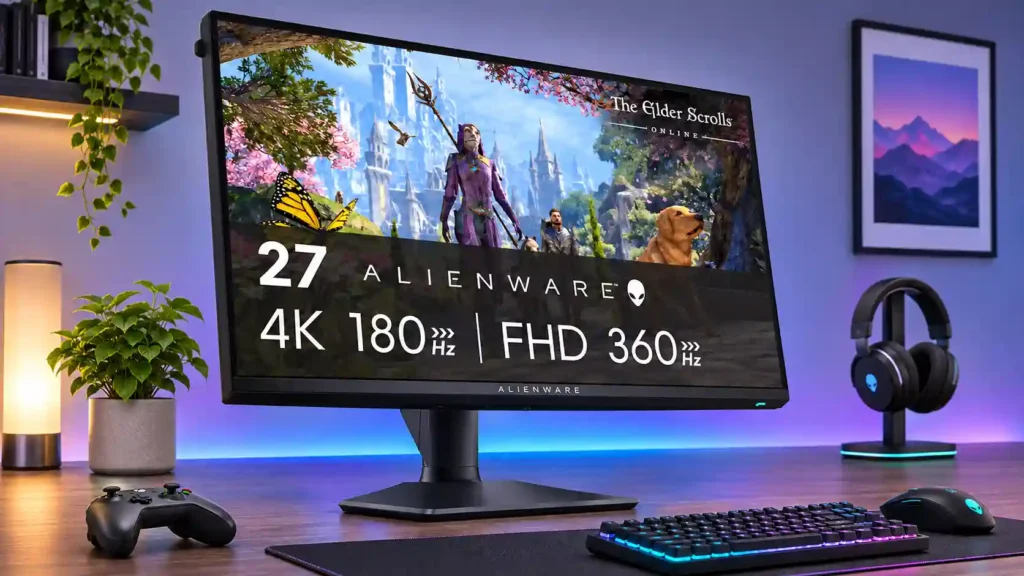
Sharp 4K detail and responsive 1080p/360Hz gaming make this a versatile IPS choice for players who use both modes. Low HDR contrast and no USB-C video input are its main drawbacks.
PC gamers who alternate between detailed 4K single-player or SDR gaming and fast competitive play, especially in mixed work-and-play desktop setups where crisp text matters.
Buyers prioritizing cinematic HDR, deep dark-room blacks, dedicated esports-level 360Hz clarity or one-cable USB-C laptop docking. People who only use one resolution may get better value elsewhere.
The Alienware AW2725QF makes its strongest case to PC gamers who genuinely want two different experiences from one 27-inch screen. Its sharp 4K mode is unusually good for desktop work, detailed single-player games and high-refresh SDR play; switching to 1080p at up to 360Hz gives competitive games extra speed and lower input lag. Reviewers repeatedly praise its high brightness, appealing SDR colors, ergonomic stand and straightforward controls. The compromise is picture depth: the IPS panel has limited native contrast, coarse edge-lit dimming and inconsistent HDR impact, so OLED and capable mini-LED displays look more cinematic. The fastest mode also produces softer fine details and does not always deliver true 360Hz-level motion clarity. With no USB-C video input or headphone jack, it is a less convenient laptop dock. This is a persuasive mixed-use gaming monitor when both modes matter, but less compelling for buyers who can commit to one resolution.
Compared with other Monitors, this product is above average in Per-input settings memory, Dual-mode versatility, portability and weight, near average in refresh rate, design and aesthetics, below average in contrast, black levels, Headphone jack convenience.
| Attribute | This product | Category average | Difference |
|---|---|---|---|
| contrast | 1.7 | 4.3 | -2.5 |
| black levels | 1.7 | 4.1 | -2.4 |
| Headphone jack convenience | 1.3 | 3.7 | -2.4 |
| HDR highlight detail | 1.5 | 3.7 | -2.2 |
| Blooming control | 2.0 | 4.2 | -2.2 |
| local dimming performance | 1.2 | 3.2 | -2.1 |
| Per-input settings memory | 4.0 | 1.8 | +2.2 |
| HDR performance | 2.1 | 3.4 | -1.3 |
Choose Samsung Odyssey OLED G80SH S32HG802S. It scores 5.0 vs 1.7 for contrast, with a 4.1 overall score.
Choose LG 27GX790A-B. It scores 5.0 vs 1.7 for black levels, with a 4.0 overall score.
Choose Dell Alienware AW2725DF. It scores 5.0 vs 1.5 for HDR highlight detail, with a 4.2 overall score.
Choose ASUS ROG Swift OLED PG27AQWP-W. It scores 5.0 vs 1.2 for local dimming performance, with a 4.3 overall score.
Products reviewers directly compared with this model, grouped into quick takeaways.
It runs at 4K up to 180Hz or 1080p up to 360Hz. The maximum rates require overclocking options; 165Hz and 330Hz are the standard rates.
Yes, its 1080p/360Hz mode offers low lag and fluid play. Fine details can look soft, and its IPS response does not always match the crispness of a dedicated premium esports or OLED screen.
HDR brightness and color can look pleasing, but low contrast and coarse local dimming leave blacks gray and some highlights flat or haloed. Reviewers generally favor SDR or a stronger OLED/mini-LED for serious HDR.
The 27-inch 4K screen produces clear small text and accurate SDR color, making it strong for everyday work, basic photo editing and mixed use. Darkened edges and limited HDR fidelity make it less suitable for demanding reference-grade work.
No. The USB-C port is downstream for peripherals and limited charging; it does not carry a DisplayPort video input. A separate HDMI or DisplayPort connection is needed.
Yes, HDMI 2.1 supports modern console 4K/120Hz and VRR signals. The monitor has no built-in speakers or 3.5mm headphone output, although compatible HDMI audio passthrough is available.
It makes the most sense if you regularly alternate between sharp 4K games or work and competitive high-frame-rate play. If you mainly use one mode, several reviewers favor a less expensive single-mode 4K screen or an OLED alternative.
These are a few of the reviews included in our analysis.


The Dell Alienware AW2725QF is a mid-range 27-inch gaming monitor with an IPS panel. Featuring a native 4k resolution and 180Hz refresh rate...
With its ability to switch between 4K at 180Hz and 1080p at 360Hz modes, this is one super-versatile IPS gaming monitor from Alienware.
Dell's gaming arm, Alienware, has released a dual-resolution/refresh rate gaming monitor that supports 4K at 180Hz and 1080p (FHD) at 360Hz.
The Alienware AW2725QF functions as both an everyday gaming monitor as well as a competitive eSports option. Our review.
The best dual-mode monitor yet, but still clearly flawed

This 360Hz QD-OLED ultrawide delivers exceptional gaming motion, vibrant HDR and dramatically cleaner text. Its high price, less-than-perfect bright-room blacks and occasional HDR dimming are the main reasons to hesitate.
Pros: color gamut, contrast
Cons: value for money, Resolution

A huge, sharp ultrawide workspace and unusually capable Thunderbolt dock make the U4025QW outstanding for demanding productivity and editing. Its high price, modest HDR, and imperfect motion handling keep it...
Pros: overall picture quality, color accuracy
Cons: value for money, built-in speakers

Lightning-fast 360Hz OLED gaming, rich color and an unusually flexible USB-C/KVM setup are the big draws. Strong room lighting, limited full-screen HDR brightness and static-content burn-in concerns keep it from...
Pros: color gamut, overall satisfaction
Cons: reflection handling, VRR flicker

The 27-inch 4K OLED picture is exceptionally crisp and responsive, with useful USB-C and KVM extras. Its high price, oversized stand, and bright-room compromises limit its appeal.
Pros: sharpness, overall satisfaction
Cons: value for money, VRR flicker