
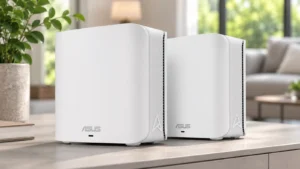
ASUS ZenWiFi BE5000 Pro Feature Scores
Overall Scorata score: 4.0/5
Based on 7 analyzed reviews · View source samples
Explore all 72 feature scores for ASUS ZenWiFi BE5000 Pro, organized into pros and cons.
Scores by Feature
Summary
72 reviewed features-
Very positive 4.5-5.047 (65%)
-
Positive 3.5-4.412 (17%)
-
Neutral 2.5-3.48 (11%)
-
Negative 1.5-2.45 (7%)
Pros
Sort
-
Excellent indoor range is one of the system’s biggest strengths, including in larger homes.
-
The mesh delivers broad coverage for everyday household use, though actual reach depends on the layout and node placement.
-
AiMesh support makes expanding a compatible ASUS network flexible, including the option of an outdoor node.
-
Wireless performance is strong for a dual-band mesh, particularly for everyday household traffic and longer indoor distances.
-
Dual 2.5G ports offer useful connectivity and delivered more than 2.3 Gbps in testing, but faster alternatives are available for higher-speed plans.
-
Advanced network settings, security and parental controls do not require an ongoing subscription, a notable advantage against subscription-heavy competitors.
-
Several people can stream video, make calls and use the network at once without the system struggling in typical household scenarios.
-
Fast wireless speeds hold up well against similarly positioned mesh systems, though premium tri-band systems reach higher peaks.
-
Parental controls are extensive and useful, including website and app-category filters, device blocking and schedules, but no daily usage limits.
-
Ethernet backhaul is a major strength, particularly for latency-sensitive devices and homes already wired with network cables. Daisy-chaining can simplify installation.
-
Extensive settings, VPN options and flexible management give users considerably more control over the network.
-
Initial setup is generally straightforward, with pre-synced nodes and the option of using either an app or a browser.
-
Multi-gig Ethernet is useful for wired devices and backhaul, although two 2.5G ports per unit cannot match higher-tier hardware.
-
Strong indoor reach makes this mesh a good choice for homes spanning multiple floors.
-
Compatible nodes are easy to add, including an outdoor option, but extra wireless nodes should be placed where they actually improve coverage.
-
Connections held reliably during stress testing and in areas that usually have weak reception.
-
Speeds hold up particularly well at longer indoor distances, making distant rooms less of a bottleneck.
-
The mesh has ample reach, with the option to add more compatible access points for troublesome areas.
-
A multi-day stress test ran without disconnections, and normally weak corners stayed connected in another home test.
-
Wired connectivity is fast and stable, with real-world Ethernet throughput exceeding 2.3 Gbps in testing.
-
Strong coverage, speed and subscription-free features offer good value, particularly for larger homes. Simpler homes may not need to spend as much.
-
Mesh performance is strong for its hardware class, but using three wireless nodes can lower speeds versus two.
-
Additional compatible nodes can help cover weak-signal areas, and normally troublesome corners stayed connected in home testing.
-
The mesh is a compelling overall choice for most households, particularly those that need broad coverage and reliable speeds.
-
Built-in online protection and advanced security features are notable strengths.
-
Advanced VPN options, including VPN Fusion and Instant Guard, give users more flexibility than many simpler mesh systems.
-
Auto-sensing Ethernet ports provide flexibility for multi-gig WAN, LAN and backhaul connections.
-
Near a node, speeds are good enough to make effective use of a gigabit internet connection.
-
The hardware remained cool during stress testing, and the cooling design is a welcome addition.
-
AiProtection provides a useful layer of online protection for the network and connected devices.
-
The 5 GHz band delivers particularly strong speed and range.
-
The materials feel premium and the construction is practical for home use.
-
Hardware reliability was encouraging in a three-day stress test without disconnections.
-
Installation is straightforward, with AiMesh making it easy to get the system running and extend it.
-
Pre-paired units join the mesh when plugged in, simplifying the process of adding the included nodes.
-
The pre-synced BD5 units simplify initial setup by arriving ready to join the network.
-
The units operated completely silently during testing.
-
Simultaneous high-definition streaming stayed smooth even under heavy traffic.
-
Device blocking is a useful part of the parental-control toolkit.
-
The remaining pre-synced units automatically join once the main router is configured and they are powered on.
-
The wider 240 MHz channel on 5 GHz gives the hardware an advantage over the lower-tier BD4.
-
Website and app-category filtering provide useful options for restricting inappropriate content.
-
Fast indoor connections are well suited to downloading large files in different rooms.
-
Setup and everyday operation are both regarded as straightforward.
-
Smart Home Master makes setting up an IoT network convenient.
-
An optional outdoor PoE node offers a useful way to extend coverage into a large yard.
-
Advanced QoS is part of a comprehensive suite of networking controls.
-
Smart Home Master SSIDs make integration with smart-home devices more convenient.
-
Internet-access schedules let parents control when devices go online, although daily usage allowances are unavailable.
-
The browser interface offers extensive settings for users who want more control over their network.
-
Browser-based setup provides a useful alternative for people who prefer configuring the network on their main computer.
-
The 2.5 Gbps ports deliver strong real-world rates, but their ceiling limits very demanding wired networks.
-
Wi-Fi 7 can improve gaming responsiveness, but this dual-band implementation leaves out the 6 GHz advantages of higher-tier systems.
-
The flexibility to set up the system with or without the mobile app is welcome.
-
The nodes look sleek and practical, though their bulk may not suit a minimalist room.
-
The optional ASUS Router app provides a convenient alternative to web management without mandatory login or subscription.
-
The quad-core processor is designed to support smooth continuous operation.
-
Online troubleshooting guides and FAQs provide useful resources for resolving problems.
-
Opinions on size vary: the units are compact for their capabilities but bulkier than some competing mesh systems.
Cons
Sort
-
There is no 6 GHz band, so compatible devices cannot benefit from its faster speeds and lower interference.
-
There are no 10 Gbps ports, so networks needing that speed must look at higher-tier alternatives.
-
MLO can be useful for wireless backhaul, but client operation alternates between bands rather than guaranteeing simultaneous aggregation, and backhaul topology can limit it.
-
The parental controls offer schedules, but cannot enforce a daily internet usage allowance.
-
Two Ethernet ports per node can be restrictive, especially if several devices need wired connections.
-
Upgrading from another ASUS router can require recreating settings from scratch instead of importing a configuration backup.
-
Wireless satellite nodes are less responsive than the main router and can introduce variable latency.
-
Latency is generally consistent at the main router, while wireless satellites can make responsiveness less predictable.
-
The two-band design works well for many households, especially with wired backhaul, but leaves less wireless bandwidth for mesh links and newer clients.
-
The modest 2×2 radio configuration offers less bandwidth than a 4×4 design.
-
Wireless backhaul can achieve good throughput in favorable conditions, although inter-node traffic consumes bandwidth and adding nodes can slow clients down.
-
Wireless backhaul delivered close to 1.5 Gbps in a line-of-sight test, but additional wireless nodes can reduce available bandwidth and raise latency.
-
Main-router latency works well for everyday activities, but wireless satellites can introduce noticeable additional delay. Gaming results depend on the connection path.
Use Cases
Best for
Sort
-
Large or multi-story homes are a particularly good fit because the mesh maintains fast speeds over longer indoor distances and can be expanded.
-
Busy households benefit from the ability to stream, call and download across different rooms, even when several devices are active.
-
AiMesh offers a flexible way to extend coverage using compatible ASUS hardware, with an outdoor node option as well.
-
Wired backhaul and 2.5G connections work well for entry-level multi-gig networking, but demanding installations may need more or faster ports.
-
The system supports multiple simultaneous high-definition streams and offers strong coverage for streaming in different rooms.
-
Strong indoor speeds and support for several simultaneous users make video calls practical throughout the home.
-
Everyday home networking is a strong fit, but households that only browse or stream may get similar practical benefits from a cheaper system.
-
The system can be excellent value at discounted prices, although cheaper mesh systems may suffice for modest needs.
-
Comprehensive network settings and a browser interface make the system appealing to people who want more hands-on administration.
-
Good close-range speeds and broad coverage make the system a practical fit for gigabit-class internet plans.
-
Families benefit from extensive parental controls without recurring charges, although daily usage limits are missing.
-
Entry-level multi-gigabit connections can benefit from the 2.5G ports, but higher-speed internet plans are better served by premium hardware.
-
A wired console connection delivered stable, fast performance; wireless satellite gaming has more caveats.
-
Fast speeds across longer indoor distances make large downloads practical in different rooms.
-
Gaming tests found reduced lag compared with older Wi-Fi standards, although wireless satellite links are a less reliable choice for latency-sensitive play.
-
The system offers enough power for most small businesses, though demanding wired environments may need more ports.
-
Easy IoT network setup and Smart Home Master SSIDs make connecting smart-home gear convenient.
-
Tech enthusiasts benefit from extensive controls, VPN options and useful multi-gig Ethernet connectivity.
-
Main-router latency is adequate for ordinary web browsing.
-
The sleek appearance is attractive, but the somewhat bulky nodes can be a drawback in minimalist, visible placements.
Conditional or not ideal for
Sort
-
Competitive wireless gamingCompetitive gaming through a wireless satellite is a poor fit because latency increases and becomes less consistent. Wired backhaul is a better option.
-
Internet plans above 2.5 GbpsPlans above the 2.5 Gbps port ceiling are better matched to higher-tier systems with faster Ethernet connections.
-
Small homes and apartmentsThe system may be unnecessarily expensive or elaborate for smaller spaces that do not need its coverage.
-
Wi-Fi 7 device householdsHouseholds with multiple newer Wi-Fi 7 devices may miss the additional capacity and speed of a 6 GHz band.