
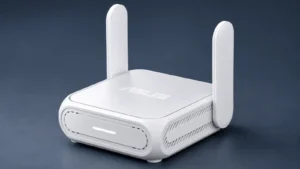
ASUS RT-BE58 Go Feature Scores
Overall Scorata score: 3.9/5
Based on 11 analyzed reviews · View source samples
Explore all 79 feature scores for ASUS RT-BE58 Go, organized into pros and cons.
Scores by Feature
Summary
79 reviewed features-
Very positive 4.5-5.025 (32%)
-
Positive 3.5-4.429 (37%)
-
Neutral 2.5-3.411 (14%)
-
Negative 1.5-2.413 (16%)
-
Very negative below 1.51 (1%)
Pros
Sort
-
Pre-paired devices can automatically reconnect to the router when it joins a new upstream network, avoiding repeated passwords.
-
The compact folding design fits easily in a bag or pouch, although some travel routers are smaller.
-
The extensive software provides many configuration choices, though some open-source alternatives offer even more customization.
-
Public Wi-Fi can be turned into a familiar private network for all your devices. Connecting at a new location can require a slow reboot.
-
Ethernet, public Wi-Fi, and USB tethering make it adaptable to changing internet sources.
-
The programmable side switch makes VPN activation and home/travel mode changes convenient.
-
The compact router earns positive recommendations for its feature set and travel performance, with range, software, and wired-speed caveats.
-
USB-C Power Delivery makes it convenient to reuse a compatible charger or portable power source.
-
Connections were dependable after configuration, including during extended stress tests and mobile tethering.
-
USB phone tethering works reliably with compatible devices and offers a useful travel or backup connection.
-
Nearby throughput is strong, including a measured 865 Mbps at six feet on 5 GHz.
-
Built-in security, VPN tools, and local network isolation add useful protection when traveling.
-
Router-level VPN connections work well, and importing configuration files helps when a provider is not directly supported.
-
Fast short-range Wi-Fi is a highlight; speeds depend on the uplink and distance, and enabling MLO can reduce performance.
-
The 5 GHz radio is a strength, delivering good throughput at both six and 25 feet relative to its TP-Link counterpart.
-
Separate networks help isolate work, guest, and streaming devices from unwanted access.
-
Automatic captive-portal login worked smoothly on trips and in a coffee shop, but some networks may impose restrictions.
-
A private local network shields connected devices from other users of public Wi-Fi, with VPN options for additional privacy.
-
Wi-Fi 7 is a welcome upgrade for travel, though its practical advantage over Wi-Fi 6 depends on the connection speed.
-
Wireless throughput is impressive for a travel router, especially nearby, but performance falls with distance.
-
A compatible USB-C power bank makes portable operation practical, but it adds equipment and must supply sufficient power.
-
The simple, sleek design is attractive for a portable router.
-
Downloads can be fast with a wired uplink, while VPN and wireless-uplink results depend on the connection.
-
Multiple devices can share a connection comfortably, including while VPN encryption is active.
-
Stress testing and repeated benchmarks were reassuring, although enabling MLO made speeds less consistent.
-
The price is attractive when the advanced software and mesh features are useful, but cheaper rivals make sense for simpler needs.
-
A preconfigured streaming stick connected successfully through the router on vacation.
-
Existing ASUS router settings can be restored to make upgrading or duplicating a home network easier.
-
Fanless operation is effectively silent.
-
Upload performance held an advantage over the Slate 7 in repeatable tests.
-
One VPN test achieved around 60 Mbps, substantially faster than the older travel router it replaced.
-
Selective VPN routing lets work devices use encryption while other devices use the regular connection.
-
Wall mounting adds flexibility for placing the router in a small home.
-
The 2.5GbE WAN port can make good use of a fast upstream broadband connection.
-
At about 242 grams with folding antennas, it is easy to carry in a bag.
-
A WireGuard home VPN connection worked successfully during international travel.
-
The foldable external antennas help make the router easy to pack.
-
The built-in firewall adds a welcome protective layer on public networks.
-
Wi-Fi 7 support is appealing for buyers who want a portable router with a newer wireless standard.
-
The USB port is versatile for tethering, storage, and supplying power to a connected phone.
-
Once configured, everyday use is straightforward, but initial setup and switching between networks take some learning.
-
USB file sharing is handy for travel backups and media, but sustained SSD transfer speeds are modest.
-
The web interface offers extensive options and straightforward controls, although its appearance feels dated.
-
Keeping both bands under one network name is convenient when automatic band steering is preferred.
-
Congested 5 GHz tests showed a manageable 10–15 percent throughput drop.
-
A cellular connection can provide backup alongside the wired WAN connection.
-
The fanless enclosure becomes slightly warm but did not get worryingly hot in testing.
-
A dedicated IoT network can improve compatibility with older wireless devices.
-
The interface offers convenient at-a-glance system and client information.
-
The router maintained competitive throughput with six additional clients streaming video.
-
Quick access to QoS settings makes adjusting traffic priorities convenient.
-
AiMesh can move devices between compatible nodes without requiring manual network changes.
-
AiProtection adds useful protection against malware, phishing, and unauthorized access.
-
Phone tethering offers a useful backup when the main internet connection is unavailable.
Cons
Sort
-
Repeated reboots and resets can interrupt setup and switching between public networks.
-
The sole 1GbE LAN port is a recurring limitation for fast wired devices and network storage.
-
Changing wireless settings and switching upstream networks can involve several minutes of waiting.
-
Enabling the limited MLO implementation reduced speed and consistency in testing; leaving it disabled performed better.
-
Multi-gigabit Ethernet is restricted to the WAN side, limiting high-speed local wired networking.
-
The ports cover common travel needs, but having only one LAN connection restricts wired expansion.
-
There is no 6 GHz radio, so buyers miss out on the additional spectrum available with tri-band Wi-Fi 7 models.
-
The QR-based app setup is convenient in principle, but navigating the app is not especially intuitive.
-
The router is not cordless: it requires an external USB-C power supply or compatible power bank.
-
Starting up takes longer than ideal, although other travel routers can be similarly slow.
-
Wired HTTP processing can saturate one CPU core instead of spreading the workload effectively across the processor.
-
Frequently needed travel settings are buried deep in the mobile app rather than readily accessible.
-
Parents cannot enforce daily usage limits, despite the availability of basic scheduling.
-
Coverage is more appropriate for compact spaces than for an entire large home.
-
Wired HTTP routing tests reported a processing bottleneck below 800 Mbps per direction, limiting demanding wired workloads.
-
Device restrictions and scheduling are useful, but advanced filtering and daily usage limits are limited.
-
A single 2.5GbE port is useful for upstream connectivity, but competing models offer two.
-
Basic site and app restrictions are available, but more comprehensive filtering is missing.
-
The extensive software takes some getting used to, especially for travelers accustomed to competing routers.
-
Speeds fall at distance; it beats some TP-Link results but trails GL.iNet alternatives in reach.
-
The 2.4 GHz radio performs similarly to its direct rival, with no clear overall advantage.
-
The upgrade to Wi-Fi 7 is more worthwhile with faster-than-gigabit internet; slower connections may see little difference.
-
Initial configuration is manageable, but applying settings can take several minutes and switching networks can trigger reboots.
-
The app has extensive controls, but important travel settings are buried in menus designed primarily for home routers.
-
Hotel-room coverage is generally adequate, but distant rooms can be challenging. Some alternatives reach considerably farther.
Use Cases
Best for
Sort
-
Compact hardware, flexible internet sources, and reusable private Wi-Fi make it an excellent travel companion, though not every trip requires one.
-
Hotel rooms are an especially good fit because devices can share a private network and avoid repeated logins. Portal compatibility and network policies still matter.
-
Sharing one upstream connection with several preconfigured devices is one of its strongest travel benefits.
-
The router can serve small apartments and hotel rooms well when positioned appropriately.
-
Families can preconnect phones, tablets, and streaming devices before leaving home and reconnect everything together at the hotel.
-
AiMesh support lets compatible ASUS households reuse the travel router as a mesh node at home.
-
Advanced users get extensive network configuration options, including routing and device separation.
-
The router can double as a secondary home router or backup hotspot when not traveling.
-
Its security and networking features can cover ordinary home needs in a small space.
-
Cruise cabins can benefit from shared private Wi-Fi, provided the ship permits routers and suitable external power is available.
-
Fast upstream connectivity is possible, but limited LAN speed and wired processing reduce its usefulness for sustained multi-gigabit workloads.
-
Connecting to a home VPN from abroad worked without problems.
-
Remote workers can use hotel Ethernet or public Wi-Fi and route selected work devices through a VPN.
-
Preconnected streaming devices can get online through hotel Wi-Fi without individually completing the portal login.
-
Access point mode provides flexibility for extending an existing network rather than replacing it.
-
A private local network can be prepared in advance for on-location media production and live streaming.
-
The dedicated IoT network is helpful when older devices struggle with compatibility.
-
Its small enclosure makes it practical on a desk or shelf where space is limited.
-
Flexible upstream connections make it useful in RVs where available Wi-Fi or cellular connectivity changes.
-
It can function as a standalone router in a small home, where its feature set is more than adequate.
-
Wi-Fi 7 support is useful for compatible devices when the upstream connection is fast enough to benefit.
Conditional or not ideal for
Sort
-
Large or multi-story homesLimited range and modest wired capacity make it a poor primary choice for larger homes.
-
Standalone cellular hotspot useIt lacks a built-in cellular modem and cannot act as a standalone cellular hotspot without an external internet source.
-
Home network storageUSB storage works for light sharing, but slow transfers and a gigabit LAN port limit serious NAS use.
-
Wired multi-gigabit networkingThe single gigabit LAN port and wired processing limitations make it a poor choice for serious multi-gigabit wired networking.
-
Households with childrenBasic scheduling and filtering can help families, but more advanced parental controls are limited.
-
Single-device travel networkingA cheaper and simpler travel router may be sufficient for someone connecting only one device.