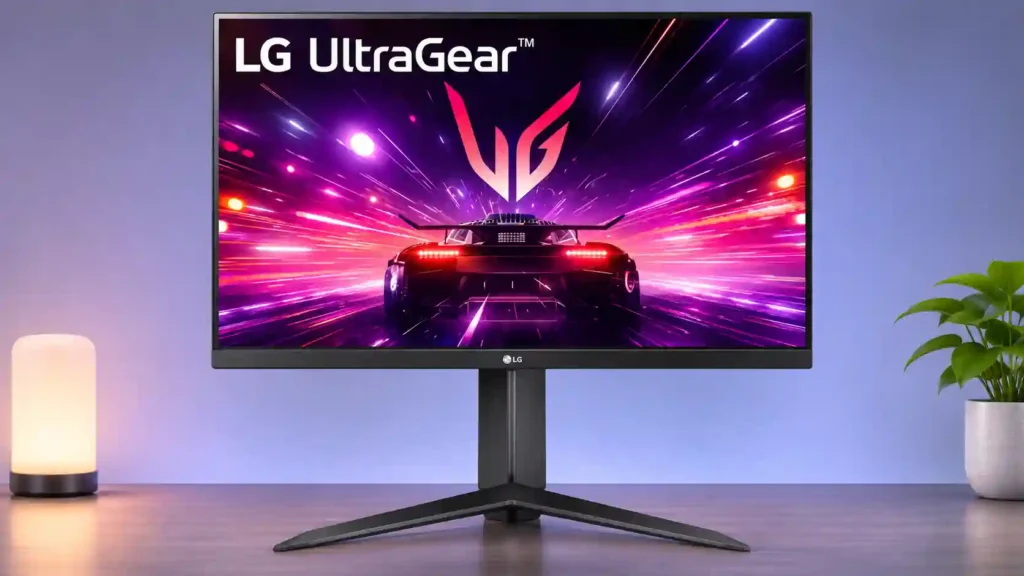
LG 24GS65F-B

LG 24GS65F-B Monitor Review

Brand: LG
Released: June 28, 2024
Updated: 40 minutes ago
3.3
Overall review score
164
Review insights
65
Scored features
6
Expert reviews

Bottom Line

The LG 24GS65F-B delivers smooth, affordable 180Hz PC gaming with a surprisingly adjustable stand. Weak HDR, shallow blacks, and limited console features keep it from being a great all-purpose display.

Budget-conscious PC gamers who want smooth 1080p action, plus students using a compact desk for both study and gaming. The adjustable stand also suits portrait-oriented second-monitor setups.

HDR enthusiasts, console-first players, professional color editors, or anyone needing a sharp 1440p desktop and USB-C laptop docking.

Verdict

The LG 24GS65F-B makes the strongest case as an inexpensive, compact PC-gaming screen. Its 180Hz IPS panel, adaptive-sync compatibility, and low input lag produce responsive gameplay, while the height-adjustable, pivoting stand is unusually useful for the price. The matte screen handles ordinary indoor light well, and text is readable for schoolwork or everyday tasks. There are meaningful compromises. Dark scenes lack depth, HDR barely improves on SDR, and demanding gamers may notice blur or distracting artifacts in the most aggressive overdrive mode. Color accuracy also needs attention: several tests found oversaturated factory settings, although calibration helps substantially. With just HDMI, DisplayPort, and a headphone jack, it is not a USB-C dock or a feature-rich console monitor. For well-priced 1080p PC gaming, it remains sensible; for cinematic HDR, dense productivity, or console-first setups, look elsewhere.

Feature Scorecards

Summary

65 reviewed features
  • Very positive 4.5-5.0
    10 (15%)
  • Positive 3.5-4.4
    27 (42%)
  • Neutral 2.5-3.4
    13 (20%)
  • Negative 1.5-2.4
    15 (23%)

Pros highlights

  • 4.4
    5 reviews strong consensus
    adaptive sync performance: 4.4, 5 reviews, strong consensus
    FreeSync and G-SYNC compatibility keep gameplay smooth when frame rates vary. Testing also found little visible flicker during adaptive refresh.
  • 3.9
    5 reviews strong consensus
    response time: 3.9, 5 reviews, strong consensus
    Pixel response remains consistent across refresh rates, and a moderate overdrive setting performs well. Some motion blur remains, and the maximum setting creates visible artifacts.
  • 3.8
    5 reviews strong consensus
    brightness: 3.8, 5 reviews, strong consensus
    The panel is bright enough for most indoor desks, with one test finding stronger-than-average SDR output. Direct sunlight can still overpower it.
  • 4.5
    4 reviews strong consensus
    stand adjustability: 4.5, 4 reviews, strong consensus
    Height adjustment, tilt, and portrait rotation are exceptional conveniences for an inexpensive gaming monitor. The stand gives much more flexibility than tilt-only rivals.
  • 4.4
    4 reviews strong consensus
    refresh rate: 4.4, 4 reviews, strong consensus
    A 180Hz refresh rate makes camera movement, aiming, and scrolling noticeably smoother than ordinary 60Hz screens. Faster 240Hz and 280Hz alternatives exist.
  • 4.1
    4 reviews strong consensus
    input lag: 4.1, 4 reviews, strong consensus
    Low-to-moderate input lag makes control responses feel quick, particularly in PC games. It performs well for the price without leading the fastest segment.

Cons highlights

  • 1.8
    6 reviews strong consensus
    HDR performance: 1.8, 6 reviews, strong consensus
    HDR support adds little real impact: modest brightness, poor blacks, and no local dimming prevent dramatic highlights. SDR is the better-looking mode.
  • 2.5
    6 reviews moderate consensus
    console gaming compatibility: 2.5, 6 reviews, moderate consensus
    The monitor can accept common 1080p console signals, including 120Hz, but lacks some console-oriented VRR and ALLM behavior. It is a better choice for PC-only than console-only gaming.
  • 3.0
    6 reviews moderate consensus
    color accuracy: 3.0, 6 reviews, moderate consensus
    Factory color is contentious: instrumented tests found oversaturation and poor accuracy without an sRGB clamp, while another account described natural-looking colors. Calibration dramatically improves the result.
  • 3.4
    6 reviews moderate consensus
    motion clarity: 3.4, 6 reviews, moderate consensus
    Fast-moving games look fluid at 180Hz, but fine motion detail is not as clean as on stronger esports displays. Motion blur and overdrive artifacts limit the best-case image.
  • 2.1
    4 reviews strong consensus
    contrast: 2.1, 4 reviews, strong consensus
    Native IPS contrast is weak, leaving dark scenes washed out. Black Stabilizer can reveal targets but further reduces image depth.
  • 2.3
    4 reviews strong consensus
    port selection: 2.3, 4 reviews, strong consensus
    One HDMI, one DisplayPort, and a headphone jack cover basic gaming. Missing USB-C and USB ports reduce versatility.

Use Cases

Best for

  • 4.8
    2 reviews limited evidence
    College study setups: 4.8, 2 reviews, limited evidence
    A flexible stand, compact screen, and smooth gaming refresh suit a student who switches between coursework and games.
  • 4.0
    4 reviews strong consensus
    Budget-conscious buyers: 4.0, 4 reviews, strong consensus
    Budget-focused buyers get an enjoyable 180Hz PC-gaming display with unusually flexible ergonomics. Its value depends on keeping the price below more capable alternatives.
  • 4.2
    3 reviews strong consensus
    Casual gaming: 4.2, 3 reviews, strong consensus
    Casual gamers get fluid 1080p play, adaptive synchronization, and an accessible price without needing premium extras.

Not ideal for

  • Single-cable laptop docking
    1.0
    2 reviews limited evidence
    Single-cable laptop docking: 1.0, 2 reviews, limited evidence
    No USB-C video and charging connection means this cannot serve as a one-cable laptop dock.
  • HDR gaming
    1.8
    4 reviews strong consensus
    HDR gaming: 1.8, 4 reviews, strong consensus
    HDR gaming lacks bright highlights and convincing blacks. SDR is the preferred mode for both PC and console play.

Compared With Category Average

Compared with other Monitors, this product is above average in VRR flicker, screen uniformity, GPU demands, near average in reflection handling, brightness, below average in backlight bleed control, HDR highlight detail, overall picture quality.

Comparison summary

65 compared features
  • Above average 0.4+ pts higher
    13 (20%)
  • Same as average within 0.3 pts
    20 (31%)
  • Below average 0.4+ pts lower
    32 (49%)

Largest category differences

Attribute This product Category average Difference
backlight bleed control 1.5 4.5 -3.0
HDR highlight detail 1.5 4.0 -2.5
overall picture quality 2.3 4.6 -2.3
USB-C power delivery 1.5 3.8 -2.3
contrast 2.1 4.3 -2.2
Integrated power supply 2.0 4.2 -2.2
black levels 2.0 4.1 -2.1
HDMI 2.1 support 2.0 4.1 -2.1

Consider This Instead

If you want better HDR performance

Choose MSI MAG 274QPF X30MV. It scores 4.7 vs 1.8 for HDR performance, with a 3.9 overall score.

Compare

If you want better backlight bleed control

Choose Dell S2725QC. It scores 5.0 vs 1.5 for backlight bleed control, with a 4.2 overall score.

Compare

If you want better local dimming performance

Choose TCL 32R84. It scores 4.5 vs 1.5 for local dimming performance, with a 4.2 overall score.

Compare

If you want better HDR highlight detail

Choose Dell Alienware AW2725DF. It scores 5.0 vs 1.5 for HDR highlight detail, with a 4.2 overall score.

Compare

Compared in Reviews

Products reviewers directly compared with this model, grouped into quick takeaways.

Dell 24 Plus S2425HSM

  • Alternative: Built-in speakers and stand adjustments The Dell option has speakers and swivel adjustment but offers a lower 144Hz refresh rate.

Dell G2524H

  • Better: Refresh rate and blur The Dell has smoother 280Hz operation and less motion blur; the LG offers HDR signal support without much HDR benefit.

Dell SE2426HGS

  • Better: Refresh rate and out-of-box color accuracy The Dell offers 240Hz and a more accurate sRGB preset, while their motion handling is similar.

FAQ

Is the LG 24GS65F-B good for competitive PC gaming?

Yes for affordable 1080p gaming: 180Hz, low input lag, and variable refresh feel responsive. Faster esports models offer cleaner motion and higher refresh rates.

Does the HDR mode look substantially better than SDR?

No. Weak blacks, modest peak brightness, and no local dimming make HDR largely symbolic; SDR is usually the better gaming choice.

Does it work well with PS5 or Xbox consoles?

It can accept common 1080p signals up to 120Hz, but its console features and signal compatibility are limited. For a console-first setup, a model with stronger console VRR and HDR support makes more sense.

Can you adjust the stand or rotate the screen vertically?

Yes. The stand provides height adjustment, tilt, and portrait rotation, and a standard VESA mount works with compatible monitor arms.

Are the colors accurate out of the box?

Independent testing found oversaturated colors and no dedicated sRGB clamp. Calibration and an appropriate color profile can improve SDR accuracy considerably.

Does it have USB-C, speakers, or a USB hub?

No. You get HDMI, DisplayPort, and a headphone jack, so external speakers and separate laptop charging or USB connections may be necessary.

Is it suitable for schoolwork and editing?

It works well for basic documents, browsing, and casual photo tasks. Full HD workspace and limited wide-gamut accuracy make it less suitable for dense spreadsheets, professional editing, or print-color work.

Sample Expert Reviews We Analyzed

These are a few of the reviews included in our analysis.
Video Reviews

Article Reviews

rtings.com

The LG 24GS65F-B is an entry-level 24-inch, 1080p gaming monitor. It's an updated version of the LG 24GN650-B, sitting alongside the...

Review score
3.1

Top Monitors to Consider

#1 Asus ROG Swift 34 QD-OLED PG34WCDN
4.5

This 360Hz QD-OLED ultrawide delivers exceptional gaming motion, vibrant HDR and dramatically cleaner text. Its high price, less-than-perfect bright-room blacks and occasional HDR dimming are the main reasons to hesitate.

Pros: color gamut, contrast

Cons: value for money, Resolution

#2 ASUS ROG Swift OLED PG27UCDM
4.4

The 27-inch 4K OLED picture is exceptionally crisp and responsive, with useful USB-C and KVM extras. Its high price, oversized stand, and bright-room compromises limit its appeal.

Pros: sharpness, overall satisfaction

Cons: value for money, VRR flicker

#3 MSI MPG 322UR QD-OLED X24
4.4

Best for exceptional 4K HDR, accurate color, fast 240Hz gaming, and strong work connectivity. Skip it if you need built-in speakers, ultrawide immersion, television-level HDR brightness, or a budget-friendly upgrade.

Pros: brightness, reflection handling

Cons: cable management
#4 MSI MPG 341CQR QD-OLED X36
4.4

Best for class-leading 360Hz ultrawide motion, spectacular HDR, deep blacks, and unusually strong work-and-play connectivity. Skip it if you want 4K-like text sharpness, a matte screen, or the best value...

Pros: overall satisfaction, sharpness

Cons: Resolution, cable management