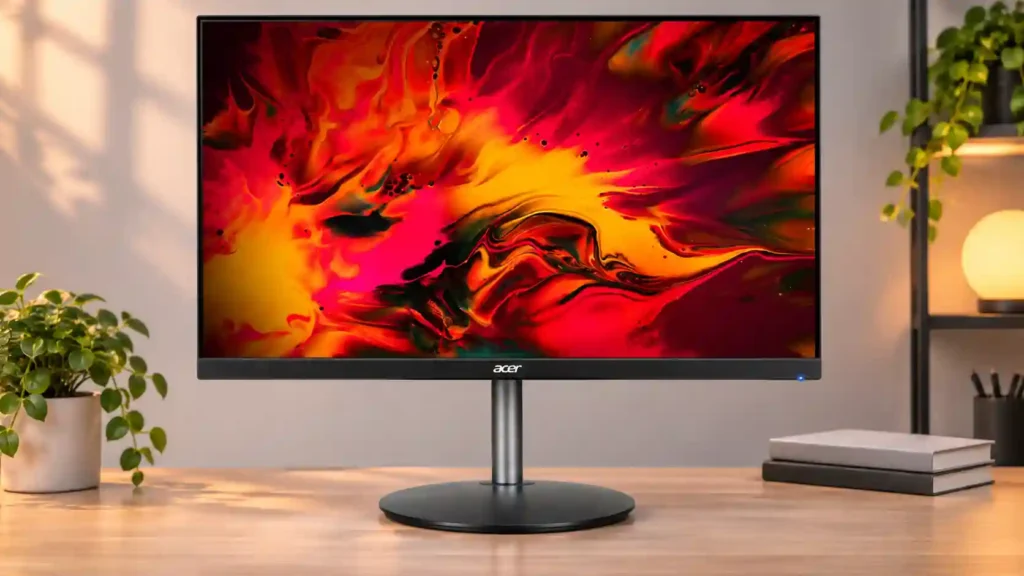
Acer Nitro XF243Y Pbmiiprx

Acer Nitro XF243Y Pbmiiprx Monitor Review

Brand: Acer
Released: October 1, 2020
Updated: 33 minutes ago
3.7
Overall review score
162
Review insights
63
Scored features
6
Expert reviews

Bottom Line

Quick 165Hz response, very low lag, and accurate SDR color make this an appealing budget PC gaming monitor. Weak HDR, grayish blacks, and limited desk space keep it from being an all-purpose display.

Budget-conscious PC gamers who want smooth competitive or SDR gaming, plus people sharing a compact screen for local co-op.

HDR enthusiasts, dark-room movie watchers, and people needing a large multiwindow workspace or strong built-in audio.

Verdict

The Acer Nitro XF243Y Pbmiiprx delivers the essentials of fast budget PC gaming unusually well. Its 165Hz refresh rate, rapid pixel response, very low input lag, and FreeSync/G-SYNC compatibility make action feel smooth and immediate. Accurate sRGB color and wide IPS viewing angles add versatility, while the highly adjustable stand makes it easy to position or share the display. The tradeoffs become apparent in darker scenes and productivity work. Low native contrast, occasional backlight bleed, narrow HDR gamut, and dim HDR highlights prevent a convincing cinematic image. The 23.8-inch 1080p screen is also tight for substantial multitasking, and weak speakers and missing USB ports make it a basic workstation companion. At a good sale price, its gaming fundamentals are excellent; closer to full retail, shoppers should compare competing monitors with stronger value or a bigger workspace.

Feature Scorecards

Summary

63 reviewed features
  • Very positive 4.5-5.0
    16 (25%)
  • Positive 3.5-4.4
    20 (32%)
  • Neutral 2.5-3.4
    9 (14%)
  • Negative 1.5-2.4
    13 (21%)
  • Very negative below 1.5
    5 (8%)

Pros highlights

  • 4.8
    6 reviews strong consensus
    adaptive sync performance: 4.8, 6 reviews, strong consensus
    FreeSync and G-SYNC compatibility reduce tearing and offer welcome flexibility when choosing an AMD or NVIDIA graphics card.
  • 4.8
    6 reviews strong consensus
    PC gaming compatibility: 4.8, 6 reviews, strong consensus
    Rapid pixel transitions, exceptionally low lag, and FreeSync/G-SYNC support make PC gaming the monitor’s strongest use.
  • 4.3
    6 reviews strong consensus
    overall satisfaction: 4.3, 6 reviews, strong consensus
    The consensus is favorable for value-oriented gaming, with compromises concentrated in HDR, dark scenes, speakers, and convenience features.
  • 5.0
    5 reviews strong consensus
    competitive gaming suitability: 5.0, 5 reviews, strong consensus
    The 165Hz panel, sharp motion, and minimal input delay deliver the speed expected for competitive PC games.
  • 5.0
    5 reviews strong consensus
    response time: 5.0, 5 reviews, strong consensus
    Short pixel transitions keep moving objects clear and make the monitor especially convincing for fast gaming.
  • 4.8
    5 reviews strong consensus
    refresh rate: 4.8, 5 reviews, strong consensus
    The 165Hz maximum refresh rate is repeatedly praised for fluid, highly responsive gaming, with some configurations using overclocking.

Cons highlights

  • 1.3
    4 reviews strong consensus
    HDR performance: 1.3, 4 reviews, strong consensus
    This is not an impactful HDR display: poor wide-gamut coverage, insufficient highlight brightness, and weak contrast curb the effect.
  • 1.5
    4 reviews strong consensus
    contrast: 1.5, 4 reviews, strong consensus
    Native IPS contrast is one of the clearest weaknesses; dim scenes look washed out instead of deeply shaded.
  • 1.8
    4 reviews strong consensus
    black levels: 1.8, 4 reviews, strong consensus
    Dark blacks often appear gray because of weak IPS contrast and sometimes uneven backlighting.
  • 1.3
    3 reviews strong consensus
    USB hub functionality: 1.3, 3 reviews, strong consensus
    There are no USB ports or built-in hub, which removes a useful cable and peripheral convenience.
  • 2.3
    3 reviews strong consensus
    color gamut: 2.3, 3 reviews, strong consensus
    Standard sRGB coverage is respectable, but the limited DCI-P3 and Rec. 2020 range seriously hurts HDR color.
  • 2.7
    3 reviews low consensus
    console gaming compatibility: 2.7, 3 reviews, low consensus
    Basic 1080p HDMI use is convenient, but the inability to accept PS5 1440p and HDMI Forum VRR limits newer console features.

Use Cases

Best for

  • 4.4
    5 reviews moderate consensus
    Budget-conscious buyers: 4.4, 5 reviews, moderate consensus
    Its quick 1080p gaming performance is compelling at a discounted price. At higher asking prices, competing 144Hz models narrow the value gap.
  • 5.0
    2 reviews limited evidence
    Local co-op gaming: 5.0, 2 reviews, limited evidence
    The unusually wide viewing angles make it easier for two nearby players to see a consistent picture, while generous stand movement helps position the screen.
  • 5.0
    2 reviews limited evidence
    SDR gaming: 5.0, 2 reviews, limited evidence
    Accurate sRGB color, balanced imagery, and fast motion make standard dynamic range gaming a standout strength.

Not ideal for

  • HDR gaming
    1.0
    2 reviews limited evidence
    HDR gaming: 1.0, 2 reviews, limited evidence
    Limited gamut, mediocre contrast, and weak highlight punch make this a poor pick for gamers who prioritize HDR effects.
  • Dark-room viewing
    1.8
    4 reviews strong consensus
    Dark-room viewing: 1.8, 4 reviews, strong consensus
    Grayish blacks, weak native contrast, and visible clouding mean dark games and movies lose much of their intended depth.

Compared With Category Average

Compared with other Monitors, this product is above average in GPU demands, competitive gaming suitability, Backlight strobing, near average in input lag, Gaming feature selection, below average in backlight bleed control, HDMI 2.1 support, contrast.

Comparison summary

61 compared features
  • Above average 0.4+ pts higher
    16 (26%)
  • Same as average within 0.3 pts
    14 (23%)
  • Below average 0.4+ pts lower
    31 (51%)

Largest category differences

Attribute This product Category average Difference
backlight bleed control 1.0 4.2 -3.2
HDMI 2.1 support 1.0 3.9 -2.9
contrast 1.5 4.1 -2.6
USB hub functionality 1.3 3.6 -2.3
black levels 1.8 3.9 -2.2
premium feel 2.0 4.2 -2.2
productivity versatility 2.0 4.2 -2.2
HDR performance 1.3 3.3 -2.0

Consider This Instead

If you want better HDMI 2.1 support

Choose LG 27GR83Q-B. It scores 4.9 vs 1.0 for HDMI 2.1 support, with a 4.2 overall score.

Compare

If you want better productivity versatility

Choose Dell S2725QS. It scores 4.8 vs 2.0 for productivity versatility, with a 3.8 overall score.

Compare

Compared in Reviews

Products reviewers directly compared with this model, grouped into quick takeaways.

Acer Nitro VG271 Pbmiipx

  • Worse: gaming response and viewing angles The Acer XF243Y is quicker and more adjustable, although the VG271 is brighter and offers PiP/PbP.

Acer Nitro XF252Q Xbmiiprzx

  • Similar: built-in speaker convenience Both Acer models provide integrated speakers for quick audio setup.

Acer Nitro XV252Q Fbmiiprx

  • Better: color depth and HDR suitability The XF243Y’s 6-bit-plus-FRC panel was judged weaker for HDR than the XV252Q model.

FAQ

Is the Acer Nitro XF243Y good for competitive gaming?

Yes. The 165Hz refresh rate, fast response time, minimal lag, and clean motion make it especially well suited to fast PC games.

Does it work with FreeSync and G-SYNC?

It supports AMD FreeSync and NVIDIA G-SYNC Compatible operation; G-SYNC compatibility requires a DisplayPort connection.

Is HDR worth using on this monitor?

Not if HDR impact matters. Narrow wide-color coverage, low contrast, and insufficient highlight brightness make HDR only a minor change from SDR.

Will it be comfortable in a dark room?

Dark-room use is a weak point: blacks look gray, and some units show clouding or backlight bleed.

Can I use it with a PS5 or other consoles?

The HDMI inputs support basic console use, but testing found it does not accept PS5 1440p signals or the PS5 HDMI Forum VRR mode.

Is the stand adjustable?

Yes. Multiple reviewers praise its flexible height and angle adjustments, with easy rotation; a VESA arm can help reclaim desk space.

Does it have good speakers and USB ports?

The built-in speakers are weak and bass-light, and the monitor has no USB hub or USB ports.

Sample Expert Reviews We Analyzed

These are a few of the reviews included in our analysis.

Video Reviews

Article Reviews

motherboardfor.com

Acer's Nitro XF243Y stands out with its 165Hz refresh rate and 1ms response time, making it a solid choice for competitive gamers. The Full...

Review score
4.3
rtings.com

The Acer Nitro XF243Y Pbmiiprx is an excellent budget gaming monitor. It delivers amazingly smooth and responsive gameplay due to its low...

Review score
3.4

Top Monitors to Consider

#1 Asus ROG Swift 34 QD-OLED PG34WCDN
4.5

This 360Hz QD-OLED ultrawide delivers exceptional gaming motion, vibrant HDR and dramatically cleaner text. Its high price, less-than-perfect bright-room blacks and occasional HDR dimming are the main reasons to hesitate.

Pros: color gamut, contrast

Cons: value for money, Resolution

#2 Dell U4025QW
4.4

A huge, sharp ultrawide workspace and unusually capable Thunderbolt dock make the U4025QW outstanding for demanding productivity and editing. Its high price, modest HDR, and imperfect motion handling keep it...

Pros: overall picture quality, color accuracy

Cons: value for money, built-in speakers

#3 ASUS ROG Strix OLED XG27ACDNG
4.4

Lightning-fast 360Hz OLED gaming, rich color and an unusually flexible USB-C/KVM setup are the big draws. Strong room lighting, limited full-screen HDR brightness and static-content burn-in concerns keep it from...

Pros: color gamut, overall satisfaction

Cons: reflection handling, VRR flicker

#4 ASUS ROG Swift OLED PG27UCDM
4.4

The 27-inch 4K OLED picture is exceptionally crisp and responsive, with useful USB-C and KVM extras. Its high price, oversized stand, and bright-room compromises limit its appeal.

Pros: sharpness, overall satisfaction

Cons: value for money, VRR flicker