Best overall
ASUS ROG Harpe II Ace
4.6 overall score
Highest ranked product in this category by consolidated review score.

Highest ranked product in this category by consolidated review score.
Balances a strong score with broader review coverage.

Choose the ROG Harpe II Ace for ultralight FPS play, precise tracking, smooth glide, and web-based tuning. Skip it if you need palm-grip support, MMO buttons, onboard profiles, or long...
Pros: glide smoothness, weight
Cons: handedness options

Best for a quiet, premium, compact wireless board with excellent switches. Skip it if you need hot-swappable switches, a full layout, polished software, or the lowest price.
Pros: portability, value for money
Cons: software quality, key spacing

Best for precise TMR sticks, fast trigger stops, low-latency 2.4GHz play, and deep tuning. Skip it if you want a cheaper all-rounder, softer buttons for long sessions, or painless console-only...
Pros: overall satisfaction, button quality
Cons: d-pad accuracy, charging dock support

Best for a comfortable, precise wireless gaming mouse with strong battery life and user-replaceable switches. Skip it if you want the lightest shell, a lower price, or software that reviewers...
Pros: battery life, software usability
Cons: click noise, fingertip grip comfort

Best for a tiny, ultra-light esports mouse with precise tracking, strong battery life, and flexible wireless. Skip it if you need left-handed support, large-hand comfort, polished software, or included 8K...
Pros: shape comfort, value for money
Cons: handedness options

Best for hot-swappable switches, strong customization, smooth glide, and good value. Skip it if you need an ultralight shape, wireless-first freedom, or a low-profile mouse for wider or shape-sensitive hands.
Pros: button responsiveness, shape comfort

Best for premium typing feel, quiet sound, strong wireless, and mod-friendly hardware. Skip it if Armoury Crate, limited macro layers, or the high price would frustrate you.
Pros: switch feel, typing feel
Cons: software quality, volume control

Best for a compact wireless numpad keyboard with excellent switches, quiet acoustics, strong battery life, and sturdy build. Skip it if Armoury Crate frustration, dimmer RGB, or a cramped 96%...
Pros: switch feel, typing feel
Cons: software quality, key spacing

Choose the Keris II Ace for a light, fast right-handed FPS mouse with top sensor and wireless performance. Skip it if you need cheaper value, left-handed support, grippier coating, or...
Pros: value for money, sensor performance
Cons: software usability, grip texture

Best for elite wired Hall-effect speed, refined tuning, sturdy build, and a 75% layout that works for play and work. Skip it if you need wireless, broad switch experimentation, or...
Pros: switch feel, customization options
Cons: value for money, wireless performance

Best for accurate wireless gaming, long battery life, swappable switches, and strong value. Skip it if you need a taller palm-grip shape, wired mode, or built-in USB charging.
Pros: Accuracy and tracking precision, shape comfort
Cons: long-session comfort

Best for a featherweight FPS mouse with precise tracking, long battery life, and deep tuning. Skip it if you need lots of buttons, top-side DPI switching, or Armoury Crate-free simplicity.
Pros: weight, grip texture
Cons: software usability, profile switching

Best for premium mechanical typing, bold RGB styling, long battery life, and strong wireless convenience. Skip it if price, Hall effect features, or lighter software matters most.
Pros: typing feel, design aesthetics
Cons: value for money, materials quality
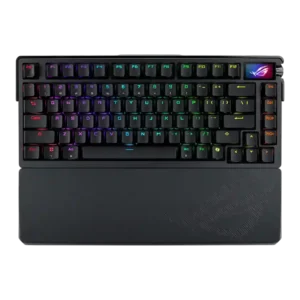
Best for luxury build, excellent typing feel, strong wireless, and deep customization. Skip it if $500 pricing, weak rapid-trigger support, or Armoury Crate friction outweighs the premium experience.
Pros: build quality, customization options
Cons: value for money, rapid trigger support
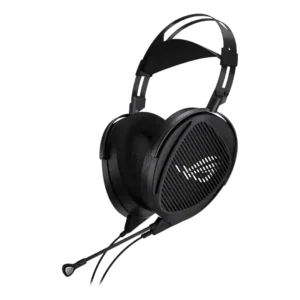
Choose the Kithara for exceptional wired clarity, separation, and long-session comfort in a quiet room. Skip it if you need wireless freedom, isolation, reliable Xbox mic support, strong stock sub-bass,...
Pros: Overall satisfaction, Sound quality
Cons: Microphone, Headband adjustability
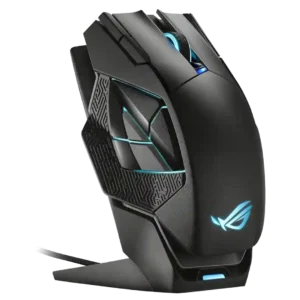
Best for a large, premium MMO-style mouse with dock charging, RGB, and many programmable buttons. Skip it if you want a lightweight FPS mouse, Mac software support, or easy-to-feel side...
Pros: charging convenience, RGB features
Cons: side button quality, weight
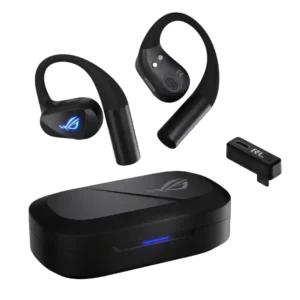
Choose these if you want open-ear comfort, strong awareness, secure fit, and low-latency gaming across devices. Skip them if you prioritize deep bass, isolation, seamless firmware, a compact case, or...
Pros: Overall satisfaction, Sound quality
Cons: Value for money, Bass performance

Best for deep customization, strong battery life, smooth glide, and a fast sensor. Skip it if you need lightweight FPS reliability, clean software, easy side buttons, or a natural-feeling joystick.
Pros: glide smoothness, scroll wheel quality
Cons: analog joystick usability, shape comfort