Best for KVM switch performance
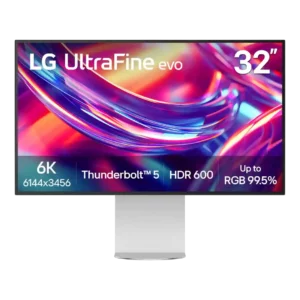
LG UltraFine 6K Evo 32U990A
5.0 attribute score
Highest scored product for this attribute based on supporting review evidence.

Highest scored product for this attribute based on supporting review evidence.
Balances the attribute score, supporting reviews, and overall product strength.
Has the broadest review evidence for this attribute.
Strongest overall product among items with scored evidence for this attribute.
Overall: 3.9/5
The built-in KVM is a standout productivity feature, with reviewers describing switching between connected systems as seamless or superb. It helps the monitor serve as a multi-computer workstation hub.
Pros: port selection, overall satisfaction
Cons: value for money, cable management

Overall: 3.9/5
The absence of a KVM switch is a drawback for people who want to share one keyboard and mouse between multiple machines.
Pros: brightness, color gamut
Cons: AI scene optimization, value for money

Overall: 4.0/5
Despite USB connectivity, there is no built-in KVM switch. Anyone sharing a mouse and keyboard between computers needs another solution.
Pros: Resolution, Dual-mode versatility
Cons: value for money, GPU demands

Overall: 4.1/5
A KVM switch is absent, limiting convenience for people sharing keyboard and mouse peripherals between systems.
Pros: overall satisfaction, value for money
Cons: reflection handling, screen uniformity

Overall: 4.0/5
There is no built-in KVM, limiting convenience for people who want a single keyboard and mouse to follow multiple computers.
Pros: refresh rate, competitive gaming suitability
Cons: value for money, brightness

Overall: 4.1/5
A built-in KVM is missing, disappointing those hoping to share peripherals between multiple computers.
Pros: Resolution, overall satisfaction
Cons: value for money, Image scaling

Overall: 3.6/5
There is no integrated KVM to share keyboard and mouse between computers. Hybrid desk setups need external hardware or a different monitor.
Pros: reflection handling, HDR performance
Cons: screen uniformity, Screen coating clarity

Overall: 4.1/5
There is no integrated KVM switch, a notable omission for a premium monitor with multiple video inputs. Switching a keyboard and mouse between computers needs another solution.
Pros: Resolution, overall satisfaction
Cons: value for money, GPU demands

Overall: 3.6/5
The monitor lacks a hardware KVM switch, a disappointment at this price. LG's software sharing option is less seamless and requires networked computers.
Pros: refresh rate, Dual-mode versatility
Cons: motion clarity, black levels