If you want better on-screen display usability
Choose Acer Nitro XF243Y Pbmiiprx. It scores 5.0 vs 2.8 for on-screen display usability, with a 3.7 overall score.

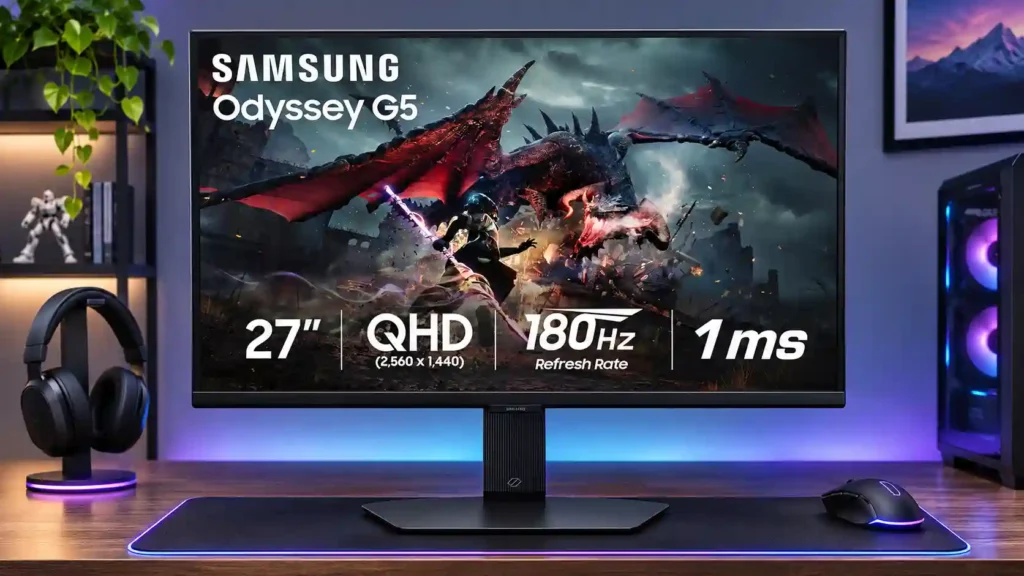
The 27-inch G50D balances sharp 1440p detail, smooth 180Hz PC gaming and flexible ergonomics at a good discount. Weak HDR, gray blacks and minimal ports make it much less compelling at full price.
Discount-seeking PC gamers who want fast QHD SDR gaming alongside office productivity, everyday streaming and occasional sRGB editing.
HDR-first gamers, dark-room cinema enthusiasts, professional HDR colorists and console-first buyers who need dependable VRR or HDMI 2.1 features.
The 27-inch Samsung Odyssey G50D S27DG50 is an appealing everyday 1440p gaming monitor when the discount is right. Its 180Hz refresh rate, low input lag and clear QHD image work especially well for PC gaming, while IPS viewing angles and a flexible stand make it surprisingly comfortable for office tasks and general sRGB creation. The restrained design and solid build are welcome at this level. However, pixel response is good rather than class-leading, and the image loses depth in dark scenes. The limited local dimming cannot rescue weak HDR highlights or grayish blacks. The basic port selection also omits USB-C docking and a useful hub, while console players face compatibility compromises. Owners differ about menu controls and stand movement. Buy for versatile, high-refresh SDR use at a meaningful sale price; compare rivals closely if HDR, premium connectivity or the clearest fast-motion performance matters more.
Compared with other Monitors, this product is above average in reliability over time, reflection handling, productivity versatility, near average in overall satisfaction, response time, below average in HDMI 2.1 support, USB hub functionality, backlight bleed control.
| Attribute | This product | Category average | Difference |
|---|---|---|---|
| HDMI 2.1 support | 1.5 | 3.9 | -2.4 |
| USB hub functionality | 1.5 | 3.7 | -2.2 |
| backlight bleed control | 2.2 | 4.1 | -2.0 |
| black levels | 2.0 | 3.9 | -1.9 |
| reliability over time | 5.0 | 3.1 | +1.9 |
| port selection | 2.1 | 3.7 | -1.5 |
| sleep and wake behavior | 1.0 | 2.6 | -1.6 |
| console gaming compatibility | 2.3 | 3.8 | -1.6 |
Choose Acer Nitro XF243Y Pbmiiprx. It scores 5.0 vs 2.8 for on-screen display usability, with a 3.7 overall score.
Choose LG UltraFine 6K Evo 32U990A. It scores 5.0 vs 1.0 for sleep and wake behavior, with a 3.9 overall score.
Choose Gigabyte MO27U2 Gaming Monitor. It scores 5.0 vs 1.8 for local dimming performance, with a 4.1 overall score.
Choose Dell Alienware AW2523HF. It scores 5.0 vs 2.5 for Included accessories, with a 3.9 overall score.
Products reviewers directly compared with this model, grouped into quick takeaways.
Yes. Its 27-inch 1440p panel, 180Hz refresh and low input lag are well suited to responsive PC gaming, though some rivals have cleaner motion.
Not really. HDR is usable and can add a little pop, but shallow blacks, weak highlights and limited local dimming keep the effect modest.
QHD text, viewing angles and ergonomics make it a good daily workstation. Light sRGB photo or video work is reasonable, but critical grading needs a stronger display.
It can handle common console modes, but limitations such as missing PS5 VRR and HDMI 2.1 make it less attractive as a console-first purchase.
No. Its basic connectivity omits a USB-C docking connection, a useful USB hub and built-in speakers.
A discounted price can buy a sharp, smooth QHD IPS screen with an unusually useful stand for both games and everyday work.
These are a few of the reviews included in our analysis.
Samsung Odyssey G5 (G50D) is a gaming monitor with 27" IPS screen and 180Hz refresh rate. See all measured data and compare monitor with...
The Samsung Odyssey G50D S27DG50 is a responsive 27-inch 1440p 180Hz IPS monitor, but weak contrast, HDR, HDMI 2.0, and pricing limit its appeal.
BEST Gaming Monitors, 4K MONITORS, AND 144HZ MONITORSWatch Shows
The Samsung Odyssey G50D S27DG50 is a 27-inch, 1440p entry-level gaming monitor with a 180Hz max refresh rate and FreeSync and G-SYNC VRR...

This 360Hz QD-OLED ultrawide delivers exceptional gaming motion, vibrant HDR and dramatically cleaner text. Its high price, less-than-perfect bright-room blacks and occasional HDR dimming are the main reasons to hesitate.
Pros: color gamut, contrast
Cons: value for money, Resolution

A huge, sharp ultrawide workspace and unusually capable Thunderbolt dock make the U4025QW outstanding for demanding productivity and editing. Its high price, modest HDR, and imperfect motion handling keep it...
Pros: overall picture quality, color accuracy
Cons: value for money, built-in speakers

Lightning-fast 360Hz OLED gaming, rich color and an unusually flexible USB-C/KVM setup are the big draws. Strong room lighting, limited full-screen HDR brightness and static-content burn-in concerns keep it from...
Pros: color gamut, overall satisfaction
Cons: reflection handling, VRR flicker

The 27-inch 4K OLED picture is exceptionally crisp and responsive, with useful USB-C and KVM extras. Its high price, oversized stand, and bright-room compromises limit its appeal.
Pros: sharpness, overall satisfaction
Cons: value for money, VRR flicker