If you want better HDMI 2.1 support
Choose MSI MPG 272URX QD-OLED. It scores 5.0 vs 1.5 for HDMI 2.1 support, with a 4.2 overall score.

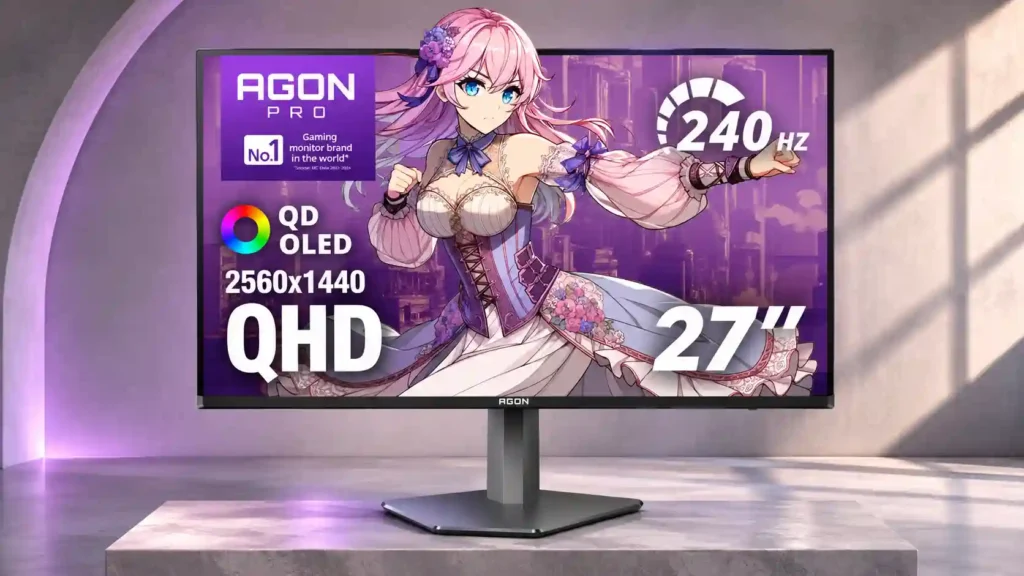
The AG276QZD2 makes fast 1440p gaming look wonderfully smooth, with excellent OLED blacks and persuasive value. Its unusually muted HDR colors and HDMI limitations mean it is not the safest all-round OLED purchase.
Competitive and casual PC players who prioritize responsive 1440p SDR gameplay, rich OLED blacks and a lower OLED entry price, especially in controlled lighting.
HDR purists, console-first players needing full HDMI 2.1 functionality, or people spending long hours on static text and USB-C laptop docking.
The AOC AGON PRO AG276QZD2 is at its best in high-refresh PC gaming. Its 1440p QD-OLED screen combines deep blacks, sharp motion, near-instant response and low input lag in a compact, fully adjustable package. SDR color and calibration frequently impress, and its price can make the jump from an LCD unusually appealing. But there is a material compromise: several detailed tests found HDR colors unexpectedly muted, even though small highlights and contrast can still look striking. Glare, occasional VRR flicker and OLED upkeep also merit attention. Originally tested HDMI 2.0 configurations limit refresh and console functionality, and the absence of USB-C and a KVM reduces desktop flexibility. Some later units reportedly have different refresh-rate and HDMI specifications, so verify the exact configuration. It is an enticing gaming-first bargain only when priced distinctly below stronger OLED rivals.
Compared with other Monitors, this product is above average in competitive gaming suitability, built-in speakers, response time, near average in refresh rate, overall satisfaction, below average in HDMI 2.1 support, PS5 gaming, USB port accessibility.
| Attribute | This product | Category average | Difference |
|---|---|---|---|
| HDMI 2.1 support | 1.5 | 4.0 | -2.5 |
| PS5 gaming | 2.0 | 4.0 | -2.0 |
| USB port accessibility | 2.0 | 4.0 | -2.0 |
| console gaming compatibility | 2.0 | 3.8 | -1.8 |
| portability and weight | 2.0 | 3.9 | -1.9 |
| HDR adjustment controls | 2.0 | 3.6 | -1.6 |
| reflection handling | 2.4 | 3.7 | -1.3 |
| gaming image presets | 2.3 | 3.8 | -1.5 |
Choose MSI MPG 272URX QD-OLED. It scores 5.0 vs 1.5 for HDMI 2.1 support, with a 4.2 overall score.
Choose ASUS ROG Strix OLED XG27AQWMG. It scores 5.0 vs 2.0 for console gaming compatibility, with a 4.4 overall score.
Choose Samsung Odyssey OLED G80SH S32HG802S. It scores 4.9 vs 2.4 for reflection handling, with a 4.1 overall score.
Choose KOORUI S2741LM. It scores 5.0 vs 2.6 for VRR flicker, with a 4.2 overall score.
Products reviewers directly compared with this model, grouped into quick takeaways.
Yes. Extremely fast OLED pixel response, low high-refresh input lag and 240Hz-class performance give shooters clean, responsive motion, especially over DisplayPort.
The panel produces excellent blacks and bright small highlights, but multiple detailed evaluations found HDR colors less vivid than competing OLED displays. SDR color is generally stronger.
The originally tested version ran at 240Hz, while some later units and listings report 280Hz. Check the exact unit, firmware, ports and refresh options rather than assuming every configuration is identical.
Earlier HDMI 2.0 versions can deliver 1440p 120Hz, but PS5 VRR support and Xbox HDR behavior have limitations. Confirm the specific revision because later port specifications may differ.
Its SDR gamut and calibration make photos and light productivity appealing. Text fringing, stationary interfaces and burn-in considerations make extended office work less ideal.
The originally tested configuration has a basic USB-A hub but lacks USB-C video docking and a built-in KVM, making multi-computer and single-cable laptop setups less convenient.
It offers pixel shifting, pixel refresh and several static-element dimming features, plus three-year burn-in warranty coverage subject to terms. Protective cycles can sometimes be intrusive.
These are a few of the reviews included in our analysis.

AOC AGON PRO AG276QZD2 review: 48/100 on the specs we hold, what is good, what to know, what changed from the model before, and how it...
With a QD-OLED panel, a 1440p resolution, and a 280Hz refresh rate, we put the AOC Agon PRO AG276QZD2 monitor to the test.
Our AOC AGON PRO AG276QZD2 review covers QD-OLED image quality, 240Hz vs 280Hz confusion, HDMI 2.0, HDR, text clarity, OLED care and...
The AOC AG276QZD2 is often the most affordable OLED gaming monitor! It features a 27" 1440p 240Hz QD-OLED panel!

This 360Hz QD-OLED ultrawide delivers exceptional gaming motion, vibrant HDR and dramatically cleaner text. Its high price, less-than-perfect bright-room blacks and occasional HDR dimming are the main reasons to hesitate.
Pros: color gamut, contrast
Cons: value for money, Resolution

The 360Hz QD-OLED panel delivers exceptional HDR gaming, responsive motion, and cleaner text than earlier ultrawides. Its 3440×1440 resolution is less sharp than 4K, and premium pricing remains a hurdle.
Pros: refresh rate, Text fringing
Cons: Resolution, GPU demands

A huge, sharp ultrawide workspace and unusually capable Thunderbolt dock make the U4025QW outstanding for demanding productivity and editing. Its high price, modest HDR, and imperfect motion handling keep it...
Pros: overall picture quality, color accuracy
Cons: value for money, built-in speakers

Lightning-fast 360Hz OLED gaming, rich color and an unusually flexible USB-C/KVM setup are the big draws. Strong room lighting, limited full-screen HDR brightness and static-content burn-in concerns keep it from...
Pros: color gamut, overall satisfaction
Cons: reflection handling, VRR flicker