
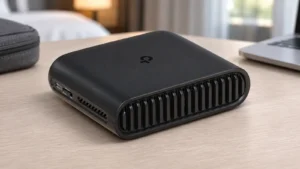
TP-Link Roam 6 TL-WR3002X Feature Scores
Overall Scorata score: 3.8/5
Based on 11 analyzed reviews · View source samples
Explore all 59 feature scores for TP-Link Roam 6 TL-WR3002X, organized into pros and cons.
Scores by Feature
Summary
59 reviewed features-
Very positive 4.5-5.014 (24%)
-
Positive 3.5-4.429 (49%)
-
Neutral 2.5-3.410 (17%)
-
Negative 1.5-2.46 (10%)
Pros
Sort
-
A pocket-sized housing with internal antennas packs easily and takes little room in a travel bag.
-
Ethernet, public Wi-Fi, tethered phones and compatible USB modems give travelers several practical ways to share internet access.
-
The combination of compact size, fast nearby Wi-Fi and flexible networking earns a favorable overall assessment, with external power and limited range the main drawbacks.
-
A 2.5 Gbps WAN port provides valuable headroom for fast Ethernet sources, although it cannot improve a slow upstream connection by itself.
-
Multiple router modes, VPN options and advanced network settings offer substantial flexibility, though OpenWrt-based competitors offer more customization.
-
Wireless speed is impressive close to the router, although actual internet speed depends on the upstream connection and distance.
-
The modest price is attractive given the performance and feature set, especially if the extra connection options will actually be used.
-
The wireless hardware is fast enough to exceed the speeds many people normally use on a home router.
-
The microSD slot is a handy way to share files while leaving the USB port available for tethering.
-
Router-level VPN client support is a useful way to protect connected devices on unfamiliar networks, especially with an existing VPN setup.
-
Short-range performance is a highlight, with sustained gigabit-plus wireless speeds in one test and stronger nearby speeds than some competing travel routers.
-
Hands-on tests found dependable connectivity, including a full-day stress test without a disconnect and a week of reliable operation.
-
The router stayed connected during extended testing, even across different operating scenarios.
-
The router is light enough to carry almost anywhere; its optional power bank can add more weight than the router itself.
-
USB storage sharing is practical for backups and media, with sustained transfer speeds near gigabit limits in one test.
-
The VPN server supports several protocols, making it more flexible than its predecessor for remote connections.
-
The 2.5 GbE WAN connection is a meaningful step above gigabit intake, especially when the source network is fast enough to use it.
-
Power requirements are modest enough for portable batteries, and Eco mode reduces consumption further at the cost of coverage.
-
A separate private network and VPN capabilities improve security on public Wi-Fi, although they do not automatically protect every type of traffic.
-
Initial setup is generally straightforward, especially through the app, but some public-network connection failures take trial and error to resolve.
-
Repeater mode can extend an existing Wi-Fi signal into a more convenient location, although wired access-point mode is preferable when Ethernet is available.
-
The router has ample rated capacity for typical family travel devices, although a demanding mix of clients can saturate the 2.4 GHz band.
-
Private LAN separation and optional VPN use help protect devices and traffic, and remote monitoring can be disabled. End-to-end encryption is not automatic.
-
USB-C power can be supplied by a compatible charger, power bank or even a suitable car USB port.
-
The compact, distinctive housing looks attractive and practical rather than bulky.
-
One library test improved download speeds from roughly 25 Mbps on the direct connection to over 80 Mbps through the router.
-
The router operates silently, which helps it remain unobtrusive in a hotel room or shared space.
-
The physical Boost, Balance and Eco switch makes it convenient to adjust coverage, power use and temperature.
-
The USB port can power portable SSDs, but storage and tethered cellular devices may compete for the same port.
-
The web interface offers advanced settings familiar from larger routers, but the mobile app presents information more accessibly.
-
The 5 GHz band provides a stronger nearby signal in the tested portable networking setup.
-
The Tether app makes initial configuration easy, with advanced settings available through the browser afterward.
-
The free security check can identify outdated firmware and weak Wi-Fi passwords, giving users actionable ways to improve security.
-
App configuration is straightforward, and technical users can access more advanced controls through the web interface.
-
Eco mode reduces heat generation by trading some wireless range for lower power consumption.
-
The supplied cable and wall adapter provide the essentials to get the router started.
-
One test maintained roughly 600 Mbps farther from the router, though other testing found overall reach limited.
-
The router is presented as capable of sharing connectivity among many devices, although real capacity depends on traffic and the available internet source.
-
Local media stored on a portable drive can be streamed on trips without relying on an online streaming service.
-
WireGuard is part of a broader VPN protocol selection that improves flexibility compared with the older model.
-
The mobile app presents information accessibly and is easy to navigate, although it appears limited compared with the browser controls.
-
The setup wizard guides connection choices, but its error messages can leave users unsure why a connection failed.
-
Wi-Fi 6 provides ample speed for common travel needs, but cannot fully exploit newer Wi-Fi 6E or Wi-Fi 7 clients.
Cons
Sort
-
The lack of an internal battery means a charger or suitable power bank must always be connected. Extra cables and devices can make a tiny router setup cluttered.
-
The single gigabit LAN port limits the number of wired devices that can be connected directly.
-
Subscription offers during setup can be unwelcome when all a buyer wants is to get connected.
-
A demanding mix of security-camera traffic can saturate the 2.4 GHz band despite the generous advertised client count.
-
Paid security and parental-control extras are offered during setup, but buyers may prefer to decline them and use the free features first.
-
Connection failures can be frustrating to diagnose because the router gives little explanation of why authentication or connection attempts failed.
-
The 2.4 GHz band offers little generational improvement and can become saturated by multiple demanding devices such as security cameras.
-
The gigabit LAN port is adequate for ordinary wired connections but cannot deliver the full speed of the faster 2.5 Gbps WAN port to one wired client.
-
The newer model adds useful hardware and VPN features, but owners of the older router may see little everyday benefit from upgrading.
-
The wider 160 MHz channel can be useful, but DFS restrictions can reduce its practical availability.
-
The Tether app requires an account, while traditional browser setup provides an account-free alternative.
-
Browser-based setup offers a guided wizard but can require more trial and error than expected when a connection fails.
-
Phone tethering and compatible cellular modems are useful, but add hardware and can depend on phone, cable and carrier compatibility.
-
Coverage is sufficient for a hotel room or other compact space, but range drops off more noticeably than on some rival travel routers.
-
One-step captive-portal authentication can simplify hotel Wi-Fi sign-in, but compatibility varies and some networks have difficult login flows.
-
USB-C power-bank operation makes the router portable, but there is no internal battery. Carrying an extra power source makes the kit less self-contained.
Use Cases
Best for
Sort
-
The tiny router is a practical travel companion, particularly when several devices need one private connection. Separate power and an existing internet source are required.
-
A private network and single upstream login simplify connecting multiple devices to hotel and public Wi-Fi. Some captive portals and venue restrictions can still cause difficulty.
-
USB and microSD sharing make this a useful miniature network-storage hub, with strong USB transfer speeds in hands-on testing. It is not a full-featured NAS replacement.
-
Connecting phones, laptops, tablets and handhelds through one private network is a particularly useful feature for families and groups on trips.
-
The router can serve a hotel room or small apartment well; its limited coverage makes larger homes a less natural fit.
-
The price is appealing for buyers who need its broader features, although a simpler cheaper router may be sufficient for basic browsing.
-
The browser interface exposes advanced configuration, including VPN and network settings, making this a capable portable option for technical users.
-
The faster WAN port can accept multi-gigabit internet, although a single wired LAN device remains limited to gigabit speed.
-
A consistent private network, multiple upstream options and VPN support make it appealing for remote work while traveling.
-
A more capable VPN server makes the router useful for accessing a private network remotely.
-
A portable SSD connected to the USB port delivered sustained copying speeds close to the gigabit connection's limit.
-
Its coverage is sufficient for the compact interior of an RV or boat, provided a suitable upstream internet connection and power are available.
-
Access-point mode is useful for adding Wi-Fi to an existing wired network, including temporary office setups.
-
Its multi-device networking is attractive for cruise travel, provided the ship's network permits the connection.
-
The travel-router feature set is attractive for online gaming, though its suitability depends on the upstream connection and measured latency is not established.
-
Its relatively generous device capacity is appealing for business scenarios with multiple connected devices.
-
The router is an appealing option for streaming while traveling, provided the upstream internet connection has sufficient bandwidth.
Conditional or not ideal for
Sort
-
Single-device travel networkingTravelers connecting just one phone or laptop may find the additional networking features and separate power requirements unnecessary.
-
Standalone cellular hotspot useThis is not a self-contained cellular hotspot: it lacks an integrated modem, SIM slot and battery.
-
Basic home networkingIt can work as a main router in the right circumstances, but is generally less suitable than a full-size home router.
-
First-time router setupPeople unfamiliar with routers may struggle when initial connections fail, since the setup process does not clearly explain what went wrong.
-
Mesh network expansionNative mesh-node operation is unavailable, limiting its usefulness for expanding a compatible home mesh system.
-
Smart home networkingCamera-heavy smart-home networks can overwhelm the 2.4 GHz band, making this less attractive for demanding connected-home setups.
-
Wired multi-gigabit networkingWith just one gigabit LAN port, this is not a good fit for a multi-gigabit wired network with several fast devices.