
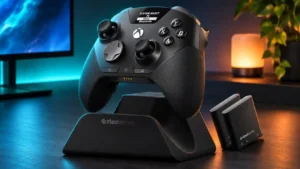
SteelSeries Aeon Pro Wireless Controller Feature Scores
Overall Scorata score: 4.3/5
Based on 31 analyzed reviews · View source samples
Explore all 82 feature scores for SteelSeries Aeon Pro Wireless Controller, organized into pros and cons.
Scores by Feature
Summary
82 reviewed features-
Very positive 4.5-5.044 (54%)
-
Positive 3.5-4.421 (26%)
-
Neutral 2.5-3.45 (6%)
-
Negative 1.5-2.49 (11%)
-
Very negative below 1.53 (4%)
Pros
Sort
-
Nearly everyone loves the hot-swappable two-battery approach: drop in a fresh pack and continue without plugging in mid-game. It is the controller's clearest point of agreement.
-
The charging dock stands out for doing several jobs well: charging the controller, holding a spare battery and stick caps, and linking two gaming systems. A standby-charging quirk was later addressed by firmware.
-
Xbox support is broadly dependable, with easy wireless play and practical system switching. It is especially convenient beside a PC connected to the same dock.
-
The wraparound textured grips earn widespread praise for staying secure and resisting sweaty slips. Several reviewers consider their feel a standout part of the design.
-
Crisp mechanical buttons register clearly and usually feel superb. A minority find the face controls and D-pad too stiff, making the overall feedback less universally loved.
-
Switching between a nearby Xbox, PC, and Bluetooth device is unusually fluid, with the QuickSwitch dock sparing repeated pairing and dongle swaps. The dual-host advantage depends on keeping both wired devices within reach.
-
Most testers find the familiar Xbox-shaped body reassuringly comfortable, including over several hours. One reviewer with larger hands reported an awkward grip angle and hand aches.
-
The familiar Xbox-style shape and textured grips make the controller natural to hold through most games. A few large-handed users find the grip proportions or rear paddles ergonomically awkward.
-
Flip-switch trigger stops are a highlight: they turn long analog pulls into quick, tactile hair-trigger clicks. Reviewers especially like the genre-specific flexibility.
-
Dense construction, close-fitting parts, and a solid feel consistently reinforce the premium impression. Reviewers rarely find anything loose or flimsy.
-
Driving games benefit from long analog trigger travel, precise steering, and strong rumble. One tester wished for extra trigger resistance for fine throttle work.
-
SteelSeries GG offers generous software tuning, including stick dead zones, profiles, vibration, and automatic PC game configurations. A few high-end adjustments remain missing.
-
Mechanical buttons have an audible, satisfying click that many liken to a good keyboard. The distinct sound is generally a positive part of the tactile feedback.
-
Triggers react quickly in both full-travel and shortened modes, which makes their response useful across shooting and driving games.
-
Shooters benefit from responsive sticks, micro-switch buttons, and hair triggers, but some reviewers find the lower paddles or initial stick feel too slow for demanding competition.
-
Soft-touch grip surfaces and tactile plastics make the controller pleasant to hold and give the materials an upscale character.
-
Overall impressions tend strongly positive, with the uninterrupted power system and premium controls creating genuine enthusiasm despite the cost.
-
Per-battery endurance is sufficient for long sessions, typically discussed around a dozen hours. With a charged spare, practical downtime becomes far less important than a single charge duration.
-
The Hall Effect sticks are precise and generally responsive, with resistance to drift. Some enthusiasts would prefer TMR sensors or need time to adapt to the stick feel.
-
Reviewers repeatedly describe a polished, expensive-feeling controller, from its switches to the finish and dock. The quality is evident even among those questioning the price.
-
Rumble and vibration effects provide substantial, well-tuned feedback, especially in racing games and moments of impact.
-
Programmable rear buttons are useful for moving actions off the face buttons and creating per-game layouts. Extra bumper inputs and broader mapping targets would give enthusiasts more freedom.
-
High polling rates help the controller feel fast on PC, while Xbox operates at a lower rate. The real-world speed impresses even though rival controllers can quote bigger numbers.
-
Hall Effect sticks generally deliver accurate steering and aiming, though a few players find their movement unfamiliar at first. Competitive precision improves after adjustment for most.
-
Platformers respond well to the precise sticks and quick mechanical inputs, with game-specific configurations adding control over 2D movement.
-
The dock's low-latency 2.4GHz link works well for nearby Xbox and PC setups. Having no separate dongle limits flexibility when those systems are far apart.
-
Connection switching usually works without fuss or dropouts, though a few PC configurations suffered disruptive latency or setup-specific failures.
-
Most functions feel intuitive, especially the OLED-based settings and rapid source switching. The unusually placed menu buttons can interrupt early familiarity.
-
The understated black or white design looks polished, with textured grips and metallic accents giving the controller a clean desktop presence.
-
Short hair-trigger travel and quick, tactile controls make counters and fast parries particularly satisfying in fighting-focused play.
-
Eight configurations can live on the controller, making switching layouts between games quick without revisiting desktop software.
-
Contactless Hall Effect sensors are valued for avoiding traditional potentiometer wear and helping keep stick drift at bay.
-
The controller has a substantial premium heft without feeling unwieldy to most testers. A few find it heavy beside lighter rivals, so preferred weight matters.
-
The onboard OLED is more than decoration: it makes source switching, profiles, battery levels, and basic remapping accessible without opening software. Some find the small display or initial menu navigation less polished.
-
Mapping actions to rear controls can simplify combat, dodging, or vehicle handling. The benefit varies with paddle placement and how easily the buttons can be pressed.
-
Full-range analog triggers offer controlled acceleration in racing games, though one tester wanted more resistance for fine throttle adjustments.
-
Initial connection and switching feel straightforward for most users, particularly when both systems are beside the dock. The dual-port setup itself takes little effort.
-
There is substantial tuning through profiles, remapping, and stick adjustments, but deep hardware changes and advanced curves or macros are comparatively limited.
-
Solid construction and contactless stick hardware inspire confidence for longer-term use. Actual years-long wear remains unproven, and the rubber grip material raises one concern.
-
Most users report quick, virtually instantaneous inputs, but two Windows 10 tests surfaced severe lag or stuttering. Performance depends on the PC environment.
-
The thumbsticks move smoothly and predictably, with one tester likening their motion to skating on ice.
-
For relaxed play, comfortable grips, satisfying controls, and fuss-free power keep the controller pleasantly out of the way.
-
The face buttons give immediate, definite feedback with very little perceived delay, helping fast inputs feel dependable.
-
Wireless operation was stable in successful setups, with no noticeable dropouts while moving among supported hosts.
-
Button remapping and stored profiles are easy to access, yet the paddles cannot always trigger macros, keyboard shortcuts, or independent game actions.
-
The large mechanical paddles feel snappy and premium to many hands, but others dislike their size, force requirements, or inability to remove them.
-
GG is generally seen as capable and easy to navigate, especially alongside the OLED. Some testers miss deeper trigger curves or more flexible paddle assignments.
-
After the initial adjustment, reviewers report repeatable inputs and a controller that keeps behaving reliably across games and sessions.
-
Stick tension feels reassuringly controlled rather than floppy. Some reviewers notice a firmer or longer movement than on a standard Xbox controller.
-
Bluetooth is convenient when it works, but experiences conflict sharply: some enjoy easy pairing and one tester could barely use it across devices.
-
Competitive players get fast triggers and responsive switches, yet grip fit, paddle force, and the lack of some esports-oriented inputs divide opinion.
-
Charging the spare pack was reported to be quick, recovering a useful amount of charge within an hour.
-
Magnetically attached stick caps snap on and off without a struggle, while the dock provides safe spots for the spares. Reviewers like the convenience even when wishing for more cap choices.
-
Large lettering and responsive navigation make the OLED settings menu clearer than the tiny, fiddly displays found on some controllers.
-
The full-range triggers feel smooth and controlled with satisfying travel rather than a mushy pull.
-
The proprietary wireless link felt notably quicker than Bluetooth in direct use, supporting responsive gameplay.
-
Xbox wake-from-standby support is welcomed as a practical perk that some third-party wireless controllers lack. It makes the gamepad easier to treat as a main Xbox controller.
-
SteelSeries' software and engineering support can be helpful with issues, but desktop dependencies mean some fixes take extra steps.
-
The D-pad's satisfying click wins praise, although some testers criticize stiff activation or find its feel less comfortable than expected.
-
PC support is flexible and largely successful on supported setups, but Windows 10 testers reported serious input-lag or performance problems. This is an important compatibility qualification.
-
Keeping a 3.5mm headset jack is welcomed as a handy option for wired earbuds and headsets.
-
Precise haptics add texture to movement and in-game action without pulling attention away from play.
-
A wired connection provided a useful fallback when one Windows 10 machine experienced wireless PC-mode latency.
-
Firmware updates can resolve practical charging behavior, though installation through the desktop GG app may be inconvenient for Xbox-only households.
-
Bumpers often earn praise for their clicky mechanical feel, but one player struggled to reach the right shoulder control comfortably.
Cons
Sort
-
Nintendo Switch owners cannot count on it as their Switch controller. Its licensed Xbox and PC focus leaves Nintendo gaming out.
-
This is not a viable replacement controller for PlayStation players; reviewers repeatedly warn that the PS5 is unsupported.
-
Taking the controller away from the desk can be awkward when the dock and cables are part of its main appeal. A few reviewers miss a protective carry case.
-
A failed Bluetooth attempt on several secondary devices makes mobile and portable-device compatibility uncertain for at least one tester.
-
Some owners may find accessory compatibility narrower than expected, especially when using third-party charging gear or specialized custom parts.
-
One large-handed tester experienced pinky strain after a couple of hours because the thin grips and low paddles changed their hand position.
-
Mac owners cannot rely on the full SteelSeries GG desktop experience, limiting deeper setup and firmware maintenance compared with Windows users.
-
The lack of macro assignments for the back paddles limits what advanced PC users can automate directly from the controller.
-
A reviewer specifically criticizes the lack of useful motion-control functionality for their preferred way of playing.
-
Physical personalization is relatively shallow at this price: you can change the stick caps, but the D-pad, paddles, and basic button layout stay fixed. Owners wanting swappable modules may feel restricted.
-
Large hands may not fit the relatively thin grips comfortably, particularly with the low rear paddles affecting finger placement.
-
A dedicated dock and limited easy Bluetooth use make the controller less convenient to take between locations for some owners.
-
Two batteries, spare stick caps, and the multifunction dock add tangible value. Missing a second dock cable or carrying case disappoints some buyers at this price.
-
The high asking price is the most consistent criticism. Its battery and switching conveniences feel worth the premium to some, but others point to cheaper, highly capable rivals.
-
Moving the View, Menu, and Share buttons below the sticks is polarizing. Some appreciate the easier reach after adapting; others miss the standard Xbox placement every time they pause.
-
Relocated menu buttons, prominent paddles, and slightly different stick motion require an adjustment period. Most players settle in, though the learning curve irritates some.
-
The four prominent rear paddles divide opinion: many find them perfectly placed, while others activate them accidentally or struggle with the lower pair.
Use Cases
Best for
Sort
-
FPS gaming gets quick triggers, low perceived lag, and programmable paddles, but there is disagreement about how well those large paddles support twitch play.
-
Racing games are a strong fit for smooth analog acceleration, responsive steering, and informative vibration; a little more trigger resistance would suit some drivers.
-
Competitive shooters are a conditional fit: rapid triggers and precise aiming help, but some players struggle with paddle speed or would rather have more esports-specific controls.
-
PC players receive responsive inputs, saved profiles, and easy Xbox switching, with a major caution about lag on some Windows 10 setups.
-
Xbox players get dependable wireless operation, familiar controls, and useful wake support, making it an attractive high-end controller for the ecosystem.
-
Comfortable grips and a ready spare battery make long play sessions appealing. Hand size and low paddles may cause discomfort for a minority.
-
Platform games play cleanly with responsive sticks and buttons, and profile adjustments can help tailor movement to 2D controls.
-
Fighting games suit its quick hair-trigger mode and crisp inputs, which help execute counters and parries on time.
-
Exploration and RPG play benefit from approachable controls and comfort, especially when the priority is immersion rather than extreme input customization.
-
Replaceable batteries and solid construction support longer ownership, though the actual lifespan of the rubber grips has not been demonstrated.
-
For casual gaming with friends or solo, it feels comfortable and capable; the premium price may be harder to justify for occasional play.
-
For an Xbox and gaming PC sharing a desk or TV, the two-port dock makes a single controller practical for both systems. Changing platforms takes seconds instead of reconnecting peripherals.
-
Existing Arctis Nova headset owners gain a useful shared battery system, and some profiles can coordinate headset and controller settings. This makes the controller particularly convenient in an established SteelSeries setup.
-
Local co-op is enjoyable thanks to comfortable controls that let a player stay immersed through hours of shared play.
Conditional or not ideal for
Sort
-
Budget-conscious buyersBudget-conscious shoppers face a tough sell: lower-cost alternatives can match many performance features, while this controller's premium mainly buys convenience.
-
TravelTraveling with the controller is a mixed proposition: the swappable spare helps, but dependence on a dock and inconsistent Bluetooth undermine portability.
-
Windows 10 PC gamingWindows 10 gaming is a clear risk: two testers encountered substantial latency or frame-rate trouble in PC mode. Alternative connections or Windows 11 helped individual setups, but the initial experience was poor.
-
Separate-room Xbox and PC gamingSeparate-room PC and Xbox setups miss much of the dual-device advantage because the dock must be cabled to both machines. Those players may need long cables or a different switching arrangement.