
If you want better mobile compatibility
Choose Scuf Valor Pro Wireless Controller. It scores 4.4 vs 1.0 for mobile compatibility, with a 4.1 overall score.

The dual-device dock and hot-swappable batteries make the Aeon Pro exceptionally convenient for Xbox and PC gaming. Crisp controls impress, but its steep price and divisive rear paddles make it less compelling for budget or esports-first buyers.
Xbox and PC players who keep both systems near one dock, particularly those already using compatible SteelSeries Arctis headsets, will benefit most from quick switching and shared hot-swap batteries.
Budget buyers, PS5 or Nintendo Switch players, and people whose Xbox and PC are in different rooms should look elsewhere. Competitive players needing removable paddles, extra shoulder inputs, or deep macro programming may prefer other controllers.
SteelSeries makes a convincing premium Xbox and PC controller by solving the small annoyances that interrupt gaming. Its QuickSwitch dock keeps both systems connected when they share a desk or TV, and the two replaceable batteries make charging breaks almost disappear. Testers also praise the textured grips, clicky mechanical buttons, useful onboard OLED, and versatile trigger modes. But the premium price prompts repeated skepticism when cheaper controllers offer similarly fast inputs or more physical customization. The four large rear paddles are polarizing: some find them perfectly placed, while others press them accidentally or struggle with their lower buttons. PC owners should also note reports of severe latency on Windows 10, and Bluetooth results are not entirely consistent. The Aeon Pro is most persuasive as a convenient, do-everything controller for a nearby Xbox and PC, rather than a value pick or a narrowly esports-focused upgrade.
Compared with other Video Game Controller, this product is above average in battery replaceability, charging dock support, button noise, near average in overall comfort, Hall effect stick performance, below average in mobile compatibility, portability, compatibility with Nintendo Switch.
| Attribute | This product | Category average | Difference |
|---|---|---|---|
| battery replaceability | 5.0 | 2.3 | +2.7 |
| mobile compatibility | 1.0 | 4.1 | -3.1 |
| portability | 1.7 | 4.1 | -2.5 |
| compatibility with Nintendo Switch | 1.4 | 3.5 | -2.2 |
| motion control accuracy | 2.0 | 4.2 | -2.2 |
| travel friendliness | 2.0 | 4.2 | -2.2 |
| charging dock support | 4.9 | 3.3 | +1.5 |
| button noise | 4.9 | 3.2 | +1.8 |
Choose Scuf Valor Pro Wireless Controller. It scores 4.4 vs 1.0 for mobile compatibility, with a 4.1 overall score.
Choose GameSir G7 Pro 8K. It scores 4.2 vs 1.4 for compatibility with Nintendo Switch, with a 4.2 overall score.
Choose GameSir Cyclone 2 Wireless Controller. It scores 5.0 vs 2.0 for hand fatigue over long sessions, with a 4.2 overall score.
Choose Asus ROG Raikiri II. It scores 5.0 vs 1.7 for portability, with a 4.3 overall score.
Compared with SteelSeries Aeon Pro Wireless Controller
Yes. The QuickSwitch dock connects by cable to both systems and lets you change the active 2.4GHz connection from the controller. Both devices need to be close enough to reach the dock.
Two rechargeable packs are included. One powers the controller while the other charges in the dock, so you can exchange them quickly and keep playing without a charging cable.
It can be for players who often switch between Xbox and PC or already use compatible Arctis gear. Reviewers repeatedly question the value for players focused only on raw gaming performance or lower prices.
The four mechanical paddles cannot be removed. Some reviewers love their placement and tactile response, while others report accidental presses, awkward grip positions, or excessive force on the lower pair.
No. The tested controller targets Xbox and PC, with Bluetooth support for some other devices; it is not a suitable PS5 or Nintendo Switch controller.
Yes. Two reviewers experienced serious input lag or stuttering with Windows 10 in PC mode, while other PC configurations performed well. One reviewer also reported unreliable Bluetooth pairing across several devices.
It provides access to battery status, connection switching, saved profiles, button mapping, and other settings. Many everyday changes can be made directly on the controller without opening the desktop app.
These are a few of the reviews included in our analysis.



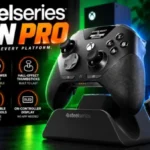
Pressing buttons has never been more pleasurable.
SteelSeries' is breaking into the premium Xbox controller space, and as a fan of their headsets, it has been great to see. This first...
After testing this SteelSeries Xbox controller’s smart battery system and dual-platform 2.4GHz connectivity, I’m not sure I can ever go back...
Does SteelSeries’ multi-platforming Aeon Pro controller offers commensurate value for its price.
SteelSeries' Aeon Pro delivers superb comfort, Hall Effect precision, useful OLED features, and premium quality at a premium price.
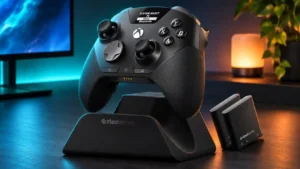
The dual-device dock and hot-swappable batteries make the Aeon Pro exceptionally convenient for Xbox and PC gaming. Crisp controls impress, but its steep price and divisive rear paddles make it...
Pros: battery replaceability, charging dock support
Cons: value for money, back button placement
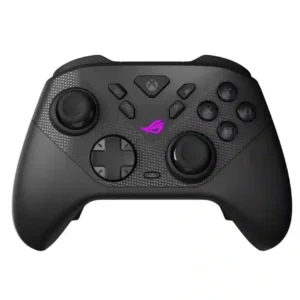
Best for precise TMR sticks, fast trigger stops, low-latency 2.4GHz play, and deep tuning. Skip it if you want a cheaper all-rounder, softer buttons for long sessions, or painless console-only...
Pros: overall satisfaction, button quality
Cons: d-pad accuracy, charging dock support
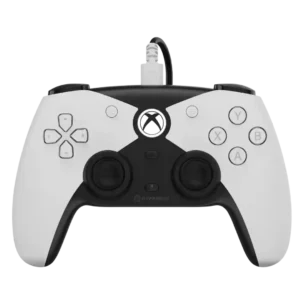
Best for a comfortable, affordable Xbox/PC pad with precise Hall sticks, a PlayStation-style layout, and useful rear buttons. Skip it if wireless play, deep software tuning, or consistently top-tier D-pad...
Pros: overall satisfaction, value for money
Cons: wired performance, vibration quality
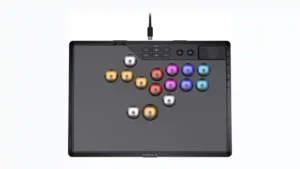
Choose it if you want a premium, tournament-ready leverless controller with excellent 2.4GHz wireless, deep actuation tuning, and sturdy construction. Skip it if loud, tall buttons, a heavy chassis, or...
Pros: overall satisfaction, button quality
Cons: control placement, button noise