Skip to content
Scorata
  • Entertainment
    • Movies
    • TV Shows
    • Video Games
  • Gaming
    • Gaming Keyboards
    • Gaming Mice
    • Headsets
    • Video Games
    • Video Game Controllers
  • Headphones
    • Earbud Headphones
    • Headsets
    • Open-Ear Headphones
    • Over-Ear Headphones
  • Home
    • Air Purifiers
    • Coffee Machines
    • Home Security
      • Cameras
      • Doorbells
      • Home Security Systems
    • Smart Home
      • Smart Locks
      • Smart Thermostats
    • Vacuums
      • Carpet Cleaning Machines
      • Handheld Vacuums
      • Robotic Vacuums
      • Shop Wet Dry Vacuums
      • Stick Vacuums & Electric Brooms
      • Upright Vacuums
  • Speakers
    • Bookshelf Speakers
    • Portable Bluetooth Speakers
    • Sound Bars
  • Wearable Tech
    • Activity & Fitness Trackers
    • Smart Glasses
    • Smart Watch
  1. Home
  2. Electronics
  3. Monitors
  4. Per-input settings memory

Best Monitors for Per-input settings memory

What matters
All attributes brightness build quality color accuracy color gamut competitive gaming suitability contrast design and aesthetics eye comfort features on-screen display usability panel type port selection premium feel productivity versatility reflection handling refresh rate Resolution screen size sharpness software support stand adjustability Per-input settings memory
Per-input settings memory
Explore: brightnessbuild quality
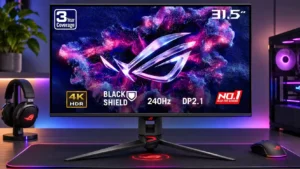
#1 ASUS ROG Swift OLED PG32UCDM Gen3
ASUS ROG Swift OLED PG32UCDM Gen3
1.5

Color and brightness preferences are not stored separately for each source, meaning laptop and desktop users may have to reset their settings after changing inputs.

Pros: overall satisfaction, black levels

Cons: value for money, stand adjustability

  • About
  • Contact Us
  • Privacy Policy
Follow Us

© 2026 Scorata. All rights reserved.