If you want better size and form factor
Choose Corsair K65 PRO Mini. It scores 4.8 vs 2.5 for size and form factor, with a 4.2 overall score.

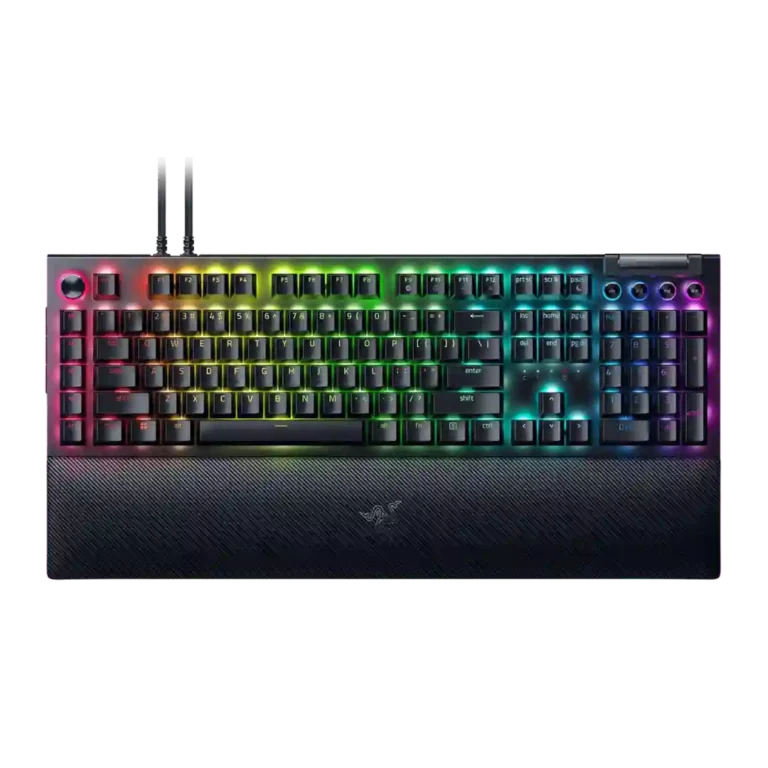
Choose it for a feature-packed, responsive Razer keyboard with strong macros, RGB and comfort. Skip it if desk space, quiet typing, wireless freedom, low software reliance or price matter more.
Best for gamers, creators and productivity users who will actually use dedicated macros, the Command Dial, media controls, RGB profiles and a plush wrist rest on a large desk.
Not for small desks, quiet shared spaces, wireless-first setups, or buyers who dislike Synapse dependency or do not need many extra controls.
Reviewers frame the Razer BlackWidow V4 Pro as a maximalist command-center keyboard rather than a minimalist gaming board. Its strongest evidence is around macro depth, the Command Dial, vivid RGB, sturdy construction, wrist-rest comfort and fast, smooth gaming response. The tradeoff is equally clear: the full-size board is huge, louder switch options can be disruptive, and many advanced controls lean heavily on Synapse. Value depends on whether the buyer will actually use the macros, dial, passthrough and lighting; reviewers who did often found the price fair, while 75% Pro coverage was much harsher on battery life and $300 pricing.
Compared with other Gaming Keyboards, this product is above average in wrist rest quality, ease of switch replacement, passthrough features, near average in value for money, typing feel, below average in compatibility, battery life, size and form factor.
| Attribute | This product | Category average | Difference |
|---|---|---|---|
| compatibility | 2.0 | 3.9 | -1.9 |
| battery life | 2.3 | 4.0 | -1.7 |
| size and form factor | 2.5 | 4.2 | -1.7 |
| desk space efficiency | 2.6 | 4.2 | -1.6 |
| wrist rest quality | 4.5 | 3.3 | +1.2 |
| ease of switch replacement | 5.0 | 3.7 | +1.3 |
| durability | 3.3 | 4.4 | -1.2 |
| onboard memory | 3.0 | 4.1 | -1.1 |
Choose Corsair K65 PRO Mini. It scores 4.8 vs 2.5 for size and form factor, with a 4.2 overall score.
Choose HyperX Alloy Rise. It scores 4.8 vs 2.0 for compatibility, with a 4.0 overall score.
Choose Corsair K70 PRO. It scores 4.8 vs 2.6 for reliability, with a 4.0 overall score.
Choose Corsair K65 Plus. It scores 4.6 vs 2.6 for desk space efficiency, with a 4.2 overall score.
Products reviewers directly compared with this model, grouped into quick takeaways.
Yes. Reviewers repeatedly praised its responsiveness, low-latency wired behavior, high polling option, and macro advantages in games.
Mostly yes, especially with the plush wrist rest and Yellow or smoother switch options. Some reviewers found Green switches loud or less cushioned for long writing.
Yes. The full-size layout, macro column and large wrist rest were repeatedly called big, hefty, or unsuitable for limited desk space.
Synapse is important for advanced customization, custom Command Dial modes, macros and profiles. Several reviewers liked the interface, but others criticized the software dependency.
The supplied reviews show a split by variant: full-size V4 Pro reviewers criticized the lack of hot-swap, while 75% variants were praised for easy switch replacement.
Yes. Reviewers frequently praised the bright Chroma lighting, underglow, wrist-rest lighting and customization depth, though a few wished for finer brightness or more visible media legends.
For the full-size model, many reviewers thought the feature set justified the premium if used fully. For 75% Pro reviews, the $300 price and battery tradeoffs drew much more criticism.
These are a few of the reviews included in our analysis.




Good if you want a premium 96% Hall Effect keyboard for work and gaming with excellent build, sound, and customization. Skip it if you need cheaper esports-first speed, 8,000Hz polling,...
Pros: size and form factor, typing feel
Cons: switch options, portability

Choose it if competitive gaming speed, Rapid Trigger, and deep per-key customization matter more than extras. Skip it if you need wireless, dedicated arrows/media keys, adjustable height, or a lower-cost...
Pros: overall satisfaction, customization options
Cons: value for money, switch options

Good if you want a premium, quiet TKL Hall Effect keyboard for typing and gaming. Skip it if price, portability, 8,000Hz polling, or broad switch choice matters most.
Pros: build quality, switch feel
Cons: switch options

Good if you want a premium full-size Hall Effect keyboard with smooth switches, quiet sound, and deep customization. Skip it if you need a portable, budget-friendly board or broad switch...
Pros: build quality, keycap quality
Cons: switch options, portability