If you want better value for money
Choose Keychron K2 HE. It scores 4.6 vs 3.3 for value for money, with a 4.4 overall score.

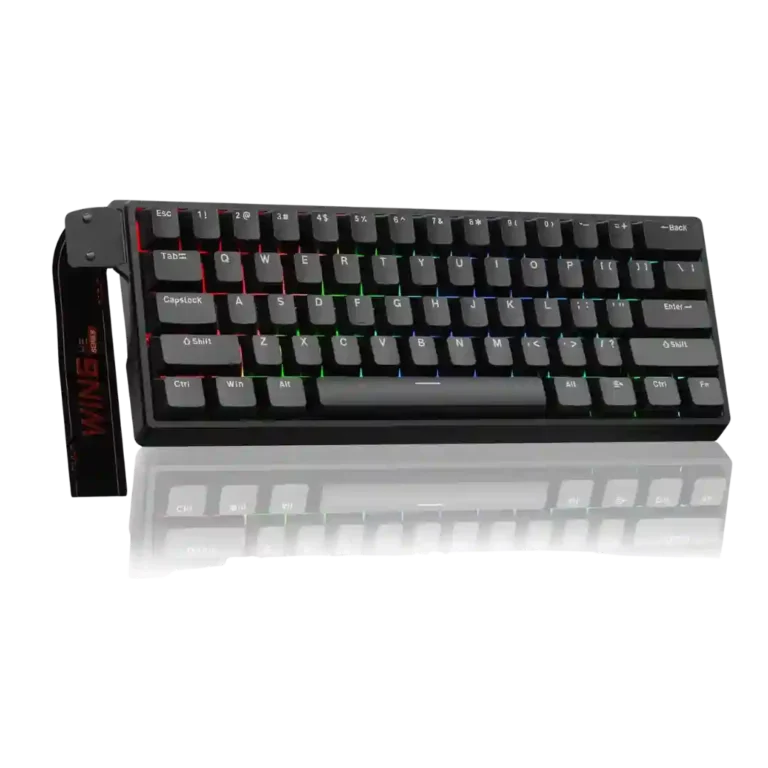
Choose it if competitive gaming speed, Rapid Trigger, and deep per-key customization matter more than extras. Skip it if you need wireless, dedicated arrows/media keys, adjustable height, or a lower-cost board.
Competitive FPS, MOBA, and movement-focused players who want ultra-responsive inputs, Rapid Trigger, and per-key actuation tuning, plus enthusiasts who enjoy deep software and hardware customization.
Users who need wireless connectivity, dedicated arrows or media controls, adjustable height, or a conventional productivity layout may find the 60% design too restrictive. Budget-focused casual gamers can also get more value elsewhere.
The Wooting 60HE+ earns its reputation by pairing extremely responsive Hall Effect switches with excellent Rapid Trigger implementation, very low latency, and unusually deep per-key tuning. Wootility is a major advantage: it is intuitive, browser-accessible, profile-friendly, and capable of handling actuation, remapping, RGB, macros, and advanced key behaviors without bulky background software. The hardware is also more customizable than most performance-focused gaming boards, and the compact footprint leaves ample mouse room. The tradeoffs are equally clear. The 60% layout removes dedicated navigation and media controls, the fixed incline and missing included wrist rest can hurt long-session comfort, and the board is wired-only. Stock plastic construction and pricing also divide opinion. For competitive gaming, however, the performance and software package are exceptionally strong.
Compared with other Gaming Keyboards, this product is above average in analog input support, rapid trigger support, legend visibility, near average in materials quality, RGB lighting quality, below average in wireless performance, volume control, media controls.
| Attribute | This product | Category average | Difference |
|---|---|---|---|
| wireless performance | 2.0 | 4.0 | -2.0 |
| volume control | 2.0 | 3.8 | -1.8 |
| media controls | 2.0 | 3.7 | -1.7 |
| analog input support | 4.7 | 3.1 | +1.6 |
| rapid trigger support | 5.0 | 3.5 | +1.5 |
| connectivity | 2.3 | 3.9 | -1.6 |
| legend visibility | 5.0 | 3.5 | +1.5 |
| software quality | 4.9 | 3.8 | +1.1 |
Choose Keychron K2 HE. It scores 4.6 vs 3.3 for value for money, with a 4.4 overall score.
Choose Epomaker P65. It scores 5.0 vs 2.0 for volume control, with a 4.2 overall score.
Choose ASUS ROG Strix Scope II 96 Wireless. It scores 4.8 vs 2.0 for wireless performance, with a 4.2 overall score.
Choose Keychron K10 HE. It scores 4.7 vs 3.9 for materials quality, with a 4.3 overall score.
Products reviewers directly compared with this model, grouped into quick takeaways.
Yes. Low latency, adjustable Hall Effect actuation, Rapid Trigger, and advanced movement features are repeatedly praised for making inputs feel faster and more controllable.
The switches and PBT keycaps are smoother and more satisfying than many gaming keyboards, but the 60% layout removes dedicated arrows, function keys, and navigation controls. Layers can restore those functions, though some users find the adjustment inconvenient.
No. The keyboard is wired-only, and several reviewers specifically wish it offered Bluetooth or another wireless mode.
Yes, compatible Hall Effect switches can be changed without soldering. The tradeoff is that standard 3- or 5-pin mechanical switches are not supported, and tactile or clicky magnetic choices are limited.
Wootility is one of the strongest parts of the package: reviewers praise its intuitive browser and desktop interfaces, profiles, per-key actuation control, remapping, RGB settings, and lightweight approach.
For competitive players who will use its low-latency Hall Effect features and deep customization, many reviewers say yes. Casual gamers or buyers prioritizing wireless, premium case materials, or custom-keyboard acoustics may find cheaper options more appealing.
These are a few of the reviews included in our analysis.




Good if you want a premium 96% Hall Effect keyboard for work and gaming with excellent build, sound, and customization. Skip it if you need cheaper esports-first speed, 8,000Hz polling,...
Pros: cable quality, typing comfort
Cons: portability, switch options

Choose it if competitive gaming speed, Rapid Trigger, and deep per-key customization matter more than extras. Skip it if you need wireless, dedicated arrows/media keys, adjustable height, or a lower-cost...
Pros: actuation consistency, rapid trigger support
Cons: wireless performance, media controls

Good if you want a premium, quiet TKL Hall Effect keyboard for typing and gaming. Skip it if price, portability, 8,000Hz polling, or broad switch choice matters most.
Pros: build quality, extra gaming features
Cons: switch options, hot-swappable switches

Good if you want a premium full-size Hall Effect keyboard with smooth switches, quiet sound, and deep customization. Skip it if you need a portable, budget-friendly board or broad switch...
Pros: key stability, frame rigidity
Cons: portability, switch options