If you want better frame rigidity
Choose ASUS ROG Falchion RX. It scores 4.9 vs 3.1 for frame rigidity, with a 4.4 overall score.

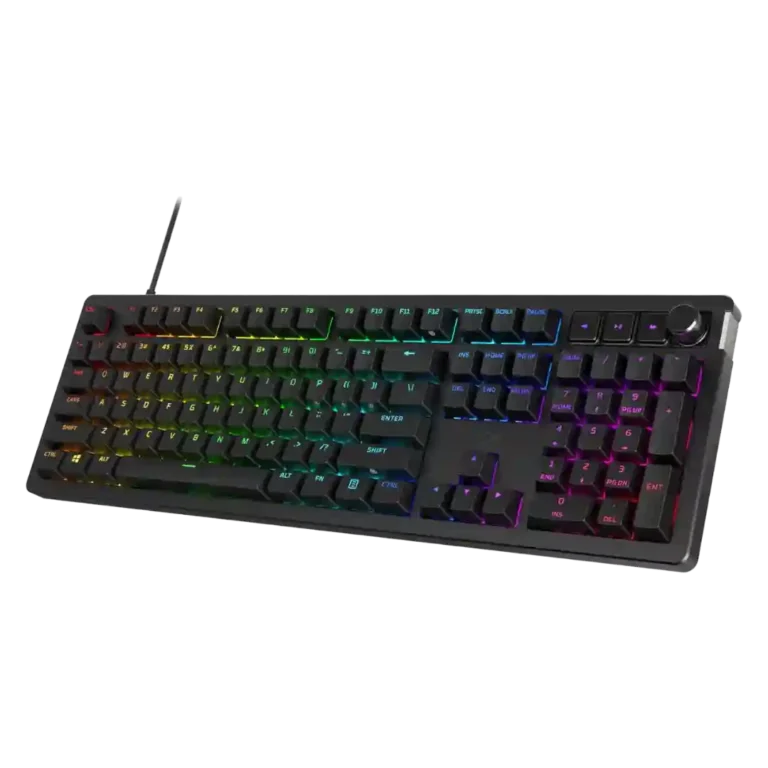
Choose the HyperX Alloy Rise for premium typing feel, bright RGB, and deep customization. Skip it at full price if you need polished software, wireless on every model, or included wrist support.
Best for users who want a smooth mechanical typing feel, bright RGB, and physical customization through switches, plates, badges, and keycaps. The 75 Wireless model also suits users who value compact ergonomics, tri-mode connectivity, and long battery life.
Not for shoppers who need flawless software, included wrist support, rapid-trigger or analog switch features, or the strongest value at full MSRP. Full-size users who need more mouse room may prefer the 75% version or another compact board.
The HyperX Alloy Rise earns its strongest praise as a typing-first gaming keyboard: reviewers repeatedly highlight smooth switches, thick PBT keycaps, sound dampening, bright RGB, and unusually broad physical customization. Wireless 75% reviews add strong battery life, low-latency connectivity, and compact ergonomics, while wired reviews appreciate 8K polling and stable performance. The tradeoff is that the experience depends heavily on model and price. Full-size and wired versions draw complaints for wrist angle, desk space, and lack of wireless, while NGENUITY is described as basic or buggy by several reviewers. Its magnetic frame concept is distinctive, but loose covers, limited accessories, and strong cheaper rivals keep it from being an automatic premium pick.
Compared with other Gaming Keyboards, this product is above average in legend visibility, hot-swappable switches, switch options, near average in design aesthetics, gaming performance, below average in cable quality, frame rigidity, wrist rest quality.
| Attribute | This product | Category average | Difference |
|---|---|---|---|
| cable quality | 2.0 | 3.7 | -1.7 |
| frame rigidity | 3.1 | 4.5 | -1.4 |
| wrist rest quality | 2.0 | 3.3 | -1.3 |
| portability | 2.3 | 3.5 | -1.3 |
| legend visibility | 4.7 | 3.5 | +1.1 |
| hot-swappable switches | 4.5 | 3.5 | +1.0 |
| ease of switch replacement | 2.8 | 3.8 | -1.0 |
| extra gaming features | 3.1 | 4.0 | -1.0 |
Choose ASUS ROG Falchion RX. It scores 4.9 vs 3.1 for frame rigidity, with a 4.4 overall score.
Choose Alienware Pro Wireless Gaming Keyboard. It scores 4.7 vs 2.3 for portability, with a 4.4 overall score.
Choose Glorious GMMK 2. It scores 4.7 vs 2.8 for ease of switch replacement, with a 4.3 overall score.
Choose ASUS ROG Strix Scope II 96 Wireless. It scores 4.7 vs 3.9 for acoustics, with a 4.2 overall score.
Products reviewers directly compared with this model, grouped into quick takeaways.
Yes, most reviewers praise the typing feel as smooth, comfortable, and premium thanks to pre-lubed switches, PBT keycaps, gasket mounting, and sound dampening. A few reviews found the keystroke harsh or fatiguing.
Reviewers generally found it responsive and capable for competitive gaming, with low latency and strong key responsiveness. It is not treated as the fastest choice for players who specifically want hall-effect, analog, or rapid-trigger behavior.
Wireless reviews are positive overall, praising tri-mode connectivity, low input delay, and long battery life. Windows Central did report occasional disconnects and setup inconsistencies.
Customization is one of the product's main strengths: reviewers mention swappable top plates, side badges, hot-swappable switches, keycaps, RGB layers, macros, and profiles. Some reviewers felt the accessory ecosystem or badge concept was premature.
Feedback is mixed. Some reviewers found it easy, streamlined, or even great, while others called it barebones, limited, buggy, or the keyboard's biggest hiccup.
Value depends heavily on price. Several reviewers liked it more on sale, but full MSRP drew repeated criticism because competing keyboards offer similar feel, wireless features, or stronger gaming tech for less.
These are a few of the reviews included in our analysis.


Good if you want a premium 96% Hall Effect keyboard for work and gaming with excellent build, sound, and customization. Skip it if you need cheaper esports-first speed, 8,000Hz polling,...
Pros: size and form factor, typing feel
Cons: switch options, portability

Choose it if competitive gaming speed, Rapid Trigger, and deep per-key customization matter more than extras. Skip it if you need wireless, dedicated arrows/media keys, adjustable height, or a lower-cost...
Pros: overall satisfaction, customization options
Cons: value for money, switch options

Good if you want a premium, quiet TKL Hall Effect keyboard for typing and gaming. Skip it if price, portability, 8,000Hz polling, or broad switch choice matters most.
Pros: build quality, switch feel
Cons: switch options

Good if you want a premium full-size Hall Effect keyboard with smooth switches, quiet sound, and deep customization. Skip it if you need a portable, budget-friendly board or broad switch...
Pros: build quality, keycap quality
Cons: switch options, portability