If you want better wireless performance
Choose Logitech G515 Lightspeed. It scores 4.8 vs 2.9 for wireless performance, with a 4.1 overall score.

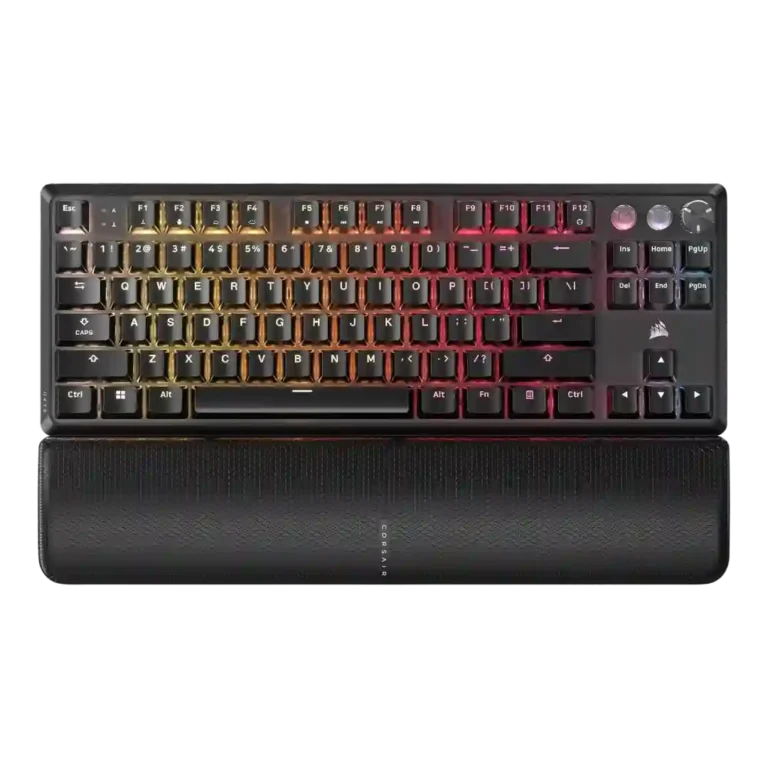
Choose the Corsair K70 PRO for fast wired gaming, deep RGB, sturdy construction, and profiles. Skip it if you need wireless freedom, quiet acoustics, hot-swap repairability, or a lower price.
Best for wired competitive gamers and Corsair/iCUE users who want fast inputs, onboard profiles, strong RGB control, media controls, and a sturdy full-size or TKL board.
Not ideal for buyers who prioritize wireless freedom, quiet typing acoustics, full hot-swap repairability, low pricing, or consistent Hall-effect coverage across every key.
Across the supplied reviews, the Corsair K70 PRO family lands as a performance-first gaming keyboard with strong build impressions, flexible RGB, useful profile storage, and quick, responsive key input. Reviewers repeatedly liked the aluminum-heavy feel, media controls, volume wheels, PBT keycaps, and iCUE customization, and gaming performance was one of the strongest points. The tradeoff is that several reviewers found the premium price hard to ignore, while the 8,000Hz polling was often described as technically impressive but hard to feel. Acoustic complaints also recur: ping, rattly stabilizers, hollow sound, and uneven sound dampening show up across multiple reviews. The Hall-effect TKL evidence adds rapid trigger strength, but also criticism for mixed switch coverage and limited hot-swap repair flexibility.
Compared with other Gaming Keyboards, this product is above average in switch options, reliability, rapid trigger support, near average in keycap quality, value for money, below average in ease of switch replacement, battery life, sound dampening.
| Attribute | This product | Category average | Difference |
|---|---|---|---|
| ease of switch replacement | 1.5 | 3.8 | -2.3 |
| battery life | 2.0 | 4.0 | -2.0 |
| sound dampening | 2.5 | 4.2 | -1.7 |
| acoustics | 2.7 | 4.1 | -1.4 |
| hot-swappable switches | 2.1 | 3.5 | -1.4 |
| switch options | 4.4 | 3.2 | +1.2 |
| reliability | 4.8 | 3.6 | +1.2 |
| polling rate | 2.9 | 3.9 | -1.0 |
Choose Logitech G515 Lightspeed. It scores 4.8 vs 2.9 for wireless performance, with a 4.1 overall score.
Choose Corsair K65 Plus. It scores 4.8 vs 3.9 for typing feel, with a 4.2 overall score.
Choose Logitech G915 X Lightspeed. It scores 4.8 vs 3.0 for stabilizer quality, with a 4.1 overall score.
Choose Corsair K65 PRO Mini. It scores 4.8 vs 2.7 for acoustics, with a 4.2 overall score.
Products reviewers directly compared with this model, grouped into quick takeaways.
Yes. Reviewers repeatedly praised gaming performance, fast response, accurate key registration, and competitive features such as Tournament/Game Mode, rapid trigger, and high polling.
Evidence is mixed. Some reviewers noticed smoother split-second gaming, but many called the difference tiny, unnoticeable, or unnecessary compared with lower polling rates.
Not consistently. Some switch versions were described as quiet or acceptable, but many reviews complained about ping, hollow acoustics, rattly stabilizers, or noisy larger keys.
iCUE was usually praised for deep RGB, macros, profiles, remapping, and hardware storage. Caveats include complexity, system load, and occasional frustration.
Many K70 RGB Pro and K70 Pro TKL reviews describe wired-only connectivity and several reviewers wished for wireless. The Mini Wireless review reported no wireless signal issues but criticized RGB-on battery life.
Value is mixed. Positive reviews said the build, speed, customization, and keycaps justify the premium, while critical reviews pointed to price, noise, missing hot-swap, or cheaper alternatives.
These are a few of the reviews included in our analysis.





Good if you want a premium 96% Hall Effect keyboard for work and gaming with excellent build, sound, and customization. Skip it if you need cheaper esports-first speed, 8,000Hz polling,...
Pros: size and form factor, typing feel
Cons: switch options, portability

Choose it if competitive gaming speed, Rapid Trigger, and deep per-key customization matter more than extras. Skip it if you need wireless, dedicated arrows/media keys, adjustable height, or a lower-cost...
Pros: overall satisfaction, customization options
Cons: value for money, switch options

Good if you want a premium, quiet TKL Hall Effect keyboard for typing and gaming. Skip it if price, portability, 8,000Hz polling, or broad switch choice matters most.
Pros: build quality, switch feel
Cons: switch options

Good if you want a premium full-size Hall Effect keyboard with smooth switches, quiet sound, and deep customization. Skip it if you need a portable, budget-friendly board or broad switch...
Pros: build quality, keycap quality
Cons: switch options, portability