If you want better gaming performance
Choose Corsair K70 PRO. It scores 4.7 vs 4.1 for gaming performance, with a 4.0 overall score.

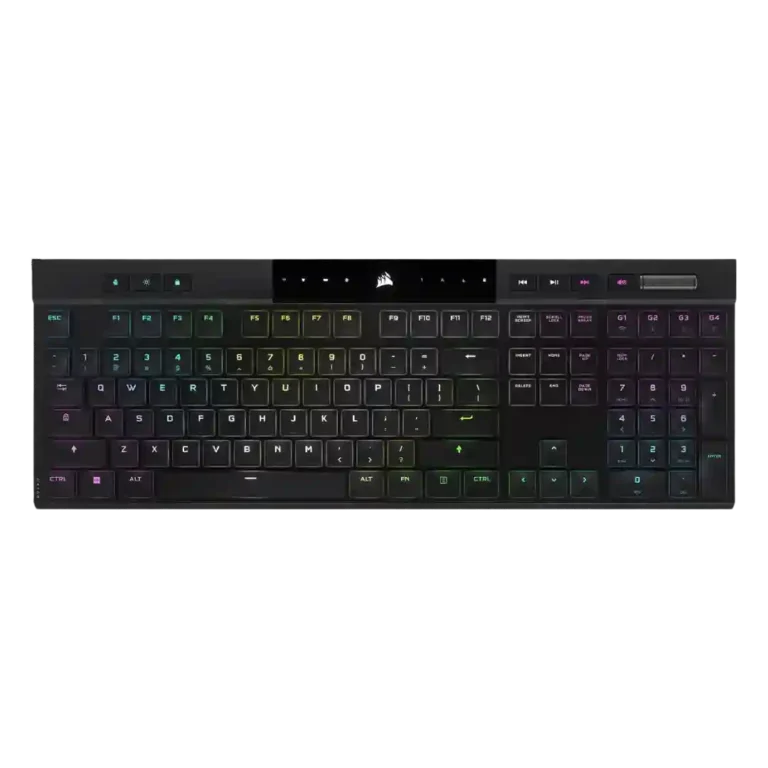
Choose the Corsair K100 Air if you want an ultra-thin, premium wireless keyboard with strong typing, RGB, battery life, and responsiveness. Skip it if price, repairability, quieter acoustics, or traditional full-height switches matter more.
Best for buyers who want a premium, ultra-thin full-size wireless keyboard with strong battery life, fast Slipstream or wired response, deep RGB control, and a laptop-like tactile typing feel.
Not for users who want a budget board, easy switch or keycap replacement, quiet stabilizers, compact layouts, or the deeper travel of conventional mechanical switches.
Reviewers treat the Corsair K100 Air as a standout ultra-thin wireless keyboard built around speed, premium looks, and a distinctive Cherry MX Ultra Low Profile tactile feel. The strongest agreement centers on its slim form factor, sturdy frame, responsive Slipstream or wired performance, deep iCUE customization, useful media controls, and battery life that usually meets expectations. The tradeoff is that the same thin design limits repairability and physical customization, while shallow switches, rattly stabilizers, louder acoustics, full-size length, and the high price divided reviewers. It performs like a flagship for buyers who value the format, but its premium is harder to defend for users who want conventional switches or easy servicing.
Compared with other Gaming Keyboards, this product is above average in backlight brightness, cable quality, volume control, near average in switch feel, RGB lighting quality, below average in sound dampening, stabilizer quality, ease of switch replacement.
| Attribute | This product | Category average | Difference |
|---|---|---|---|
| sound dampening | 1.5 | 4.2 | -2.7 |
| stabilizer quality | 1.7 | 3.9 | -2.2 |
| ease of switch replacement | 1.9 | 3.8 | -1.9 |
| acoustics | 2.4 | 4.1 | -1.7 |
| hot-swappable switches | 2.0 | 3.5 | -1.5 |
| value for money | 3.0 | 3.7 | -0.7 |
| ergonomics | 2.8 | 3.8 | -1.0 |
| layout options | 3.0 | 4.0 | -1.0 |
Choose Corsair K70 PRO. It scores 4.7 vs 4.1 for gaming performance, with a 4.0 overall score.
Choose ASUS ROG Azoth. It scores 4.7 vs 1.5 for sound dampening, with a 4.2 overall score.
Choose Logitech G515 Lightspeed. It scores 4.7 vs 4.3 for typing feel, with a 4.1 overall score.
Choose HyperX Alloy Origins. It scores 4.8 vs 4.0 for RGB lighting quality, with a 4.1 overall score.
Products reviewers directly compared with this model, grouped into quick takeaways.
Yes for most reviewers: wired and Slipstream use felt fast and responsive. A few reviewers still preferred conventional mechanical switches for serious gaming.
Most reviewers liked the low-profile tactile feel after adjustment, and several called it comfortable for long sessions. Reviewers who dislike shallow laptop-style keys were less convinced.
Battery life was widely praised. Reviewers commonly reported several days to a week or more between charges, and long-term use also supported strong endurance.
Reviewers repeatedly treated this as a weakness. The keycaps and switches are not user-friendly to remove, and several warned that removal can damage the switches.
The RGB lighting was mostly liked for brightness, per-key control, and deep customization. Some reviewers found it less vibrant, uneven, or more subdued than other Corsair boards.
Basic use and some onboard functions work without iCUE, but reviewers said the full lighting, macro, profile, and performance controls depend on Corsair’s software.
Value was the most divided area. Some reviewers said the feature set justified the premium, while many thought the price was hard to justify against cheaper alternatives.
These are a few of the reviews included in our analysis.





Good if you want a premium 96% Hall Effect keyboard for work and gaming with excellent build, sound, and customization. Skip it if you need cheaper esports-first speed, 8,000Hz polling,...
Pros: size and form factor, typing feel
Cons: switch options, portability

Choose it if competitive gaming speed, Rapid Trigger, and deep per-key customization matter more than extras. Skip it if you need wireless, dedicated arrows/media keys, adjustable height, or a lower-cost...
Pros: overall satisfaction, customization options
Cons: value for money, switch options

Good if you want a premium, quiet TKL Hall Effect keyboard for typing and gaming. Skip it if price, portability, 8,000Hz polling, or broad switch choice matters most.
Pros: build quality, switch feel
Cons: switch options

Good if you want a premium full-size Hall Effect keyboard with smooth switches, quiet sound, and deep customization. Skip it if you need a portable, budget-friendly board or broad switch...
Pros: build quality, keycap quality
Cons: switch options, portability