If you want better macro customization
Choose Logitech G515 Lightspeed. It scores 4.6 vs 2.4 for macro customization, with a 4.1 overall score.

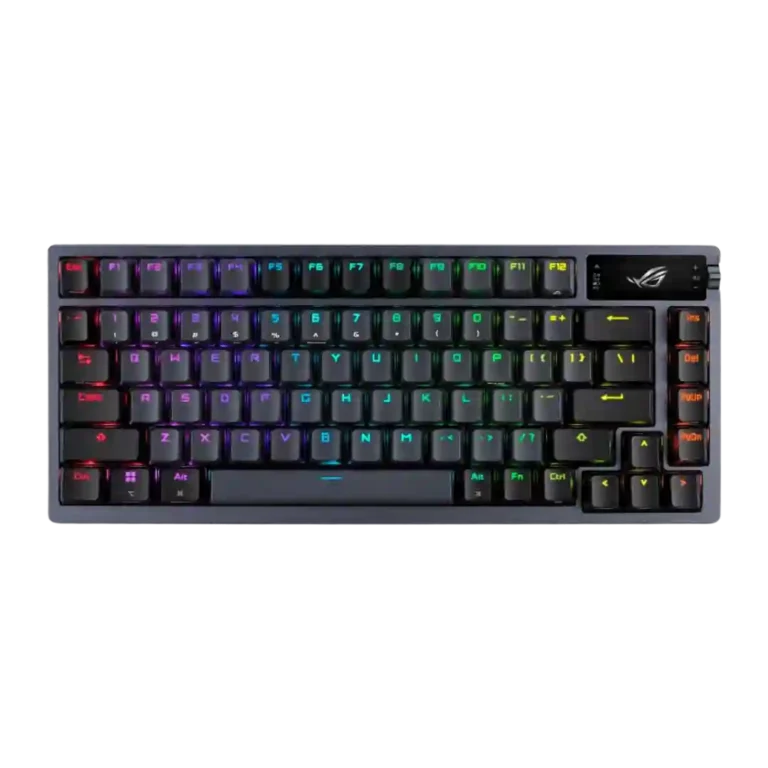
Choose the ASUS ROG Azoth for premium typing feel, quiet sound, strong wireless, and mod-friendly hardware. Skip it if Armoury Crate, limited macro layers, or the high price would frustrate you.
Best for gamers who also care about enthusiast-style typing feel, sound dampening, hot-swappable switches, and strong wireless performance. It also suits users who want a premium compact layout with enough keys for daily productivity.
Not ideal for buyers who prioritize low price, polished software, deep macro layers, very light portability, or a conventional volume wheel. Mac and Linux users should be especially cautious about customization limitations.
The ASUS ROG Azoth earns unusually strong praise because it blends enthusiast keyboard feel with mainstream gaming performance. Reviewers repeatedly liked the sturdy build, refined acoustics, hot-swap support, long battery life, and responsive wireless connection. The central tradeoff is that the hardware often feels premium enough for the price, but the surrounding experience does not always match it. Armoury Crate is the recurring pain point, with complaints about bloat, bugs, slow loading, profile issues, and limited macro layering. The OLED screen and control dial are useful to some reviewers and awkward or superfluous to others, making the Azoth most compelling when typing feel, sound, and wireless hardware matter more than software polish.
Compared with other Gaming Keyboards, this product is above average in switch options, hot-swappable switches, wireless performance, near average in typing feel, build quality, below average in onboard memory, macro customization, software quality.
| Attribute | This product | Category average | Difference |
|---|---|---|---|
| onboard memory | 2.2 | 4.1 | -1.9 |
| macro customization | 2.4 | 4.2 | -1.8 |
| software quality | 2.4 | 3.8 | -1.4 |
| switch options | 4.6 | 3.2 | +1.4 |
| legend visibility | 2.3 | 3.6 | -1.3 |
| hot-swappable switches | 4.7 | 3.5 | +1.2 |
| media controls | 2.6 | 3.7 | -1.1 |
| wireless performance | 4.9 | 4.0 | +0.9 |
Choose Logitech G515 Lightspeed. It scores 4.6 vs 2.4 for macro customization, with a 4.1 overall score.
Choose HyperX Alloy Rise. It scores 4.7 vs 2.3 for legend visibility, with a 4.0 overall score.
Choose Corsair K65 PRO Mini. It scores 5.0 vs 3.1 for volume control, with a 4.2 overall score.
Choose HyperX Alloy Origins. It scores 5.0 vs 4.4 for customization options, with a 4.1 overall score.
Products reviewers directly compared with this model, grouped into quick takeaways.
Yes. Reviewers repeatedly described it as fast, responsive, reliable, and excellent for wireless gaming, with no noticeable lag in several tests.
Typing feel is one of the strongest areas. Reviews called it next-level, fantastic, superb, and close to an enthusiast custom keyboard experience.
Often, yes. Several reviewers criticized it as bloated, buggy, slow, or limiting, even when they liked the keyboard hardware.
It depends. Some reviewers found it useful for system info, battery status, and controls, while others thought it was superfluous or hurt usability with the side control.
Yes. Reviewers praised the hot-swappable design and included tools, saying switches can be removed easily and the board is friendly to customization.
The evidence is mixed. Many reviewers felt the build, typing feel, wireless performance, and extras justify a premium, while others said the software and $250 price make it hard to recommend.
These are a few of the reviews included in our analysis.





Good if you want a premium 96% Hall Effect keyboard for work and gaming with excellent build, sound, and customization. Skip it if you need cheaper esports-first speed, 8,000Hz polling,...
Pros: size and form factor, typing feel
Cons: switch options, portability

Choose it if competitive gaming speed, Rapid Trigger, and deep per-key customization matter more than extras. Skip it if you need wireless, dedicated arrows/media keys, adjustable height, or a lower-cost...
Pros: overall satisfaction, customization options
Cons: value for money, switch options

Good if you want a premium, quiet TKL Hall Effect keyboard for typing and gaming. Skip it if price, portability, 8,000Hz polling, or broad switch choice matters most.
Pros: build quality, switch feel
Cons: switch options

Good if you want a premium full-size Hall Effect keyboard with smooth switches, quiet sound, and deep customization. Skip it if you need a portable, budget-friendly board or broad switch...
Pros: build quality, keycap quality
Cons: switch options, portability