If you want better battery life
Choose ASUS ROG Strix Scope II 96 Wireless. It scores 4.8 vs 4.4 for battery life, with a 4.2 overall score.

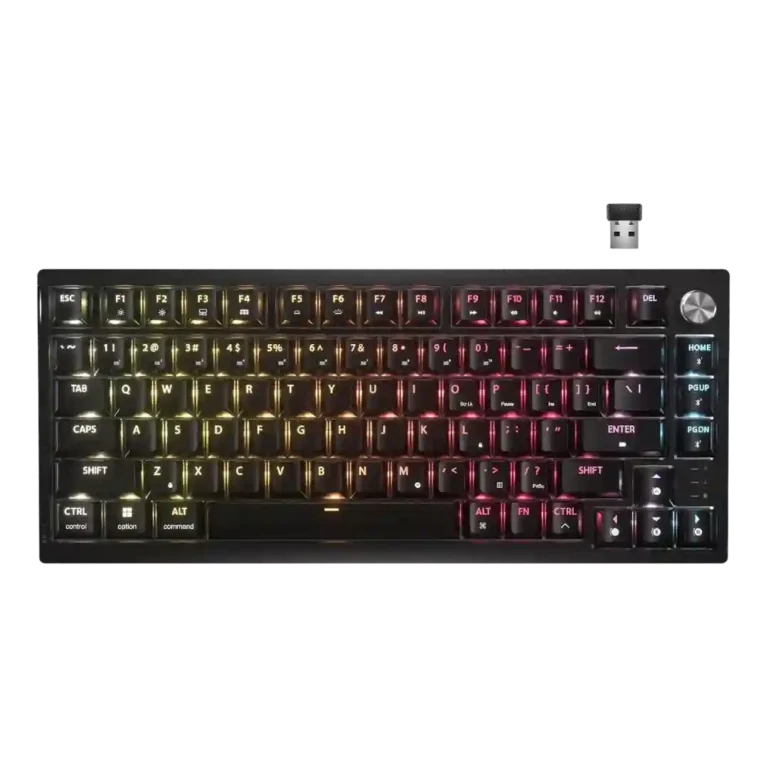
Choose the Corsair K65 Plus if you want a compact 75% wireless keyboard with smooth switches, quiet sound, and strong customization. Skip it if you need shine-through legends, tactile stock switches, top-tier polling, or a bundled wrist rest.
Best for users who want a compact 75% wireless keyboard that feels smooth, sounds quiet, and works across gaming and productivity setups. It especially suits people who like linear switches or plan to customize switches later.
Not for buyers who need shine-through legends, a bundled wrist rest, tactile or clicky stock switch choices, or advanced competitive features like rapid trigger and very high polling rates.
The Corsair K65 Plus earns strong reviewer support as a 75% wireless board that feels far more refined than many mainstream gaming keyboards. Its biggest wins are the smooth factory-lubed switches, effective sound dampening, sturdy compact build, stable wireless modes, and flexible controls through shortcuts or iCUE. The central tradeoff is that Corsair leans toward enthusiast feel without going fully enthusiast or fully esports-focused: the stock switch choice is narrow, 1,000Hz polling is ordinary, advanced features like rapid trigger are absent, and opaque keycaps make the RGB more decorative than practical. Reviewers who valued typing feel, quiet sound, and everyday versatility were highly positive, while value-focused or competitive-gaming reviewers were more cautious.
Compared with other Gaming Keyboards, this product is above average in hot-swappable switches, connectivity, compatibility, near average in acoustics, switch feel, below average in legend visibility, rapid trigger support, extra gaming features.
| Attribute | This product | Category average | Difference |
|---|---|---|---|
| hot-swappable switches | 4.6 | 3.5 | +1.1 |
| legend visibility | 2.3 | 3.6 | -1.2 |
| rapid trigger support | 2.4 | 3.6 | -1.2 |
| connectivity | 4.7 | 3.8 | +0.9 |
| compatibility | 4.7 | 3.8 | +0.9 |
| extra gaming features | 3.2 | 4.0 | -0.9 |
| wireless performance | 4.7 | 4.0 | +0.8 |
| noise level | 4.6 | 3.9 | +0.8 |
Choose ASUS ROG Strix Scope II 96 Wireless. It scores 4.8 vs 4.4 for battery life, with a 4.2 overall score.
Choose HyperX Alloy Rise. It scores 4.7 vs 2.3 for legend visibility, with a 4.0 overall score.
Choose Alienware Pro Wireless Gaming Keyboard. It scores 4.6 vs 3.1 for switch options, with a 4.4 overall score.
Choose Keychron K2 HE. It scores 5.0 vs 2.6 for wrist rest quality, with a 4.4 overall score.
Products reviewers directly compared with this model, grouped into quick takeaways.
Yes, reviewers generally found it responsive, stable, and enjoyable for gaming. The caveat is that it sticks to 1,000Hz polling and lacks rapid trigger, so competitive-feature hunters may want something more specialized.
Typing feel is one of the strongest review themes. Reviewers repeatedly praised the smooth factory-lubed switches, quiet dampened sound, and comfortable 75% layout.
No. Reviewers repeatedly noted that the keycaps are opaque, so the RGB glows around the keys rather than through the letters, making low-light typing harder.
Battery life was praised overall, especially with RGB off. With RGB on, reviewers reported shorter runtimes ranging from a couple of days at high brightness to around a week or more depending on use.
Yes. Reviewers liked that the K65 Plus is hot-swappable, though several wished Corsair offered more stock switch choices beyond the linear MLX Reds.
Not for basic use, since many lighting and control functions work from keyboard shortcuts. iCUE adds deeper remapping, macros, profiles, and lighting options, but some reviewers noted limits or software dependence.
These are a few of the reviews included in our analysis.





Good if you want a premium 96% Hall Effect keyboard for work and gaming with excellent build, sound, and customization. Skip it if you need cheaper esports-first speed, 8,000Hz polling,...
Pros: size and form factor, typing feel
Cons: switch options, portability

Choose it if competitive gaming speed, Rapid Trigger, and deep per-key customization matter more than extras. Skip it if you need wireless, dedicated arrows/media keys, adjustable height, or a lower-cost...
Pros: overall satisfaction, customization options
Cons: value for money, switch options

Good if you want a premium, quiet TKL Hall Effect keyboard for typing and gaming. Skip it if price, portability, 8,000Hz polling, or broad switch choice matters most.
Pros: build quality, switch feel
Cons: switch options

Good if you want a premium full-size Hall Effect keyboard with smooth switches, quiet sound, and deep customization. Skip it if you need a portable, budget-friendly board or broad switch...
Pros: build quality, keycap quality
Cons: switch options, portability