If you want better Ethernet port count
Choose TP-Link Deco 7 Pro BE63. It scores 4.8 vs 2.1 for Ethernet port count, with a 4.2 overall score.

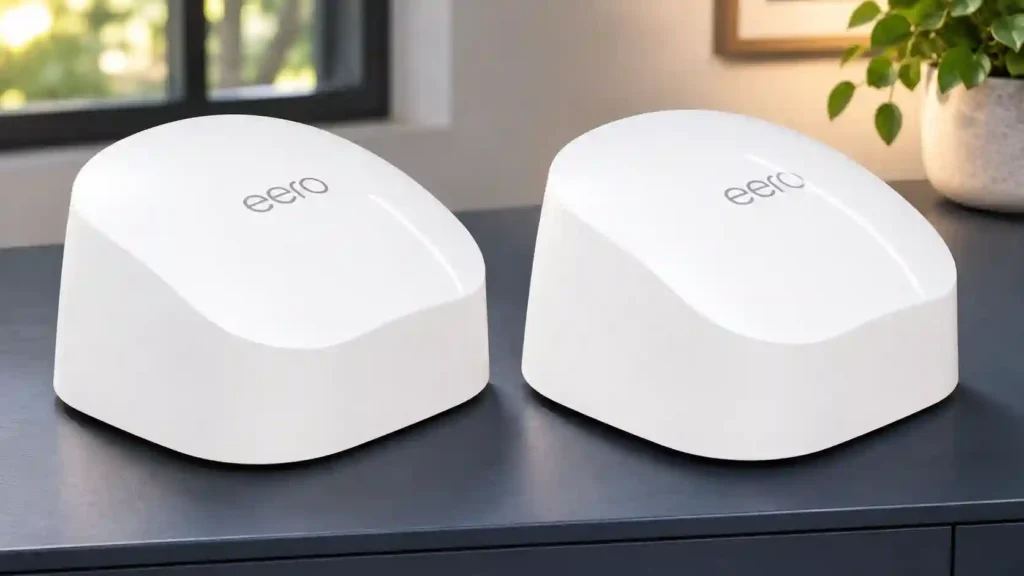
The eero 6 makes reliable home Wi-Fi easy to install and expand, especially on modest broadband plans. Its shared wireless backhaul, limited Ethernet ports and subscription-gated controls are the main compromises.
Households seeking simple home networking, modest broadband speeds and easy mesh expansion, including beginners and compatible smart-home users.
Advanced network administrators and demanding online gamers who need detailed controls, consistently high throughput or low latency should look elsewhere.
The eero 6 is an appealing mesh router for households that want dependable coverage without having to learn complicated network settings. Its compact hardware, guided app setup and easy expansion are consistent strengths, and the integrated Zigbee hub is useful for compatible smart-home devices. Everyday browsing, streaming and video calls can work well on modest broadband connections. However, wireless satellite speeds are often substantially lower than gateway speeds, and some tests found serious band-steering problems. Router units connected by Ethernet can deliver much better performance than the wireless-only extenders. Limited ports, sparse manual settings and recurring charges for advanced parental controls and security also reduce its appeal. It makes most sense for straightforward home networking, particularly when discounted, rather than for maximizing gigabit Wi-Fi or building a highly configurable network.
Compared with other Routers, this product is above average in reboot frequency, power adapter size, size and footprint, near average in mobile app quality, setup ease, below average in Ethernet port count, configuration flexibility, device prioritization.
| Attribute | This product | Category average | Difference |
|---|---|---|---|
| Ethernet port count | 2.1 | 4.6 | -2.5 |
| configuration flexibility | 1.8 | 4.3 | -2.5 |
| device prioritization | 2.0 | 4.6 | -2.6 |
| roaming performance | 1.7 | 4.3 | -2.6 |
| reboot frequency | 5.0 | 2.4 | +2.6 |
| quality of service | 2.0 | 4.6 | -2.6 |
| VPN client support | 2.0 | 4.6 | -2.6 |
| web interface quality | 2.0 | 4.2 | -2.2 |
Choose TP-Link Deco 7 Pro BE63. It scores 4.8 vs 2.1 for Ethernet port count, with a 4.2 overall score.
Choose TP-Link Archer BE230. It scores 4.8 vs 1.7 for roaming performance, with a 4.1 overall score.
Choose TP-Link Archer BE550. It scores 4.8 vs 2.0 for device prioritization, with a 4.3 overall score.
Choose TP-Link Archer AX55. It scores 4.1 vs 1.8 for configuration flexibility, with a 4.0 overall score.
Compared with eero 6
It is generally suitable for modest broadband plans and everyday browsing, streaming and calls. Wireless mesh speeds vary and often fall below what a wired gateway can deliver.
Additional compatible nodes can help fill weak areas, provided they have a strong connection to the rest of the mesh.
The wireless-only extenders have no Ethernet ports. Choose router units if you want wired backhaul or wired devices at satellite locations.
Basic networking works without a paid subscription, but advanced security, filtering and detailed monitoring may require eero Plus.
Ordinary gaming can be possible, but variable latency, modest speeds and limited traffic-prioritization options make it less attractive for demanding competitive play.
The guided phone app makes installation straightforward, including adding mesh nodes. Advanced manual settings are limited.
These are a few of the reviews included in our analysis.


We’ve tested the latest Wi-Fi routers and found the best options—from budget models to top-of-the-line—to make your wireless network faster...
Is the eero 6 still worth buying? See its Wi-Fi 6 limits, conflicting speed claims, advertised coverage, router-versus-extender differences...
Is the eero 6 still worth considering? Learn how its router differs from the extender, what eero’s speed and coverage claims mean, and which...
Amazon's mesh router from 2020 has too many holes for me too recommend it.
Forget about patchy internet connections and dead spots in the house. These WIRED-tested mesh systems will get you online in no time.

Choose the R95 for a busy home that needs fast Wi-Fi 7, strong range, multi-gig ports, and low-lag gaming. Skip it for a small, lightly connected space or if advanced...
Pros: Wi-Fi 7 support, Wi-Fi speed

Best for frequent travel, fast VPNs, dual 2.5GbE and resilient multi-WAN. Skip it if you need full 6GHz/320MHz Wi‑Fi 7, mesh, or desktop-class USB storage and long-range indoor coverage.
Pros: VPN client support, value for money
Cons: 6 GHz performance, USB storage sharing

Exceptional VPN speeds, strong Wi-Fi 6 coverage and extensive OpenWrt controls make the Flint 2 a compelling value. Its advanced setup, missing 6GHz band and firmware-specific caveats matter if you...
Pros: setup ease, configuration flexibility
Cons: Wi-Fi 7 support, USB storage sharing

Best for affordable tri-band Wi-Fi 7, abundant 2.5GbE ports, and deep free controls. Skip it if you need consistently strong garden coverage, foolproof app setup, or proven top-tier speeds across...
Pros: value for money, design and appearance
Cons: node pairing ease, outdoor coverage