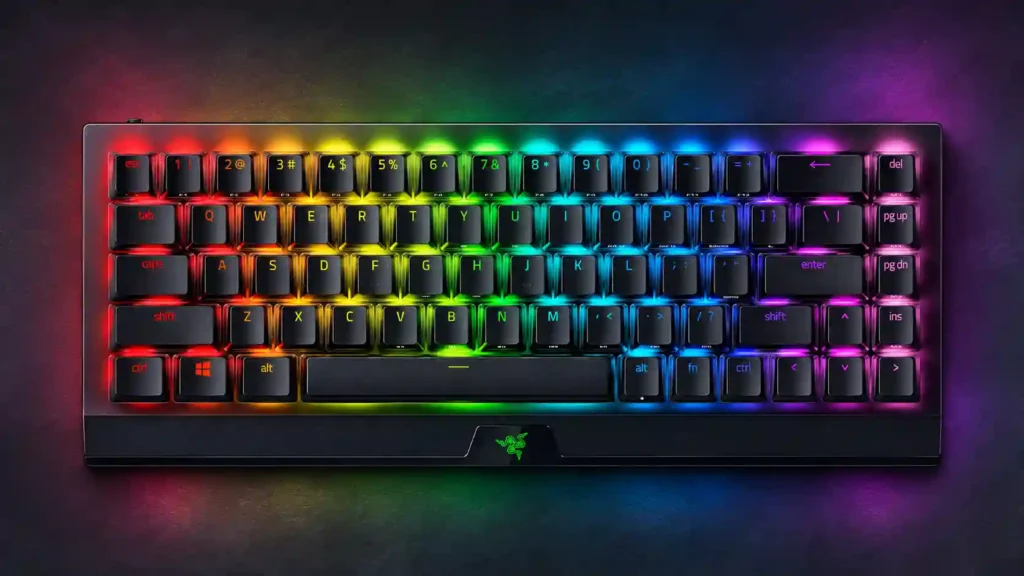
Razer BlackWidow V4 Mini HyperSpeed

Razer BlackWidow V4 Mini HyperSpeed Gaming Keyboard Review

Brand: Razer
Released: September 18, 2024
Updated: 9 minutes ago
3.8
Overall review score Expert score: 4.6 Customer score: 3.1
411
Review insights
63
Scored features
63
Total reviews
5 expert / 58 customer

Bottom Line

A compact, responsive keyboard with satisfying tactile switches and flexible customization, especially for tight gaming desks. Repeated reports of fragile keycaps, wireless dropouts and inconsistent battery life make it a riskier premium purchase.

PC gamers with limited desk space, couch gamers using a lap desk, and enthusiasts who enjoy customizing switches and lighting.

PS5 owners, people who need a dependable keyboard for important daily work, and budget-conscious buyers who cannot justify the reliability risk.

Verdict

The BlackWidow V4 Mini HyperSpeed makes a persuasive case for a smaller gaming keyboard without abandoning dedicated arrow keys. Its tactile Orange switches, hot-swappable sockets, attractive RGB lighting and multiple connectivity modes are the main draws. HyperSpeed wireless can feel impressively responsive, and the freed desk space is especially useful for mouse-heavy games or a cramped setup. However, ownership experiences vary considerably. Some buyers report broken keycaps, double-registering or missed keystrokes, disconnections and lighting failures, sometimes within weeks. Battery endurance also falls substantially with RGB enabled, and Synapse can be frustrating or unstable. The compact layout requires function-key shortcuts, and PS5 users report incompatibility. It is an appealing choice for customization-focused PC gamers who prioritize space, but the reliability concerns and premium price deserve serious consideration.

Feature Scorecards

Summary

63 reviewed features
  • Very positive 4.5-5.0
    15 (24%)
  • Positive 3.5-4.4
    17 (27%)
  • Neutral 2.5-3.4
    11 (17%)
  • Negative 1.5-2.4
    8 (13%)
  • Very negative below 1.5
    12 (19%)

Pros highlights

  • 3.7
    47 reviews low consensus
    overall satisfaction: 3.7, 47 reviews, low consensus
    Many owners love the compact design, tactile keys and lighting, but others report early failures severe enough to return the keyboard. Overall satisfaction depends heavily on whether the unit works reliably.
  • 4.4
    15 reviews low consensus
    size and form factor: 4.4, 15 reviews, low consensus
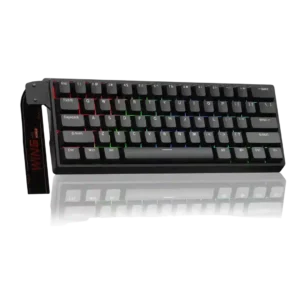
    The 65% footprint keeps arrow keys while taking up much less space than larger boards. Some users find the keys and secondary functions too cramped for everyday use.
  • 3.9
    12 reviews low consensus
    switch feel: 3.9, 12 reviews, low consensus
    Orange tactile switches often earn praise for satisfying feedback and quiet feel. Sticky keys, double presses and inconsistent operation spoil that experience for some owners.
  • 4.5
    11 reviews low consensus
    RGB lighting quality: 4.5, 11 reviews, low consensus
    Many buyers love the vivid lighting and translucent keycap edges, although one owner found colors washed out even at maximum brightness.
  • 4.3
    10 reviews low consensus
    layout options: 4.3, 10 reviews, low consensus
    Dedicated arrow keys and familiar main keys make the 65% layout practical, but number-pad and function-row shortcuts can frustrate full-size keyboard users.
  • 4.9
    9 reviews strong consensus
    customization options: 4.9, 9 reviews, strong consensus
    Switch swapping, lighting effects and configurable settings provide plenty of room to personalize the keyboard.

Cons highlights

  • 3.4
    21 reviews low consensus
    connectivity: 3.4, 21 reviews, low consensus
    USB, Bluetooth and a 2.4 GHz dongle give owners flexible connection options, but some experience failures in one or more modes.
  • 3.4
    19 reviews low consensus
    build quality: 3.4, 19 reviews, low consensus
    The chassis often feels sturdy and premium, but fragile keycaps and early defects lead other owners to question the overall construction.
  • 3.2
    18 reviews low consensus
    wireless performance: 3.2, 18 reviews, low consensus
    HyperSpeed can feel as quick as wired input, and many users enjoy reliable wireless play. Others report disconnects, interference or failed Bluetooth pairing.
  • 1.6
    17 reviews low consensus
    reliability: 1.6, 17 reviews, low consensus
    Experience is inconsistent: some owners report no issues, while others encounter failed keys, lighting problems, unstable pairing and repeated replacements.
  • 3.4
    15 reviews low consensus
    battery life: 3.4, 15 reviews, low consensus
    Runtime varies sharply with lighting and usage: some owners get several days or longer, while others need to charge daily or report fewer than ten hours.
  • 2.6
    14 reviews low consensus
    keycap quality: 2.6, 14 reviews, low consensus
    Phantom Pudding caps look attractive and enhance RGB, but cracking, splitting and caps falling off are repeated concerns. One comparison also favors a competitor’s stock keycaps.

Use Cases

Best for

  • 5.0
    6 reviews strong consensus
    Limited desk space: 5.0, 6 reviews, strong consensus
    Limited desk or lap-desk space is one of the strongest reasons to choose this compact board, since it leaves room for mouse movement.
  • 5.0
    5 reviews strong consensus
    Keyboard customization and modding: 5.0, 5 reviews, strong consensus
    Replaceable switches make this board appealing to people who want to experiment with tactile, linear or clicky feel without soldering.
  • 5.0
    4 reviews strong consensus
    Combined work and gaming: 5.0, 4 reviews, strong consensus
    Responsive tactile switches and flexible connectivity make switching between gaming and typing appealing, with the compact layout preserving essential keys.

Not ideal for

  • Long-term ownership
    2.0
    8 reviews low consensus
    Long-term ownership: 2.0, 8 reviews, low consensus
    Hot-swap capability makes the board attractive for long-term ownership, but reports of early failures and hard-to-find replacement caps undermine confidence.
  • Budget-conscious buyers
    1.4
    7 reviews strong consensus
    Budget-conscious buyers: 1.4, 7 reviews, strong consensus
    The premium price and cheaper competing boards make this a less compelling choice when cost matters most, especially given the reported failures.

Compared With Category Average

Compared with other Gaming Keyboards, this product is above average in hot-swappable switches, portability, ergonomics, near average in size and form factor, RGB lighting quality, below average in durability, profile management, key spacing.

Comparison summary

43 compared features
  • Above average 0.4+ pts higher
    10 (23%)
  • Same as average within 0.3 pts
    11 (26%)
  • Below average 0.4+ pts lower
    22 (51%)

Largest category differences

Attribute This product Category average Difference
durability 1.4 4.4 -3.0
profile management 1.0 4.0 -3.0
key spacing 1.0 3.9 -2.9
volume control 1.0 3.8 -2.8
reliability 1.6 3.6 -1.9
media controls 1.5 3.7 -2.2
actuation consistency 2.2 4.2 -2.0
compatibility 2.0 3.8 -1.8

Consider This Instead

If you want better profile management

Choose Epomaker RT100. It scores 4.5 vs 1.0 for profile management, with a 4.1 overall score.

Compare

If you want better durability

Choose ASUS ROG Azoth. It scores 5.0 vs 1.4 for durability, with a 4.2 overall score.

Compare

If you want better key spacing

Choose Epomaker P65. It scores 5.0 vs 1.0 for key spacing, with a 4.2 overall score.

Compare

If you want better keycap quality

Choose HyperX Alloy Rise. It scores 4.6 vs 2.6 for keycap quality, with a 4.0 overall score.

Compare

Compared in Reviews

Compared with Razer BlackWidow V4 Mini HyperSpeed

  • Downgrade Had problems that the newer model fixes.
  • Upgrade Worked well for this owner, unlike the repeatedly disconnecting replacement.
  • Compared Suffered similar double-press failures, although the newer board lasted longer.

Razer Huntsman Mini (2020)

  • Downgrade Lacks the dedicated arrow keys and wireless convenience this buyer wanted.
  • Cheaper Costs less but offers fewer customization options.

FAQ

Is the 65% layout good for gaming?

It retains dedicated arrow keys while leaving extra room for mouse movement. The smaller layout requires function shortcuts for some controls.

Can the switches be replaced?

Yes, the hot-swappable design accepts compatible three- and five-pin switches. Some users found removal easy, while one expert struggled to remove the stock switches.

How long does the battery last?

Reported endurance varies considerably. RGB lighting can reduce runtime to 20–30 hours or less, while dimmed or disabled lighting can extend it to several days.

Is the keyboard quiet?

The Orange tactile switches are often described as relatively quiet with satisfying feedback, but some buyers find the clicking louder than expected.

Does it work with the PS5?

Two customers report that the keyboard did not work with their PS5, including one who tried updating it first.

Are there durability concerns?

Yes. Multiple owners report cracked or detached keycaps, missed keystrokes and other early failures, though some have had trouble-free long-term use.

Can you see the keys with the lighting off?

The main legends are hidden when unlit, producing a clean black appearance. This can be inconvenient if you rely on visible labels.

Sample Expert Reviews We Analyzed

These are a few of the reviews included in our analysis.
Video Reviews

Article Reviews

Top Gaming Keyboards to Consider

#1 Keychron Q5 HE
4.5

Good if you want a premium 96% Hall Effect keyboard for work and gaming with excellent build, sound, and customization. Skip it if you need cheaper esports-first speed, 8,000Hz polling,...

Pros: size and form factor, typing feel

Cons: switch options, portability
#2 Wooting 60HE+
4.4

Choose it if competitive gaming speed, Rapid Trigger, and deep per-key customization matter more than extras. Skip it if you need wireless, dedicated arrows/media keys, adjustable height, or a lower-cost...

Pros: overall satisfaction, customization options

Cons: value for money, switch options
#3 Keychron Q3 HE
4.4

Good if you want a premium, quiet TKL Hall Effect keyboard for typing and gaming. Skip it if price, portability, 8,000Hz polling, or broad switch choice matters most.

Pros: build quality, switch feel

Cons: switch options
#4 Keychron Q6 HE
4.4

Good if you want a premium full-size Hall Effect keyboard with smooth switches, quiet sound, and deep customization. Skip it if you need a portable, budget-friendly board or broad switch...

Pros: build quality, keycap quality

Cons: switch options, portability