If you want better typing feel
Choose Corsair K65 Plus. It scores 4.8 vs 4.3 for typing feel, with a 4.2 overall score.

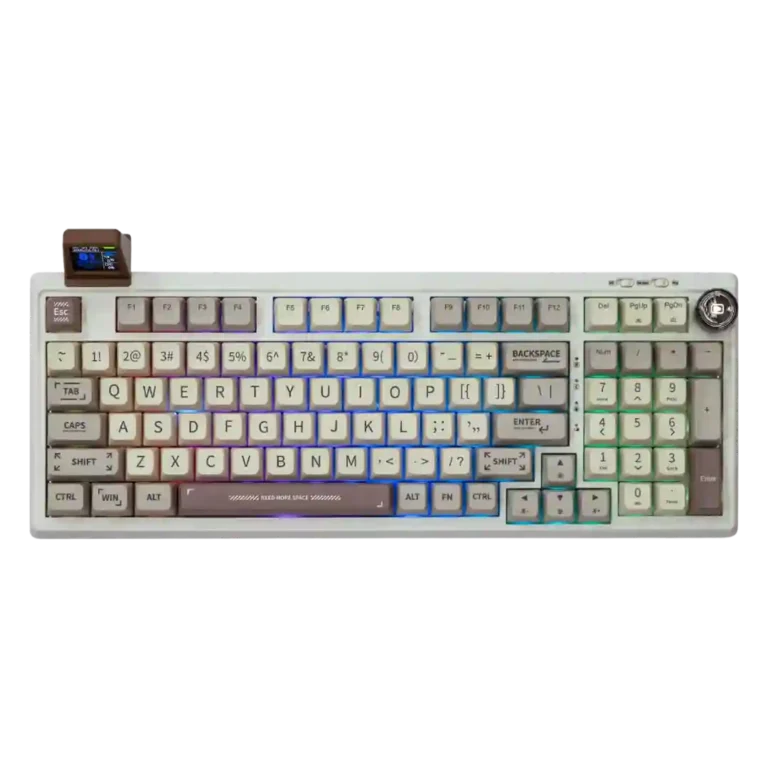
Choose the RT100 for quiet, retro-styled typing, hot-swap flexibility, and strong value. Skip it if you need polished software, a premium knob, or flawless mini-screen customization.
Best for productivity users, retro-keyboard fans, and quiet-office typists who want a compact full-size layout, numpad, hot-swappable switches, and lots of personality for around the $100-$120 range.
Not ideal for users who need polished QMK/VIA-style software, premium metal controls, travel-friendly portability, or competitive FPS precision with the soft Sea Salt Silent switches.
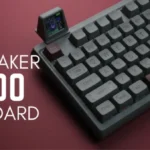
The Epomaker RT100 earns broad praise for pairing retro personality with a compact full-size layout, strong stock acoustics, quiet switch options, and useful hot-swap flexibility. Reviewers repeatedly liked its typing feel, thick PBT keycaps, high-value feature set, and tri-mode connectivity. The tradeoff is that its showpiece mini TV is more charming than fully polished: customization limits, awkward dongle sharing, sync issues, and software quirks appear across several reviews. The plastic build is generally respected for the price, but the volume knob and screen support can feel cheaper than the rest of the board.
Compared with other Gaming Keyboards, this product is above average in switch options, value for money, hot-swappable switches, near average in design aesthetics, RGB lighting quality, below average in key stability, actuation consistency, rapid trigger support.
| Attribute | This product | Category average | Difference |
|---|---|---|---|
| key stability | 2.5 | 4.2 | -1.7 |
| actuation consistency | 2.5 | 4.2 | -1.7 |
| rapid trigger support | 2.0 | 3.6 | -1.6 |
| switch options | 4.4 | 3.2 | +1.3 |
| value for money | 4.6 | 3.6 | +0.9 |
| hot-swappable switches | 4.6 | 3.5 | +1.1 |
| cable quality | 4.6 | 3.6 | +1.0 |
| legend visibility | 2.5 | 3.6 | -1.1 |
Choose Corsair K65 Plus. It scores 4.8 vs 4.3 for typing feel, with a 4.2 overall score.
Choose Keychron Q1 HE. It scores 4.9 vs 2.0 for rapid trigger support, with a 4.2 overall score.
Choose ASUS ROG Strix Scope II 96 Wireless. It scores 4.8 vs 2.8 for reliability, with a 4.2 overall score.
Choose HyperX Alloy Rise. It scores 4.7 vs 2.5 for legend visibility, with a 4.0 overall score.
Products reviewers directly compared with this model, grouped into quick takeaways.
Yes. Most reviewers praised its smooth, soft, quiet typing feel, especially with Sea Salt Silent or Wisteria switches, though a few disliked the tall MDA caps or mushier silent-switch bottom-out.
It works well for casual gaming and light competitive play, especially over 2.4GHz wireless. One reviewer found high-intensity FPS play harder with Sea Salt switches because of false inputs and reduced rapid-trigger confidence.
Reviewers liked the mini TV as a charming, distinctive display for GIFs and basic information, but many found it limited, awkward, or unreliable for deeper customization and synced stats.
Wireless performance was generally praised, with reviewers reporting easy Bluetooth switching and no obvious 2.4GHz lag. Battery life varied depending on RGB and mini-screen use.
Yes. Reviewers repeatedly praised the hot-swappable 3-pin and 5-pin switch support, with most finding replacement easy and valuable for changing sound, feel, or repairability.
The common drawbacks are clunky or finicky software, limited mini-screen customization, a plasticky volume knob, mixed battery life, and occasional discomfort or false inputs depending on switch and keycap preferences.
These are a few of the reviews included in our analysis.


Good if you want a premium 96% Hall Effect keyboard for work and gaming with excellent build, sound, and customization. Skip it if you need cheaper esports-first speed, 8,000Hz polling,...
Pros: size and form factor, typing feel
Cons: switch options, portability

Choose it if competitive gaming speed, Rapid Trigger, and deep per-key customization matter more than extras. Skip it if you need wireless, dedicated arrows/media keys, adjustable height, or a lower-cost...
Pros: overall satisfaction, customization options
Cons: value for money, switch options

Good if you want a premium, quiet TKL Hall Effect keyboard for typing and gaming. Skip it if price, portability, 8,000Hz polling, or broad switch choice matters most.
Pros: build quality, switch feel
Cons: switch options

Good if you want a premium full-size Hall Effect keyboard with smooth switches, quiet sound, and deep customization. Skip it if you need a portable, budget-friendly board or broad switch...
Pros: build quality, keycap quality
Cons: switch options, portability