If you want better ease of switch replacement
Choose Glorious GMMK 2. It scores 4.7 vs 1.0 for ease of switch replacement, with a 4.3 overall score.

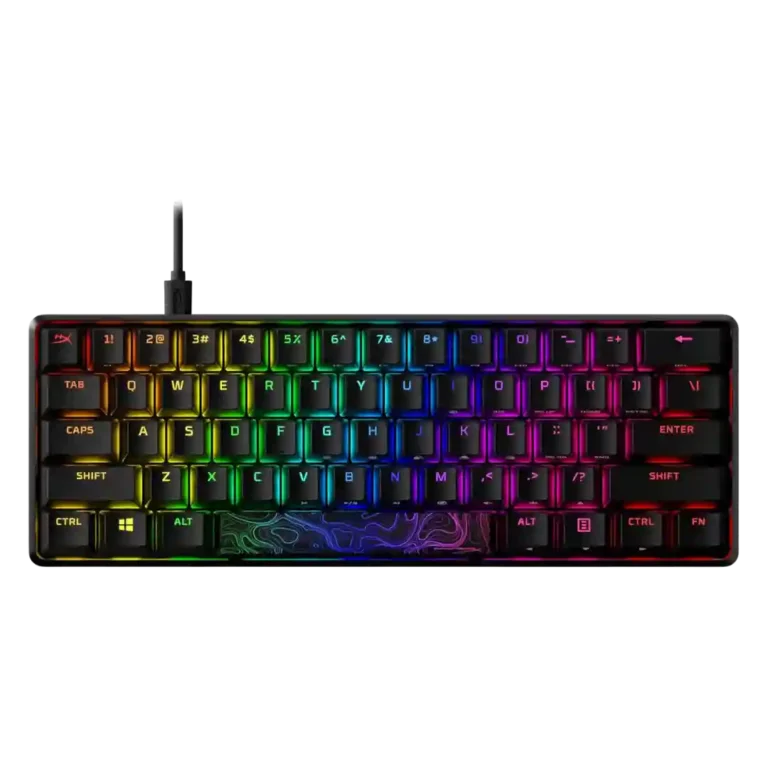
Choose it for a sturdy aluminum gaming keyboard with vivid RGB, responsive switches, and strong value. Skip it if you need polished software, wireless support, premium stock keycaps on every model, or a full productivity layout.
Best for gamers who want a heavy, sturdy wired keyboard with vivid RGB, responsive switches, and compact layout options. It especially suits users who value desk space and do not need deep software features.
Not for users who need wireless performance, rapid-trigger or analog input, a polished customization suite, or dedicated media and volume hardware. Typists sensitive to compact layouts, loud keys, or ABS keycap shine may also prefer another board.
The review set consistently frames the Alloy Origins line as a sturdy, compact gaming keyboard family whose aluminum construction, bright RGB, responsive switches, and desk-space savings are the core appeal. Gaming performance earns strong support, with reviewers praising low latency, NKRO/anti-ghosting, quick actuation, and reliable response in fast games. The tradeoff is that HyperX keeps the hardware simple: dedicated media/volume controls, USB passthrough, wireless support, and richer software polish are limited or absent. Keycap impressions vary sharply by model, with PBT-equipped 60/65 versions praised while ABS-equipped Core/full-size units draw shine, oil, and durability complaints. Overall sentiment is positive, but the best fit depends on whether build, RGB, and gaming feel matter more than software depth and productivity convenience.
Compared with other Gaming Keyboards, this product is above average in legend visibility, backlight brightness, value for money, near average in gaming performance, acoustics, below average in ease of switch replacement, reliability, profile management.
| Attribute | This product | Category average | Difference |
|---|---|---|---|
| ease of switch replacement | 1.0 | 3.8 | -2.8 |
| reliability | 1.5 | 3.6 | -2.1 |
| profile management | 2.3 | 4.0 | -1.7 |
| hot-swappable switches | 2.0 | 3.5 | -1.5 |
| legend visibility | 5.0 | 3.5 | +1.5 |
| software quality | 2.8 | 3.8 | -1.0 |
| sound dampening | 3.0 | 4.2 | -1.2 |
| backlight brightness | 5.0 | 4.0 | +1.0 |
Choose Glorious GMMK 2. It scores 4.7 vs 1.0 for ease of switch replacement, with a 4.3 overall score.
Choose Corsair K65 PRO Mini. It scores 5.0 vs 3.0 for volume control, with a 4.2 overall score.
Choose Corsair K100 RGB. It scores 4.8 vs 3.7 for RGB customization, with a 4.1 overall score.
Choose ASUS ROG Azoth. It scores 4.7 vs 2.0 for hot-swappable switches, with a 4.2 overall score.
Products reviewers directly compared with this model, grouped into quick takeaways.
Yes. Reviewers repeatedly praised its responsive switches, low latency, NKRO or anti-ghosting behavior, and strong fast-game performance.
Build quality is the clearest strength. Reviewers consistently described the aluminum body as sturdy, rigid, premium-feeling, or tank-like.
It depends on the version. Compact PBT-equipped models were praised, while ABS keycaps on other versions were criticized for shine, oil pickup, and a less premium feel.
Software feedback is mixed. Some reviewers found NGENUITY easy and useful, while others reported confusing workflows, profile sync issues, installation trouble, or limited RGB presets.
Not consistently. Some reviewers found the sound inoffensive or quieter than many gaming keyboards, but others described loud clacks, rattly stabilizers, or annoying noise.
Reviewers liked the smaller 60%, 65%, and TKL models for desk space and portability, but the 60% form factor was less convenient for productivity and shortcut-heavy work.
These are a few of the reviews included in our analysis.


Good if you want a premium 96% Hall Effect keyboard for work and gaming with excellent build, sound, and customization. Skip it if you need cheaper esports-first speed, 8,000Hz polling,...
Pros: size and form factor, typing feel
Cons: switch options, portability

Choose it if competitive gaming speed, Rapid Trigger, and deep per-key customization matter more than extras. Skip it if you need wireless, dedicated arrows/media keys, adjustable height, or a lower-cost...
Pros: overall satisfaction, customization options
Cons: value for money, switch options

Good if you want a premium, quiet TKL Hall Effect keyboard for typing and gaming. Skip it if price, portability, 8,000Hz polling, or broad switch choice matters most.
Pros: build quality, switch feel
Cons: switch options

Good if you want a premium full-size Hall Effect keyboard with smooth switches, quiet sound, and deep customization. Skip it if you need a portable, budget-friendly board or broad switch...
Pros: build quality, keycap quality
Cons: switch options, portability