If you want better hot-swappable switches
Choose Glorious GMMK 2. It scores 4.7 vs 1.0 for hot-swappable switches, with a 4.3 overall score.

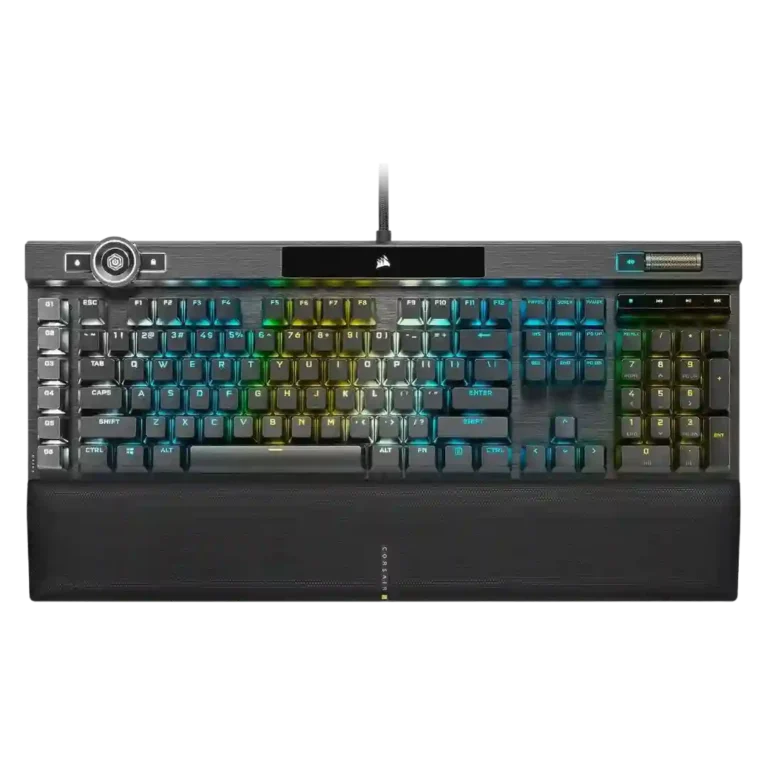
Choose the Corsair K100 RGB if you want a full-size, feature-loaded wired gaming keyboard with fast switches, lush RGB and a great wrist rest. Skip it if price, desk space, noise, simple software or portability matter most.
Best for gamers, streamers, and power users who want a full-size wired board with fast linear switches, deep macros, vivid RGB, onboard profiles, media controls, and a comfortable wrist rest.
Not for buyers who want a compact, portable, quiet, wireless, hot-swappable, tactile-switch, or simple plug-and-play keyboard, especially if they will not use the extra controls.
Across the supplied reviews, the Corsair K100 RGB lands as an ambitious flagship: fast linear switches, premium materials, vivid RGB, strong macro support, and a much-improved wrist rest make it feel like a top-tier gaming board. The tradeoff is that several headline upgrades are context-dependent. Reviewers often admire the 4,000Hz polling rate and iCue control wheel, but many also say the polling advantage is hard to feel and the wheel is more useful for productivity than games. iCue enables deep control yet repeatedly draws complaints for clunky, confusing setup. The K100 is best understood as a maximalist, desk-bound keyboard whose value depends on whether the buyer will actually use its extras.
Compared with other Gaming Keyboards, this product is above average in passthrough features, wrist rest quality, legend visibility, near average in value for money, RGB lighting quality, below average in hot-swappable switches, size and form factor, desk space efficiency.
| Attribute | This product | Category average | Difference |
|---|---|---|---|
| hot-swappable switches | 1.0 | 3.5 | -2.5 |
| size and form factor | 2.3 | 4.2 | -1.9 |
| passthrough features | 4.0 | 2.3 | +1.8 |
| desk space efficiency | 2.5 | 4.2 | -1.7 |
| wrist rest quality | 4.6 | 3.2 | +1.4 |
| portability | 2.1 | 3.5 | -1.4 |
| switch options | 2.0 | 3.2 | -1.2 |
| legend visibility | 4.6 | 3.5 | +1.0 |
Choose Glorious GMMK 2. It scores 4.7 vs 1.0 for hot-swappable switches, with a 4.3 overall score.
Choose Corsair K65 PRO Mini. It scores 4.8 vs 2.3 for size and form factor, with a 4.2 overall score.
Choose HyperX Alloy Origins. It scores 4.9 vs 2.5 for desk space efficiency, with a 4.1 overall score.
Choose Razer Huntsman V3 Pro. It scores 4.7 vs 3.5 for extra gaming features, with a 3.9 overall score.
Products reviewers directly compared with this model, grouped into quick takeaways.
Yes. Reviewers repeatedly praise its fast switches, responsive inputs, macro keys, and strong gaming feel, although several say the 4,000Hz polling advantage is subtle.
It can be, especially with the cushioned wrist rest, and some reviewers reported better typing results. Others found the sensitive switches unforgiving or said they take getting used to.
It is useful for brightness, scrolling, zooming, media control, and productivity workflows. Reviewers are more divided about its gaming value, and some find setup or mode cycling awkward.
RGB lighting is one of the strongest points in the reviews. Reviewers describe it as bright, vibrant, clear, customizable, and visually premium, with per-key control and side lighting zones.
The software is powerful and enables deep lighting, macro, profile, and wheel customization. However, many reviewers call it clunky, confusing, tedious, or less polished than expected.
Only for users who will benefit from its premium build, macros, RGB, onboard memory, media controls, wrist rest, and fast switches. Reviewers often warn that cheaper keyboards offer similar core gaming performance.
These are a few of the reviews included in our analysis.
![[INTRODUCTION] CORSAIR K100 RGB with CHERRY MX RGB SPEED SILVER](https://scorata.com/wp-content/uploads/2026/04/30558_thumb-150x150.webp)




Good if you want a premium 96% Hall Effect keyboard for work and gaming with excellent build, sound, and customization. Skip it if you need cheaper esports-first speed, 8,000Hz polling,...
Pros: size and form factor, typing feel
Cons: switch options, portability

Choose it if competitive gaming speed, Rapid Trigger, and deep per-key customization matter more than extras. Skip it if you need wireless, dedicated arrows/media keys, adjustable height, or a lower-cost...
Pros: overall satisfaction, customization options
Cons: value for money, switch options

Good if you want a premium, quiet TKL Hall Effect keyboard for typing and gaming. Skip it if price, portability, 8,000Hz polling, or broad switch choice matters most.
Pros: build quality, switch feel
Cons: switch options

Good if you want a premium full-size Hall Effect keyboard with smooth switches, quiet sound, and deep customization. Skip it if you need a portable, budget-friendly board or broad switch...
Pros: build quality, keycap quality
Cons: switch options, portability