If you want better key spacing
Choose Corsair K65 PRO Mini. It scores 4.8 vs 3.4 for key spacing, with a 4.2 overall score.

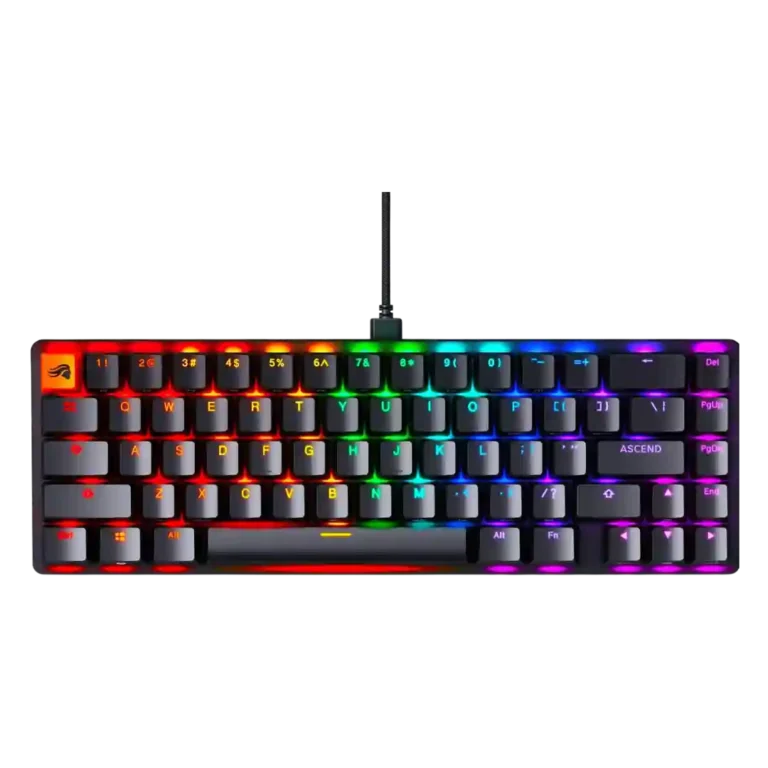
Choose the Glorious GMMK 2 for customizable RGB, smooth Fox switches, sturdy build, and strong value. Skip it if you need wireless, Mac software parity, tactile prebuilt switches, or a layout with more spacing.
Best for gamers, typists, and keyboard-curious buyers who want a sturdy wired board with hot-swap switches, strong RGB, compact layouts, and room to customize over time.
Not for buyers who need wireless use, polished Mac software, factory tactile switch options, a tenkeyless layout, or included wrist support.
The Glorious GMMK 2 lands as a strong midrange modular keyboard with unusually broad appeal. Reviewers consistently praised its smooth Fox linear switches, sturdy aluminum-topped build, vivid RGB, compact 65% and 96% layouts, and deep customization through hot-swap sockets, macros, lighting, profiles, and firmware options. The tradeoff is that the board is not equally polished in every area: ABS keycaps drew durability concerns, stabilizers ranged from excellent to mushy or scratchy, and Glorious Core was useful but uneven, especially outside Windows. The compact layouts also save desk space while creating some adjustment issues around key spacing and wrist angle.
Compared with other Gaming Keyboards, this product is above average in hot-swappable switches, value for money, ease of switch replacement, near average in software quality, customization options, below average in actuation consistency, keycap quality, key spacing.
| Attribute | This product | Category average | Difference |
|---|---|---|---|
| hot-swappable switches | 4.7 | 3.5 | +1.2 |
| value for money | 4.5 | 3.6 | +0.9 |
| ease of switch replacement | 4.7 | 3.7 | +1.0 |
| legend visibility | 4.5 | 3.5 | +1.0 |
| compatibility | 4.8 | 3.8 | +1.0 |
| reliability | 4.5 | 3.6 | +0.9 |
| actuation consistency | 3.4 | 4.2 | -0.8 |
| keycap quality | 3.7 | 4.2 | -0.5 |
Choose Corsair K65 PRO Mini. It scores 4.8 vs 3.4 for key spacing, with a 4.2 overall score.
Choose Razer Huntsman V2 TKL. It scores 5.0 vs 4.2 for layout options, with a 4.0 overall score.
Choose HyperX Alloy Origins. It scores 4.9 vs 4.5 for build quality, with a 4.1 overall score.
Choose ASUS ROG Falchion RX. It scores 4.9 vs 4.3 for design aesthetics, with a 4.4 overall score.
Products reviewers directly compared with this model, grouped into quick takeaways.
Yes. Reviewers repeatedly found it responsive in games, and several praised the low-latency settings, smooth Fox switches, and compact layouts for gaming use.
Typing feedback was very positive overall, with reviewers calling the feel smooth, sublime, comfortable, or excellent. The main caveats were key height, compact spacing, and occasional stabilizer inconsistency.
Most reviewers liked the Glorious Fox linear switches for their smooth, soft, and quiet feel. A few noted break-in time or wished Glorious offered tactile switches in the prebuilt version.
Yes. RGB was one of the most praised areas, with reviewers highlighting bright shine-through legends, vivid side lighting, and useful customization through software or onboard controls.
The main drawbacks in the reviews were ABS keycaps, uneven stabilizer impressions, Windows-focused software, no wireless option, and compact layouts that can require adjustment.
Reviewers generally considered it a strong value, especially because it combines sturdy construction, hot-swap support, RGB, software customization, and enthusiast-friendly modding at a midrange price.
These are a few of the reviews included in our analysis.





Good if you want a premium 96% Hall Effect keyboard for work and gaming with excellent build, sound, and customization. Skip it if you need cheaper esports-first speed, 8,000Hz polling,...
Pros: size and form factor, typing feel
Cons: switch options, portability

Choose it if competitive gaming speed, Rapid Trigger, and deep per-key customization matter more than extras. Skip it if you need wireless, dedicated arrows/media keys, adjustable height, or a lower-cost...
Pros: overall satisfaction, customization options
Cons: value for money, switch options

Good if you want a premium, quiet TKL Hall Effect keyboard for typing and gaming. Skip it if price, portability, 8,000Hz polling, or broad switch choice matters most.
Pros: build quality, switch feel
Cons: switch options

Good if you want a premium full-size Hall Effect keyboard with smooth switches, quiet sound, and deep customization. Skip it if you need a portable, budget-friendly board or broad switch...
Pros: build quality, keycap quality
Cons: switch options, portability