If you want better sound dampening
Choose Corsair K100 RGB. It scores 4.9 vs 1.9 for sound dampening, with a 4.1 overall score.

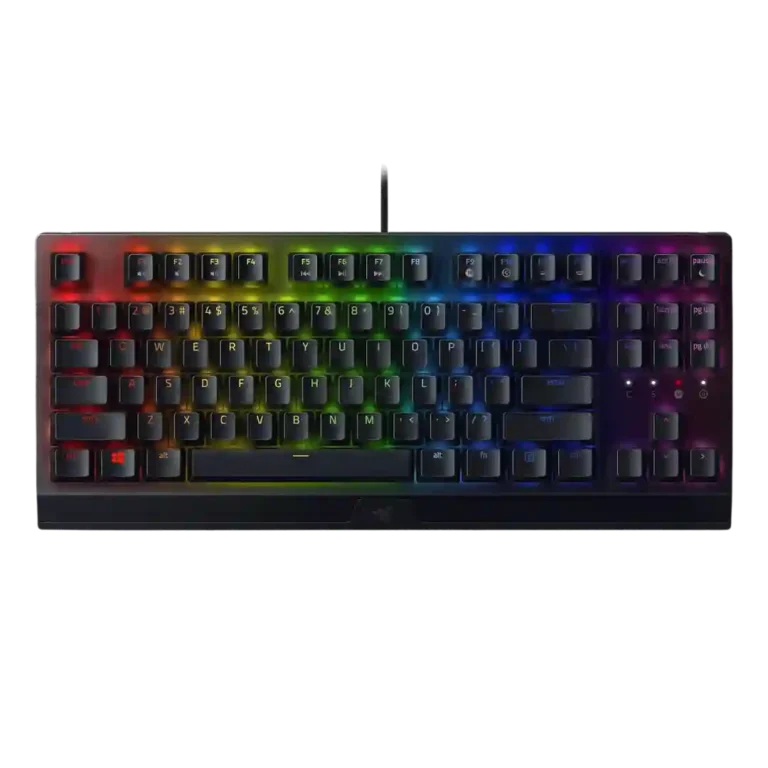
Choose the Razer BlackWidow V3 for sturdy wired gaming, responsive clicky typing, strong RGB customization, and handy volume/media controls. Skip it if you need quiet keys, wireless freedom, compact desk space, or a plush wrist rest.
Best for gamers and heavy typists who want a sturdy wired board with tactile clicky switches, customizable RGB, macros, and convenient volume/media controls. It also suits users who like a full-size layout and do not mind a louder typing sound.
Not for quiet shared rooms, wireless setups, or compact desks where a full-size board crowds mouse space. Comfort-focused buyers may also dislike the plastic wrist rest and users sensitive to software issues may find Synapse frustrating.
Review evidence frames the Razer BlackWidow V3 as a sturdy, responsive wired keyboard with a strong feel for gaming and typing. Its biggest strengths are build quality, fast key response, useful volume/media controls, and broad Synapse/Chroma customization. The tradeoff is that its personality depends heavily on preferences: Green switches can feel satisfyingly tactile and clicky, but several reviewers found them loud, pingy, or distracting. The full-size footprint and plastic wrist rest also reduce its appeal for tight desks or comfort-focused setups. RGB earns praise for vibrancy and flexibility, yet the Quartz version drew criticism for uneven shine-through and washed-out color. Overall, the evidence points to a capable board with real comfort, noise, and software caveats.
Compared with other Gaming Keyboards, this product is above average in portability, volume control, cable quality, near average in RGB customization, keycap quality, below average in sound dampening, noise level, desk space efficiency.
| Attribute | This product | Category average | Difference |
|---|---|---|---|
| sound dampening | 1.9 | 4.2 | -2.3 |
| noise level | 2.3 | 3.9 | -1.6 |
| desk space efficiency | 2.7 | 4.2 | -1.5 |
| acoustics | 2.8 | 4.1 | -1.4 |
| stabilizer quality | 2.5 | 3.9 | -1.4 |
| connectivity | 2.5 | 3.8 | -1.3 |
| portability | 4.6 | 3.5 | +1.1 |
| volume control | 4.7 | 3.8 | +0.9 |
Choose Corsair K100 RGB. It scores 4.9 vs 1.9 for sound dampening, with a 4.1 overall score.
Choose Razer Huntsman V2 TKL. It scores 4.8 vs 2.7 for desk space efficiency, with a 4.0 overall score.
Choose Corsair K65 PRO Mini. It scores 4.8 vs 2.8 for acoustics, with a 4.2 overall score.
Choose Razer BlackWidow V4 Pro. It scores 4.6 vs 4.1 for RGB lighting quality, with a 3.9 overall score.
Products reviewers directly compared with this model, grouped into quick takeaways.
Yes. Reviewers repeatedly described it as responsive in games, with no missed keypresses or messed-up sequences in tested play.
Yes. Several reviewers liked the clicky feel, but noise was the most common drawback, with complaints about loud clicks, pinging, and shared-room annoyance.
Build quality was one of the strongest areas. Reviewers praised the aluminum top, sturdy feel, durable keycaps, and low flex, though one review found it less rigid than some other enthusiast boards.
Opinions were mixed. Some reviewers found it supportive or useful, while others called it hard plastic, uncomfortable, or an afterthought compared with softer premium rests.
RGB customization was praised through Chroma and Synapse, but lighting quality depended on version. The Quartz model drew criticism for uneven shine-through, pastel tinting, and washed-out color.
The reviewed standard V3 is wired-only, and reviewers noted the absence of USB or audio passthrough. Wireless connectivity was treated as a reason to look at the Pro version instead.
Basic use is plug-and-play, but deeper RGB, macro, profile, and key remapping features depend on Synapse. Reviewers split between praising its flexibility and criticizing clunkiness or bugs.
These are a few of the reviews included in our analysis.
![Razer BlackWidow V3 Gaming Keyboard - Review & Sound Test! [4K]](https://scorata.com/wp-content/uploads/2026/04/29628_thumb-150x150.webp)

Good if you want a premium 96% Hall Effect keyboard for work and gaming with excellent build, sound, and customization. Skip it if you need cheaper esports-first speed, 8,000Hz polling,...
Pros: size and form factor, typing feel
Cons: switch options, portability

Choose it if competitive gaming speed, Rapid Trigger, and deep per-key customization matter more than extras. Skip it if you need wireless, dedicated arrows/media keys, adjustable height, or a lower-cost...
Pros: overall satisfaction, customization options
Cons: value for money, switch options

Good if you want a premium, quiet TKL Hall Effect keyboard for typing and gaming. Skip it if price, portability, 8,000Hz polling, or broad switch choice matters most.
Pros: build quality, switch feel
Cons: switch options

Good if you want a premium full-size Hall Effect keyboard with smooth switches, quiet sound, and deep customization. Skip it if you need a portable, budget-friendly board or broad switch...
Pros: build quality, keycap quality
Cons: switch options, portability