If you want better volume control
Choose Razer BlackWidow V3. It scores 4.7 vs 2.2 for volume control, with a 4.0 overall score.

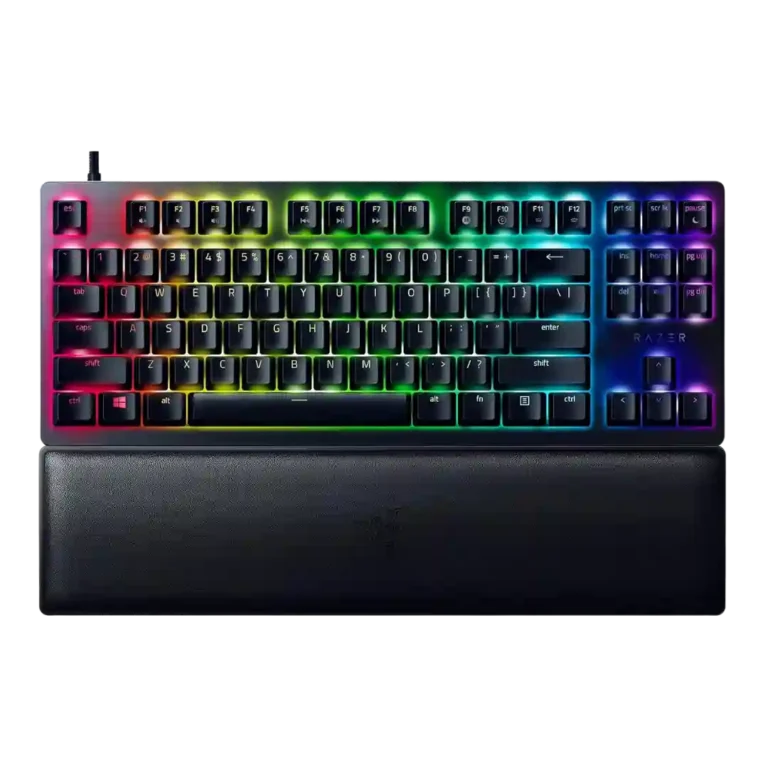
Choose the Razer Huntsman V2 TKL for fast, quiet red optical switches, PBT keycaps, and compact gaming comfort. Skip it if you need dedicated media controls, wireless use, or enthusiast-grade stabilizers.
Best for competitive PC gamers who want a compact wired TKL board with fast optical switches, strong software customization, durable PBT keycaps, and a quieter red-switch typing sound.
Not ideal for keyboard enthusiasts who prioritize tuned stabilizers, lively acoustics, wireless freedom, hot-swap switch experimentation, or dedicated media and volume hardware.
Reviewers generally saw the Razer Huntsman V2 TKL as a premium compact gaming keyboard built around speed, quiet red optical switches, and strong PBT keycaps. Its best traits are clear: very low latency, a practical TKL footprint, useful Synapse customization, and a softer sound than older Huntsman boards. The tradeoff is that Razer’s dampening can feel mushy to some typists, and stabilizer rattle remains a recurring weakness. Dedicated media keys, a volume dial, wireless support, and magnetic wrist-rest attachment are also missed. The result is a strong competitive-gaming board whose value depends on whether the 8,000Hz polling and Razer ecosystem matter enough to offset the price.
Compared with other Gaming Keyboards, this product is above average in key spacing, layout options, wrist rest quality, near average in keycap quality, value for money, below average in stabilizer quality, volume control, media controls.
| Attribute | This product | Category average | Difference |
|---|---|---|---|
| stabilizer quality | 1.9 | 3.9 | -2.0 |
| volume control | 2.2 | 3.8 | -1.7 |
| media controls | 2.2 | 3.7 | -1.6 |
| connectivity | 2.3 | 3.9 | -1.6 |
| legend visibility | 2.4 | 3.6 | -1.2 |
| backlight brightness | 3.0 | 4.1 | -1.1 |
| key spacing | 5.0 | 3.9 | +1.1 |
| layout options | 5.0 | 4.0 | +1.0 |
Choose Razer BlackWidow V3. It scores 4.7 vs 2.2 for volume control, with a 4.0 overall score.
Choose Corsair K100 RGB. It scores 5.0 vs 3.0 for backlight brightness, with a 4.1 overall score.
Choose Corsair K65 PRO Mini. It scores 4.7 vs 2.2 for media controls, with a 4.2 overall score.
Choose HyperX Alloy Rise. It scores 4.7 vs 2.4 for legend visibility, with a 4.0 overall score.
Products reviewers directly compared with this model, grouped into quick takeaways.
Yes. Reviewers repeatedly praised its fast optical switches, low latency, compact TKL layout, and strong in-game responsiveness.
Most reviewers found it impressive on paper but difficult to feel in normal use. It may matter most to competitive players chasing every possible latency reduction.
The red linear optical switches were widely described as much quieter than older Huntsman boards and many mechanical keyboards, helped by foam and dampeners.
No, this was one of the clearest complaints. Multiple reviewers described rattling, poor sound, or Razer's unusual stabilizer design as a weakness.
No. Reviewers repeatedly noted that media and volume controls are handled through function-layer shortcuts rather than dedicated controls.
Most reviewers found it comfortable and appreciated its inclusion, but several disliked that the TKL wrist rest does not attach magnetically.
It depends. Reviewers liked the performance, keycaps, and sound improvements, but several felt the premium price was hard to justify against cheaper TKL competitors.
These are a few of the reviews included in our analysis.




Good if you want a premium 96% Hall Effect keyboard for work and gaming with excellent build, sound, and customization. Skip it if you need cheaper esports-first speed, 8,000Hz polling,...
Pros: size and form factor, typing feel
Cons: switch options, portability

Choose it if competitive gaming speed, Rapid Trigger, and deep per-key customization matter more than extras. Skip it if you need wireless, dedicated arrows/media keys, adjustable height, or a lower-cost...
Pros: overall satisfaction, customization options
Cons: value for money, switch options

Good if you want a premium, quiet TKL Hall Effect keyboard for typing and gaming. Skip it if price, portability, 8,000Hz polling, or broad switch choice matters most.
Pros: build quality, switch feel
Cons: switch options

Good if you want a premium full-size Hall Effect keyboard with smooth switches, quiet sound, and deep customization. Skip it if you need a portable, budget-friendly board or broad switch...
Pros: build quality, keycap quality
Cons: switch options, portability