Best for Screen bezel design
Samsung 77S90H OLED
5.0 attribute score
Highest scored product for this attribute based on supporting review evidence.

Highest scored product for this attribute based on supporting review evidence.
Balances the attribute score, supporting reviews, and overall product strength.
Has the broadest review evidence for this attribute.
Strongest overall product among items with scored evidence for this attribute.
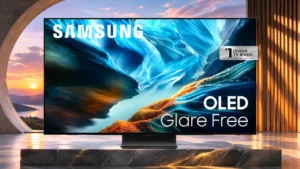
Overall: 4.1/5
Thin screen borders and a slender profile help this enormous OLED blend into a refined living-room setup.
Pros: black levels, contrast ratio
Cons: Dolby Vision support, stutter handling
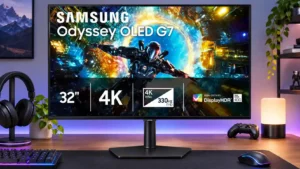
Overall: 3.8/5
Minimal borders and a restrained rear housing give the monitor a neat, modern look.
Pros: overall satisfaction, contrast
Cons: value for money, port selection

Overall: 3.5/5
Narrow edges and a modest bottom chin keep the front clean and focused on the image.
Pros: Resolution, sharpness
Cons: value for money, HDR performance

Overall: 3.8/5
Thin borders minimize visible plastic and give the screen a clean, premium-looking presentation.
Pros: overall satisfaction, picture quality
Cons: value for money, local dimming performance

Overall: 3.6/5
Thin bezels contribute to the understated design, though the visible inner display borders have not disappeared.
Pros: stand adjustability, competitive gaming suitability
Cons: value for money, port selection

Overall: 3.5/5
Replaceable bezels let the television match a room's style. The visual improvement comes with an accessory cost, and exact size compatibility matters.
Pros: art display mode, design and appearance
Cons: overall satisfaction, HDMI port accessibility

Overall: 3.8/5
A framed border supports the gallery illusion, though the slim basic bezel may look underwhelming on large sizes.
Pros: cable management, design and appearance
Cons: value for money, Dolby Vision support

Overall: 3.7/5
The tracking cameras require an enlarged upper bezel, but they are discreetly incorporated into the frame. The finished monitor still looks reasonably streamlined from the front.
Pros: glasses-free 3D quality, AI 2D-to-3D conversion
Cons: 3D compatible game library, value for money

Overall: 4.2/5
The thin-edged screen looks modern, though the silver trim can be more noticeable in a bright room than dark bezels. It is mostly a preference issue.
Pros: reflection handling, color gamut
Cons: value for money, brightness

Overall: 3.7/5
The edge bezels look slim, but the bottom border is somewhat thicker than one owner would prefer.
Pros: value for money, black levels
Cons: refresh rate, portability and weight

Overall: 4.1/5
The physical frame is thin, but the inner black border remains more noticeable than its sleek outer edge suggests.
Pros: PC gaming compatibility, reflection handling
Cons: color accuracy, VRR flicker

Overall: 4.2/5
The substantial silver frame gives the TV an art-gallery look, but some find it distracting or prefer a near-invisible bezel.
Pros: picture quality, overall satisfaction
Cons: design and appearance, Dolby Vision support