If you want better profile management
Choose Keychron K2 HE. It scores 4.6 vs 2.0 for profile management, with a 4.4 overall score.

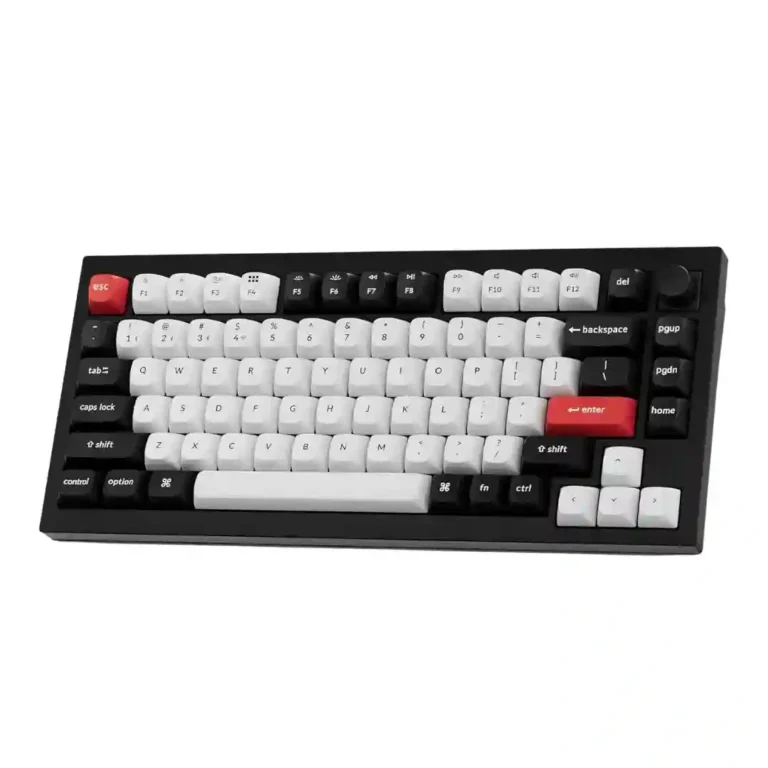
Choose the Keychron Q1 HE for a premium 75% metal board with smooth quiet typing, strong wireless, and serious Hall Effect controls. Skip it if you need broad switch choice, light portability, automatic game profiles, or a lower price.
Best for users who want a premium 75% metal keyboard that blends quiet typing with Hall Effect gaming features, especially adjustable actuation and rapid trigger. It also suits people switching between Windows and macOS or wired, Bluetooth, and 2.4GHz setups.
Not ideal for buyers who want broad tactile/clicky switch experimentation, light travel carry, automatic per-game profiles, or the lowest possible price. Casual typists who will not use HE features may find it overkill.
Across the review set, the Keychron Q1 HE lands as a premium hybrid keyboard that succeeds most clearly in build, typing feel, sound dampening, and Hall Effect responsiveness. Reviewers repeatedly praise the heavy aluminum body, smooth magnetic switches, low-noise gasket construction, 2.4GHz performance, and strong actuation/rapid-trigger controls. The tradeoff is that the same HE switch system narrows hardware customization: hot-swap exists, but switch choices remain limited and mostly linear. Software also divides reviewers, with many liking Keychron Launcher’s power and simplicity while others hit setup friction, wired-only configuration limits, missing auto game profiles, or wake issues. Its price is easier to justify for users who will use the gaming and customization features, but casual typists may find cheaper Keychron boards more practical.
Compared with other Gaming Keyboards, this product is above average in rapid trigger support, compatibility, ease of switch replacement, near average in software quality, value for money, below average in profile management, reliability, portability.
| Attribute | This product | Category average | Difference |
|---|---|---|---|
| profile management | 2.0 | 4.0 | -2.0 |
| reliability | 2.0 | 3.6 | -1.6 |
| rapid trigger support | 4.9 | 3.5 | +1.3 |
| portability | 2.3 | 3.5 | -1.2 |
| RGB customization | 3.1 | 4.3 | -1.2 |
| compatibility | 4.9 | 3.8 | +1.1 |
| backlight brightness | 3.0 | 4.1 | -1.1 |
| switch options | 2.3 | 3.2 | -0.9 |
Choose Keychron K2 HE. It scores 4.6 vs 2.0 for profile management, with a 4.4 overall score.
Choose Epomaker P65. It scores 4.9 vs 3.9 for value for money, with a 4.2 overall score.
Choose Corsair Makr Pro 75. It scores 4.7 vs 3.1 for RGB customization, with a 4.1 overall score.
Choose ASUS ROG Strix Scope II 96 Wireless. It scores 4.8 vs 2.0 for reliability, with a 4.2 overall score.
Products reviewers directly compared with this model, grouped into quick takeaways.
Yes. Most reviewers praised its rapid trigger, adjustable actuation, responsiveness, and 2.4GHz performance, though PCWorld felt its lack of automatic per-game profiles limited its appeal for some gamers.
Reviewers repeatedly described the typing feel as smooth, comfortable, quiet, and premium. The magnetic switches, gasket mount, and dampening layers were major reasons for that praise.
Software customization is deep, but physical switch choice is limited. Reviewers liked hot-swap support but repeatedly noted that compatible switches are restricted to specific magnetic options rather than standard MX switches.
The 2.4GHz connection was generally praised as solid and low-latency, often close to wired. A few reviewers reported setup friction or wake issues, and Bluetooth was treated as less ideal for latency-sensitive gaming.
Opinions are mixed-positive. Many reviewers liked the browser-based app for being powerful, lightweight, and easy, while others found first-time setup, wired-only configuration, or missing profile automation frustrating.
Not really. Reviewers liked the 75% layout, but the heavy aluminum body was repeatedly described as poor for travel, tournaments, or bag carry.
It is easiest to justify for users who want premium metal construction, quiet typing, wireless, and Hall Effect gaming features in one board. Casual users or switch experimenters may find the price steep or better served by other Keychron models.
These are a few of the reviews included in our analysis.



Good if you want a premium 96% Hall Effect keyboard for work and gaming with excellent build, sound, and customization. Skip it if you need cheaper esports-first speed, 8,000Hz polling,...
Pros: size and form factor, typing feel
Cons: switch options, portability

Choose it if competitive gaming speed, Rapid Trigger, and deep per-key customization matter more than extras. Skip it if you need wireless, dedicated arrows/media keys, adjustable height, or a lower-cost...
Pros: overall satisfaction, customization options
Cons: value for money, switch options

Good if you want a premium, quiet TKL Hall Effect keyboard for typing and gaming. Skip it if price, portability, 8,000Hz polling, or broad switch choice matters most.
Pros: build quality, switch feel
Cons: switch options

Good if you want a premium full-size Hall Effect keyboard with smooth switches, quiet sound, and deep customization. Skip it if you need a portable, budget-friendly board or broad switch...
Pros: build quality, keycap quality
Cons: switch options, portability