If you want better compatibility
Choose Keychron Q1 HE. It scores 4.9 vs 2.7 for compatibility, with a 4.2 overall score.

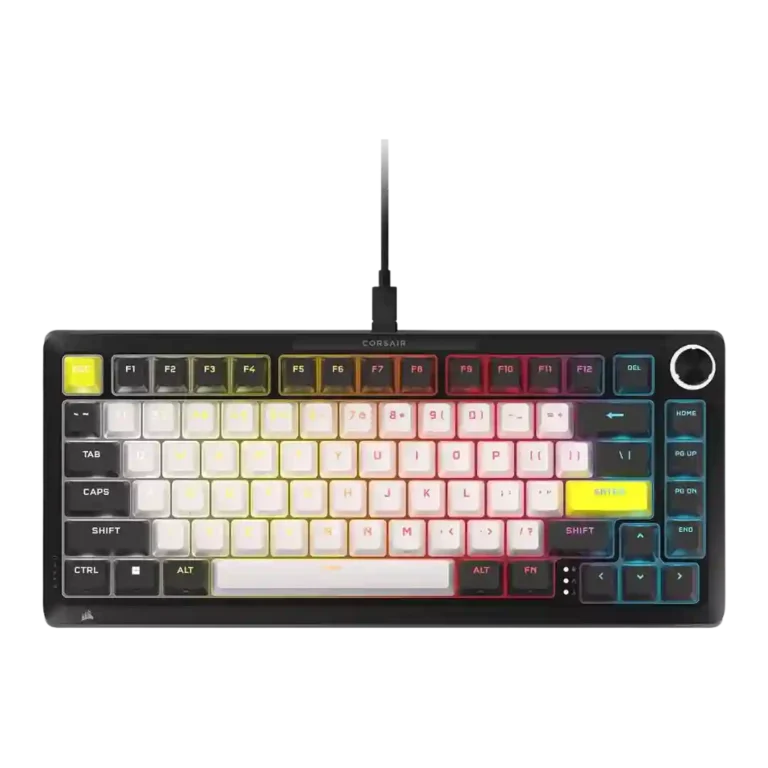
Choose the Corsair Makr Pro 75 if you want a heavy aluminum Hall Effect board with polished customization and fast gaming response. Skip it if price, wireless out of the box, softer typing, or thocky acoustics matter most.
Best for Corsair users, competitive players, and keyboard tinkerers who want a heavy aluminum 75% Hall Effect board with rapid trigger, deep actuation tuning, and a strong rotary control.
Not for buyers who want wireless included, a light portable keyboard, low pricing, open-ended switch compatibility, or a softer, deeper custom-keyboard typing sound.
The Corsair Makr Pro 75 earns broad praise as a premium 75% Hall Effect keyboard with a dense aluminum build, strong gaming responsiveness, deep actuation control, and a useful rotary knob. Reviewers often liked the smooth switches, compact layout, and Web Hub customization, and several considered the board unusually solid for a mainstream gaming keyboard. The tradeoff is that its enthusiast positioning does not fully escape gaming-keyboard compromises: typing feel can be stiff, stabilizer and acoustic impressions vary widely, wireless costs extra in several reviews, and value looks weaker beside cheaper Hall Effect competitors. It is best understood as a polished, heavy, Corsair-centered performance board rather than a universally satisfying custom-keyboard substitute.
Compared with other Gaming Keyboards, this product is above average in rapid trigger support, volume control, legend visibility, near average in build quality, key responsiveness, below average in noise level, portability, wireless performance.
| Attribute | This product | Category average | Difference |
|---|---|---|---|
| noise level | 2.4 | 3.9 | -1.5 |
| portability | 2.1 | 3.5 | -1.4 |
| rapid trigger support | 4.8 | 3.5 | +1.2 |
| wireless performance | 2.9 | 4.0 | -1.1 |
| compatibility | 2.7 | 3.9 | -1.2 |
| volume control | 4.9 | 3.8 | +1.1 |
| legend visibility | 4.6 | 3.5 | +1.1 |
| ease of switch replacement | 4.7 | 3.7 | +1.0 |
Choose Keychron Q1 HE. It scores 4.9 vs 2.7 for compatibility, with a 4.2 overall score.
Choose Epomaker P65. It scores 4.9 vs 3.1 for value for money, with a 4.2 overall score.
Choose Logitech G915 X Lightspeed. It scores 4.7 vs 2.9 for wireless performance, with a 4.1 overall score.
Choose Keychron K2 HE. It scores 4.8 vs 3.9 for typing feel, with a 4.4 overall score.
Products reviewers directly compared with this model, grouped into quick takeaways.
Yes. Reviewers repeatedly praised the rapid trigger support, 8,000Hz polling, FlashTap/SOCD features, and responsive Hall Effect switches, though one reviewer felt the gains were marginal for lower-level players.
Typing impressions are mixed. Some reviewers found it comfortable, precise, and enjoyable for long writing sessions, while others found the stiff feel tiring or less satisfying than boutique boards.
Not consistently. Several reviewers liked the controlled or improved sound, but others said it was too stiff, muted, scratchy, loud, or not as deep and pleasant as competitors.
Reviewer evidence repeatedly treats wireless as optional or extra rather than included by default. Several reviews criticized that choice because it raises the total cost.
Software is one of the most divided areas. Some reviewers called Corsair Web Hub polished, clean, and powerful, while others found iCUE/Web Hub frustrating, dense, sluggish, or limited.
Only for buyers who value the aluminum build, Corsair ecosystem, gaming features, and customization. Many reviewers still argued that competing Hall Effect keyboards offer better value.
These are a few of the reviews included in our analysis.



Good if you want a premium 96% Hall Effect keyboard for work and gaming with excellent build, sound, and customization. Skip it if you need cheaper esports-first speed, 8,000Hz polling,...
Pros: size and form factor, typing feel
Cons: switch options, portability

Choose it if competitive gaming speed, Rapid Trigger, and deep per-key customization matter more than extras. Skip it if you need wireless, dedicated arrows/media keys, adjustable height, or a lower-cost...
Pros: overall satisfaction, customization options
Cons: value for money, switch options

Good if you want a premium, quiet TKL Hall Effect keyboard for typing and gaming. Skip it if price, portability, 8,000Hz polling, or broad switch choice matters most.
Pros: build quality, switch feel
Cons: switch options

Good if you want a premium full-size Hall Effect keyboard with smooth switches, quiet sound, and deep customization. Skip it if you need a portable, budget-friendly board or broad switch...
Pros: build quality, keycap quality
Cons: switch options, portability