If you want better rapid trigger support
Choose Keychron K2 HE. It scores 4.9 vs 2.0 for rapid trigger support, with a 4.4 overall score.

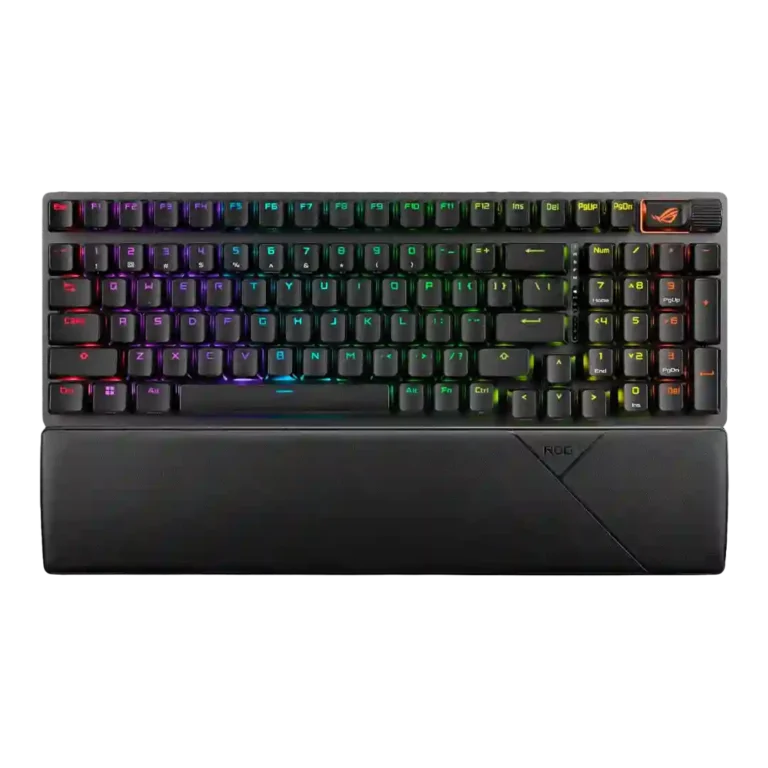
Choose it for a compact wireless numpad keyboard with excellent switches, quiet acoustics, strong battery life, and sturdy build. Skip it if Armoury Crate frustration, dimmer RGB, or a cramped 96% layout will bother you.
Best for gamers and productivity users who want a wireless mechanical keyboard with a numpad, excellent switch feel, quiet acoustics, and long battery life in less space than a full-size board.
Not for users who hate Armoury Crate, need analog or rapid-trigger features, rely on macOS software customization, or want either a truly compact layout or a traditional full-size key arrangement.
Review evidence positions the ASUS ROG Strix Scope II 96 Wireless as a high-end gaming keyboard that succeeds most where mechanical feel matters: smooth NX Snow switches, strong stabilizers, dampening, wireless stability, and battery life. The 96% layout is the central tradeoff. It keeps the numpad and frees some mouse room, but several reviewers found the key spacing, delete-key placement, or overall footprint awkward compared with either full-size or smaller boards. Armoury Crate is the other recurring drag, praised for useful controls but criticized for bloat, updates, pop-ups, and detection issues. Overall, the evidence favors it as a premium, refined gaming and typing board with software and layout caveats.
Compared with other Gaming Keyboards, this product is above average in reliability, wrist rest quality, battery life, near average in media controls, switch feel, below average in backlight brightness, rapid trigger support, software quality.
| Attribute | This product | Category average | Difference |
|---|---|---|---|
| backlight brightness | 2.0 | 4.1 | -2.1 |
| rapid trigger support | 2.0 | 3.6 | -1.6 |
| software quality | 2.5 | 3.8 | -1.3 |
| layout options | 2.9 | 4.0 | -1.2 |
| reliability | 4.8 | 3.6 | +1.2 |
| key spacing | 2.9 | 4.0 | -1.0 |
| analog input support | 2.0 | 3.2 | -1.2 |
| wrist rest quality | 4.1 | 3.3 | +0.8 |
Choose Keychron K2 HE. It scores 4.9 vs 2.0 for rapid trigger support, with a 4.4 overall score.
Choose Corsair K65 Plus. It scores 4.8 vs 2.9 for key spacing, with a 4.2 overall score.
Choose Keychron Q1 HE. It scores 4.8 vs 2.9 for layout options, with a 4.2 overall score.
Choose ASUS ROG Azoth X. It scores 4.8 vs 4.0 for size and form factor, with a 4.1 overall score.
Products reviewers directly compared with this model, grouped into quick takeaways.
Yes. Reviewers repeatedly praise its responsive keys, low-lag 2.4GHz wireless mode, strong gaming performance, and stable feel.
It is useful if you want a numpad in a smaller footprint, but it is not universally loved. Several reviewers mention cramped spacing, delete-key adjustment, or a layout that feels stuck between compact and full-size.
Mostly yes. Reviews describe the NX Snow switches and dampening as smooth, quiet, thocky, and free of metallic ping, though one reviewer felt the sound was not silent enough for calls.
Reviews say Armoury Crate is useful for RGB, macros, profiles, firmware, and wheel customization, but it is also one of the main complaints because it can be bloated, slow, or cumbersome.
Battery life is one of the strongest points in the reviews. Multiple reviewers call it excellent or class-leading, especially with RGB off.
Most reviewers like the included magnetic wrist rest and find it comfortable, but opinions are not unanimous; one reviewer found wrist-rest typing uncomfortable and another called it stiff.
These are a few of the reviews included in our analysis.



Good if you want a premium 96% Hall Effect keyboard for work and gaming with excellent build, sound, and customization. Skip it if you need cheaper esports-first speed, 8,000Hz polling,...
Pros: size and form factor, typing feel
Cons: switch options, portability

Choose it if competitive gaming speed, Rapid Trigger, and deep per-key customization matter more than extras. Skip it if you need wireless, dedicated arrows/media keys, adjustable height, or a lower-cost...
Pros: overall satisfaction, customization options
Cons: value for money, switch options

Good if you want a premium, quiet TKL Hall Effect keyboard for typing and gaming. Skip it if price, portability, 8,000Hz polling, or broad switch choice matters most.
Pros: build quality, switch feel
Cons: switch options

Good if you want a premium full-size Hall Effect keyboard with smooth switches, quiet sound, and deep customization. Skip it if you need a portable, budget-friendly board or broad switch...
Pros: build quality, keycap quality
Cons: switch options, portability