If you want better durability
Choose Keychron Q3 HE. It scores 4.8 vs 3.4 for durability, with a 4.4 overall score.

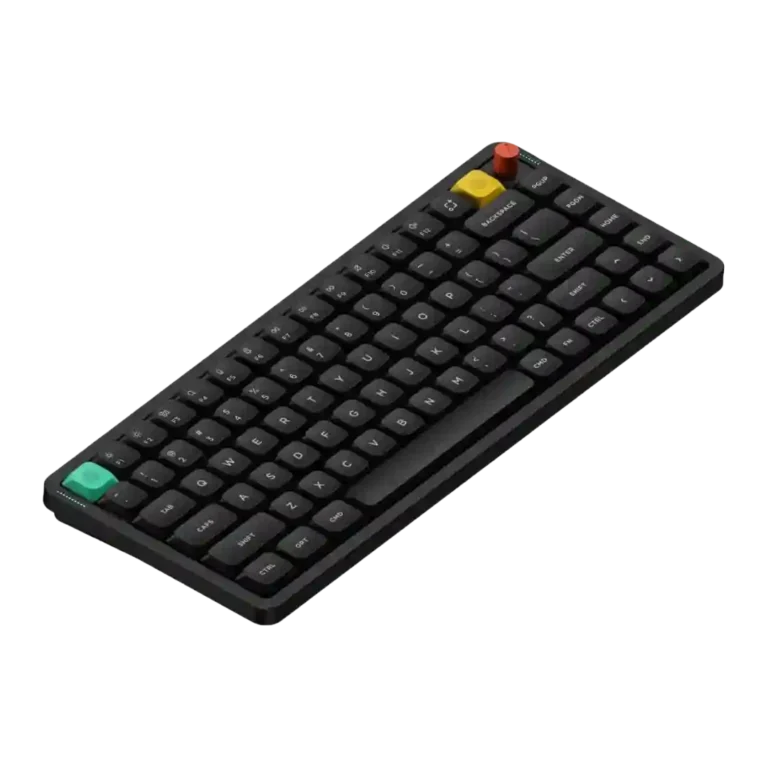
Choose the NuPhy Air75 V3 for premium low-profile typing, strong battery life, Mac-friendly controls, and rich customization. Skip it if a stable knob, deep modding, quietest possible keys, or the widest switch choice matters most.
Best for Mac-heavy or mixed Mac/Windows users who want a compact, premium-feeling low-profile board for typing, productivity, travel, and casual gaming. It especially suits buyers who value web-based customization, strong battery life, and refined sound.
Not ideal for competitive gamers, deep hardware modders, buyers who need the quietest possible keyboard, or anyone who prioritizes a rock-solid knob and a wide switch catalog. Budget-sensitive users may also find the price easier to question.
The NuPhy Air75 V3 lands as a polished low-profile keyboard with unusually strong agreement around its cushioned typing feel, refined acoustics, Mac-friendly layout, web-based software, and long battery life. Its aluminum-topped build and compact 75% form make it feel premium without abandoning portability. The tradeoff is that portability is not flawless: the V3 is heavier than earlier versions, the tall knob can hurt travel use, and larger laptop placement can be fiddly. The knob is the most repeated weak point, with several reviewers calling it wobbly or easy to pop off. Switch choice is also narrower than some expected, and a few reviewers saw dongle, Bluetooth, brightness, or software-beta quirks. Overall evidence favors a refined productivity-first board that can handle casual gaming.
Compared with other Gaming Keyboards, this product is above average in portability, compatibility, software quality, near average in typing feel, value for money, below average in per-key lighting control, backlight brightness, durability.
| Attribute | This product | Category average | Difference |
|---|---|---|---|
| per-key lighting control | 2.3 | 4.1 | -1.8 |
| backlight brightness | 2.8 | 4.1 | -1.3 |
| durability | 3.4 | 4.4 | -1.0 |
| key spacing | 3.0 | 4.0 | -1.0 |
| volume control | 3.1 | 3.8 | -0.8 |
| portability | 4.2 | 3.5 | +0.7 |
| compatibility | 4.6 | 3.8 | +0.7 |
| software quality | 4.4 | 3.8 | +0.6 |
Choose Keychron Q3 HE. It scores 4.8 vs 3.4 for durability, with a 4.4 overall score.
Choose HyperX Alloy Rise. It scores 4.7 vs 2.8 for legend visibility, with a 4.0 overall score.
Choose Epomaker RT100. It scores 4.8 vs 3.3 for noise level, with a 4.1 overall score.
Choose Corsair K100 AIR. It scores 5.0 vs 2.8 for backlight brightness, with a 4.0 overall score.
Products reviewers directly compared with this model, grouped into quick takeaways.
Yes. Reviewers repeatedly praised its cushioned typing feel, smooth switches, comfortable low-profile form, and refined sound.
It is fine for casual gaming thanks to wired and 2.4GHz polling and extra gaming features like SOCD, but reviewers framed it as productivity-first rather than competitive-gaming-first.
Most reviewers found it slim, compact, and travel-friendly, especially with dongle storage. The caveats were its added weight, fiddly placement on larger MacBooks, and the tall knob affecting travel use.
Battery life was a major positive across reviews, often described as amazing or phenomenal. One reviewer’s real-world extrapolation came in below the rated claim, but still ahead of some low-profile competitors.
The knob is useful and customizable for volume or other actions, and some reviewers liked its click feel. It was also the most repeated weakness because it can wobble, pop off, or feel gimmicky.
NuPhy.io was generally praised as clean, web-based, and easy to use for remapping, lighting, knob actions, and advanced features. A few reviews still noted limits, beta recognition trouble, or preference for other firmware ecosystems.
The recurring downsides were the wobbly knob, limited switch choices, mixed wireless reports, no per-key RGB control, possible brightness unevenness, and reduced appeal for deep modding.
These are a few of the reviews included in our analysis.



Good if you want a premium 96% Hall Effect keyboard for work and gaming with excellent build, sound, and customization. Skip it if you need cheaper esports-first speed, 8,000Hz polling,...
Pros: size and form factor, typing feel
Cons: switch options, portability

Choose it if competitive gaming speed, Rapid Trigger, and deep per-key customization matter more than extras. Skip it if you need wireless, dedicated arrows/media keys, adjustable height, or a lower-cost...
Pros: overall satisfaction, customization options
Cons: value for money, switch options

Good if you want a premium, quiet TKL Hall Effect keyboard for typing and gaming. Skip it if price, portability, 8,000Hz polling, or broad switch choice matters most.
Pros: build quality, switch feel
Cons: switch options

Good if you want a premium full-size Hall Effect keyboard with smooth switches, quiet sound, and deep customization. Skip it if you need a portable, budget-friendly board or broad switch...
Pros: build quality, keycap quality
Cons: switch options, portability