If you want better legend visibility
Choose HyperX Alloy Rise. It scores 4.7 vs 2.8 for legend visibility, with a 4.0 overall score.

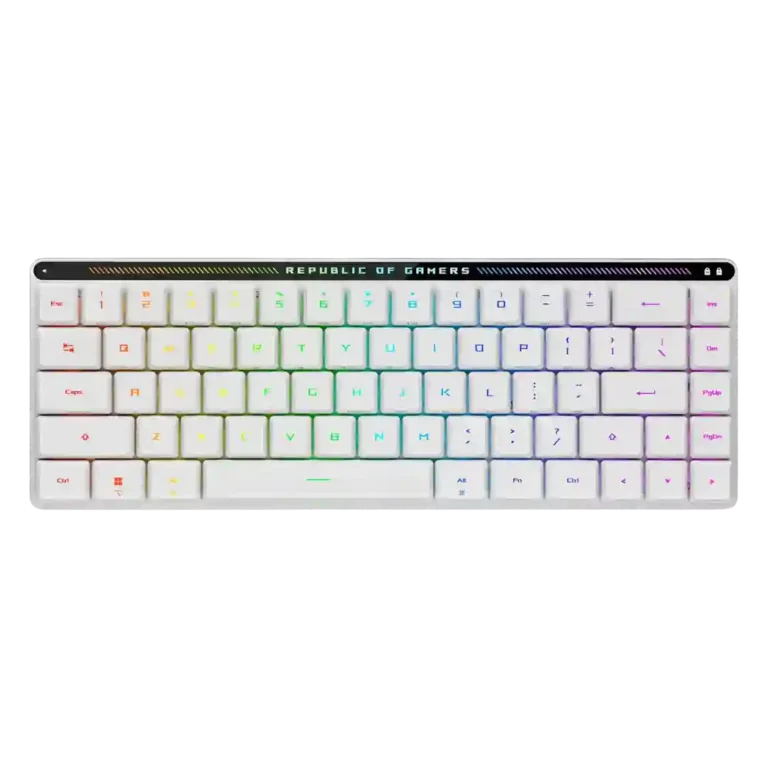
Choose it for a quiet, premium, compact wireless board with excellent switches. Skip it if you need hot-swappable switches, a full layout, polished software, or the lowest price.
Best for gamers or productivity users who want a premium low-profile wireless keyboard that is quiet, portable, Mac-friendly, and comfortable after adjustment. It especially suits small desks, laptop setups, and users who value smooth switches over deep customization.
Not for buyers who need a full-size layout, dedicated function row, hot-swappable switches, easy keycap replacement, or polished software. It is also less ideal for shoppers who prioritize low price over premium build and features.
The ASUS ROG Falchion RX Low Profile earns strong reviewer support for its smooth low-profile switches, quiet acoustics, rigid compact build, bright RGB, and dependable wireless performance. Its best tradeoff is also its biggest limitation: the 65% layout in a very small frame creates excellent portability and desk-space savings, but cramped keys, function-layer reliance, and accidental presses can take adjustment. Reviewers also split on value because the hardware feels premium, while Armoury Crate and the lack of hot-swappable switches hold it back for enthusiasts.
Compared with other Gaming Keyboards, this product is above average in reliability, noise level, connectivity, near average in value for money, build quality, below average in cable quality, ease of switch replacement, software quality.
| Attribute | This product | Category average | Difference |
|---|---|---|---|
| cable quality | 2.0 | 3.7 | -1.7 |
| reliability | 4.9 | 3.6 | +1.4 |
| ease of switch replacement | 2.5 | 3.8 | -1.3 |
| software quality | 2.7 | 3.8 | -1.0 |
| durability | 3.2 | 4.4 | -1.2 |
| noise level | 4.9 | 3.9 | +1.0 |
| connectivity | 4.8 | 3.8 | +1.0 |
| key spacing | 3.0 | 4.0 | -1.0 |
Choose HyperX Alloy Rise. It scores 4.7 vs 2.8 for legend visibility, with a 4.0 overall score.
Choose Corsair K65 Plus. It scores 4.8 vs 3.0 for key spacing, with a 4.2 overall score.
Choose ASUS ROG Strix Scope II 96 Wireless. It scores 4.7 vs 4.3 for acoustics, with a 4.2 overall score.
Choose Logitech G915 X Lightspeed. It scores 4.6 vs 3.2 for durability, with a 4.1 overall score.
Products reviewers directly compared with this model, grouped into quick takeaways.
Yes. Reviewers praised its responsiveness, low-latency 2.4GHz mode, stable wireless performance, and compact desk footprint for gaming.
Most reviewers found the typing feel smooth, refined, quiet, and comfortable. A few noted that the low-profile layout and sensitive keys take adjustment.
The red-switch versions were repeatedly described as very quiet or near-silent, helped by pre-lubed switches and silicone dampening foam. One review of the blue-switch version found the sound more annoying over long sessions.
Yes. Reviewers repeatedly praised the Mac/Windows switch, Mac legends, and cross-platform support, making compatibility one of its stronger features.
Reviewers generally treated hot-swappability as a limitation: the board is not presented as a good choice for users who want to swap switches easily.
The common drawbacks are price, Armoury Crate software, the cramped compact layout, lack of hot-swapping, and some cover or dongle-storage travel concerns.
These are a few of the reviews included in our analysis.



Good if you want a premium 96% Hall Effect keyboard for work and gaming with excellent build, sound, and customization. Skip it if you need cheaper esports-first speed, 8,000Hz polling,...
Pros: size and form factor, typing feel
Cons: switch options, portability

Choose it if competitive gaming speed, Rapid Trigger, and deep per-key customization matter more than extras. Skip it if you need wireless, dedicated arrows/media keys, adjustable height, or a lower-cost...
Pros: overall satisfaction, customization options
Cons: value for money, switch options

Good if you want a premium, quiet TKL Hall Effect keyboard for typing and gaming. Skip it if price, portability, 8,000Hz polling, or broad switch choice matters most.
Pros: build quality, switch feel
Cons: switch options

Good if you want a premium full-size Hall Effect keyboard with smooth switches, quiet sound, and deep customization. Skip it if you need a portable, budget-friendly board or broad switch...
Pros: build quality, keycap quality
Cons: switch options, portability