
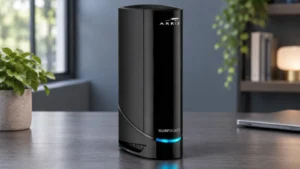
ARRIS SURFboard G18 Feature Scores
Overall Scorata score: 3.1/5
Based on 7 analyzed reviews · View source samples
Explore all 28 feature scores for ARRIS SURFboard G18, organized into pros and cons.
Scores by Feature
Summary
28 reviewed features-
Very positive 4.5-5.02 (7%)
-
Positive 3.5-4.412 (43%)
-
Neutral 2.5-3.49 (32%)
-
Negative 1.5-2.44 (14%)
-
Very negative below 1.51 (4%)
Pros
Sort
-
Combining a cable modem and wireless router simplifies installation layouts and reduces equipment clutter. The convenience is most useful when the provider approves the model and the built-in ports are sufficient.
-
The slim vertical enclosure is easy to tuck away and is smaller than the G34.
-
Wireless latency is a comparative strength against the G34 and some other routers, although it is not the best in every comparison.
-
The G18 is a sensible compact gateway for basic needs, but the G34 has a modest overall advantage.
-
The stylish tower consolidates modem and router functions without adding another box.
-
Access restrictions are flexible enough to block sites, apps, keywords and network protocols.
-
Additional DFS channels give the router more options in crowded wireless environments.
-
DFS channels provide extra room to avoid congestion in crowded apartment complexes.
-
Files can download quickly over Wi-Fi, making ordinary downloads a strength.
-
DFS support is useful in busy wireless neighborhoods because it opens up additional channels.
-
Combining two devices and potentially avoiding ISP rental fees makes the gateway a useful value option.
-
Good peak Wi-Fi speeds support 4K streaming and quick downloads, although several alternative routers are faster.
-
Wireless performance is respectable for a compact entry-level gateway, with good speed and decent reach.
-
Filtering covers sites, applications, keywords, port ranges and protocols. The lack of ready-made categories increases setup work.
Cons
Sort
-
There is no digital voice support for modem-based telephone service, which rules it out for cable plans that depend on that capability.
-
Limited built-in ports and the absence of native mesh expansion make upgrades less straightforward. A separate switch can help with wired connections.
-
Two gigabit Ethernet ports are enough for a minimal wired setup but fill up quickly. More direct connections require another gateway or extra networking equipment.
-
There is no native mesh expansion, making it unsuitable for scalable coverage across larger spaces.
-
Long-range coverage is not a standout strength, and the G34 is a more practical option for households that need stronger reach.
-
The older Wi-Fi standard and limited connectivity leave less room to take advantage of newer wireless devices.
-
A single gateway may cover a modest home, but larger or difficult layouts need careful planning and may benefit from a separate mesh system.
-
The two gigabit Ethernet connections limit wired flexibility compared with gateways that offer faster or more numerous ports.
-
Wi-Fi 6 is adequate for everyday networking but cannot fully exploit Wi-Fi 6E or Wi-Fi 7 clients.
-
Major cable providers are supported subject to approval of the exact model, account and plan; confirm compatibility before purchase.
-
Wireless latency and jitter are typical of standalone Wi-Fi 6 routers rather than exceptional.
-
Parental controls can block a wide variety of traffic, but parents must enter restrictions manually instead of using preset categories.
-
Wi-Fi 6 provides useful everyday performance, though newer client devices cannot use their full wireless capabilities.
-
Range is decent, but the advertised 1,250-square-foot coverage is not a guarantee. Layout and construction can change the practical reach.
Use Cases
Best for
Sort
-
The all-in-one design makes replacing rented cable networking equipment appealing, provided the exact model is approved for the subscribed plan.
-
Approved cable plans up to 1 Gbps are the intended fit, provided the home layout and two wired ports meet the household’s needs.
-
Simple home networks benefit from the single-device design, especially when only a couple of wired connections are needed.
-
Good top speeds make 4K video streaming a reasonable everyday task.
-
Cable customers looking to reduce recurring rental costs can benefit from owning this combined gateway.
-
Casual gaming over Wi-Fi is a reasonable fit thanks to respectable wireless latency.
-
Ordinary browsing and calls are well within the capabilities of this Wi-Fi 6 gateway.
-
The narrow tower fits easily into apartments and condos, and its Wi-Fi is fast enough for streaming and downloads.
-
Wireless performance is suitable for everyday web browsing.
Conditional or not ideal for
Sort
-
Multiple wired devicesHouseholds with several wired devices will quickly outgrow the two Ethernet ports. A switch or a different gateway can be more practical.
-
Cable telephone serviceCable telephone subscribers who need voice capability through their modem should choose another device; the G18 cannot fulfill that requirement.
-
Mesh network expansionThe G18 is a poor fit for native mesh expansion. A separate modem and mesh system is worth considering when scalable coverage matters.
-
Large or multi-story homesLarger or difficult-to-cover homes are a challenging fit because the gateway has limited reach and no native mesh expansion.
-
Multi-gigabit internetMulti-gigabit cable plans exceed the manufacturer’s stated 1 Gbps plan guidance, making another gateway a better fit.
-
Competitive wireless gamingCompetitive gaming is better served by an Ethernet connection; wireless latency and jitter are not ideal for sensitive play.
-
Wi-Fi 7 device householdsWi-Fi 7 households can use the gateway but will miss the benefits of the newer wireless standard.
-
Households with childrenFamilies can use broad parental filtering, but the lack of preset categories makes it less convenient to configure.
-
Online gamingCasual online play works reasonably well over Wi-Fi, but competitive games are better played over a wired connection.