If you want better FPS gaming suitability
Choose Corsair M75 AIR Wireless. It scores 4.6 vs 1.5 for FPS gaming suitability, with a 3.8 overall score.

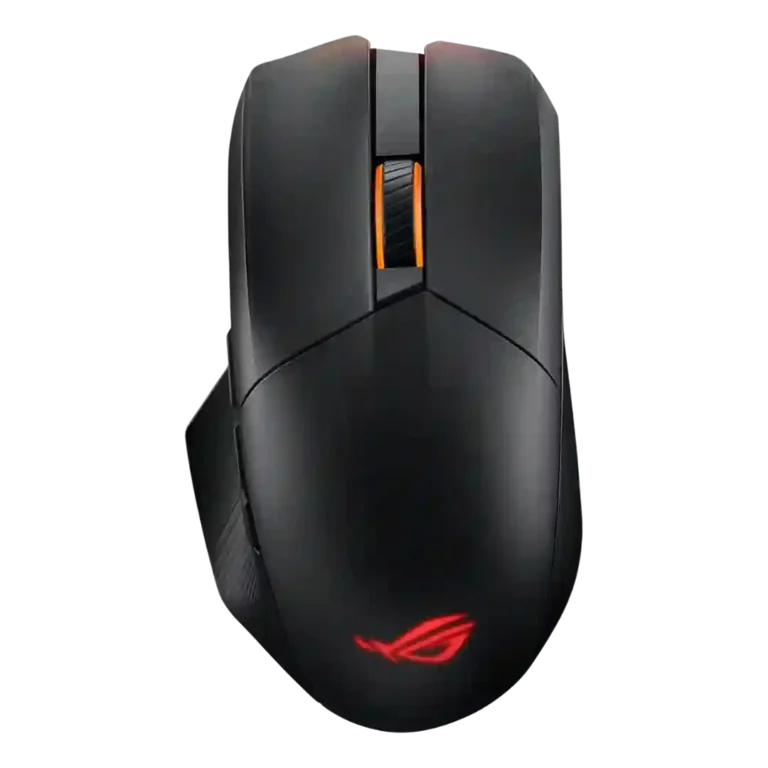
Choose the ASUS ROG Chakram X for deep customization, strong battery life, smooth glide, and a fast sensor. Skip it if you need lightweight FPS reliability, clean software, easy side buttons, or a natural-feeling joystick.
Best for right-handed users who want one premium mouse for gaming and productivity, especially if they value remapping, profiles, swappable switches, long battery life, RGB, and multi-mode connectivity.
Not for players who prioritize lightweight FPS performance, flawless competitive reliability, simple software, left-handed comfort, or side controls that are easy to reach without hand adjustment.
The ASUS ROG Chakram X comes across as ambitious and highly capable, with reviewers praising its sensor precision, smooth PTFE glide, premium feel, long battery life, swappable switches, RGB, and deep button customization. Its biggest tradeoff is that the feature-heavy design does not always translate into better play. The analog joystick split reviewers sharply: a few found it genuinely useful, while many called it awkward, stiff, poorly placed, or niche. The same pattern appears elsewhere: the mouse feels sturdy and comfortable for some right-handed users, but its weight, side-button placement, software problems, and accidental-click complaints make it risky for competitive FPS players. It is strongest as a customizable all-in-one mouse, not as a simple lightweight gaming tool.
Compared with other Gaming Mice, this product is above average in premium feel, profile switching, materials quality, near average in grip texture, programmable buttons, below average in FPS gaming suitability, left and right click quality, side button quality.
| Attribute | This product | Category average | Difference |
|---|---|---|---|
| FPS gaming suitability | 1.5 | 4.2 | -2.7 |
| left and right click quality | 2.0 | 4.2 | -2.2 |
| side button quality | 1.9 | 3.8 | -1.9 |
| software stability | 1.2 | 3.0 | -1.8 |
| weight | 2.6 | 4.1 | -1.6 |
| click latency | 3.0 | 4.6 | -1.6 |
| software usability | 2.8 | 3.9 | -1.0 |
| long-session comfort | 3.5 | 4.4 | -0.9 |
Choose Corsair M75 AIR Wireless. It scores 4.6 vs 1.5 for FPS gaming suitability, with a 3.8 overall score.
Choose HyperX Pulsefire Haste 2. It scores 4.8 vs 2.6 for weight, with a 4.0 overall score.
Choose ASUS ROG Strix Impact III Wireless. It scores 4.6 vs 2.0 for left and right click quality, with a 4.2 overall score.
Choose Turtle Beach Burst II Air. It scores 4.7 vs 2.0 for firmware reliability, with a 4.3 overall score.
Products reviewers directly compared with this model, grouped into quick takeaways.
Reviewers praised its sensor and high polling rate, but FPS suitability was undercut by weight, accidental-click complaints, and recommendations to pick lighter options for pure FPS play.
Opinions were split. Some reviewers found it genuinely useful or good for extra commands, while many found it awkward, stiff, uncomfortable, or not worth using in games.
Battery life was one of the strongest areas. Reviewers called it phenomenal, solid, impressive, and really long, though heavy RGB use reduced runtime in one review.
Usually no. Multiple reviewers criticized the side buttons as tiny, awkward, too far apart, skinny, or easy to hit accidentally.
The software was highly mixed. Some reviewers found Armoury Crate easy or user-friendly, while others reported failed settings access, endless loading, slow behavior, or strong dislike.
Yes, most evidence on feel was positive. Reviewers described the mouse as sturdy, premium, a step above cheaper mice, and good in materials and construction.
These are a few of the reviews included in our analysis.


Choose the ROG Harpe II Ace for ultralight FPS play, precise tracking, smooth glide, and web-based tuning. Skip it if you need palm-grip support, MMO buttons, onboard profiles, or long...
Pros: glide smoothness, weight
Cons: handedness options

Best for ultra-light, competition-focused speed, precise tracking, stable wireless, and long battery life. Skip it if you need quieter clicks, left-handed support, Bluetooth, more buttons, or better value for casual...
Pros: value for money, weight
Cons: click noise, RGB features

Choose it if you want a premium MMO/productivity mouse with 12 adjustable side buttons, strong battery life, and Stream Deck integration. Skip it if you need an ultralight FPS mouse,...
Pros: button customization, MMO gaming suitability
Cons: FPS gaming suitability

Best for precise wireless tracking, smooth glide, strong battery life, and unusually good 8K value. Skip it if you need polished software, quiet snappy clicks, true left-handed controls, or gentle...
Pros: software usability, sensor performance
Cons: RGB features, scroll wheel quality