If you want better tilt gesture controls
Choose Razer Naga V2 Pro. It scores 4.7 vs 2.0 for tilt gesture controls, with a 4.2 overall score.

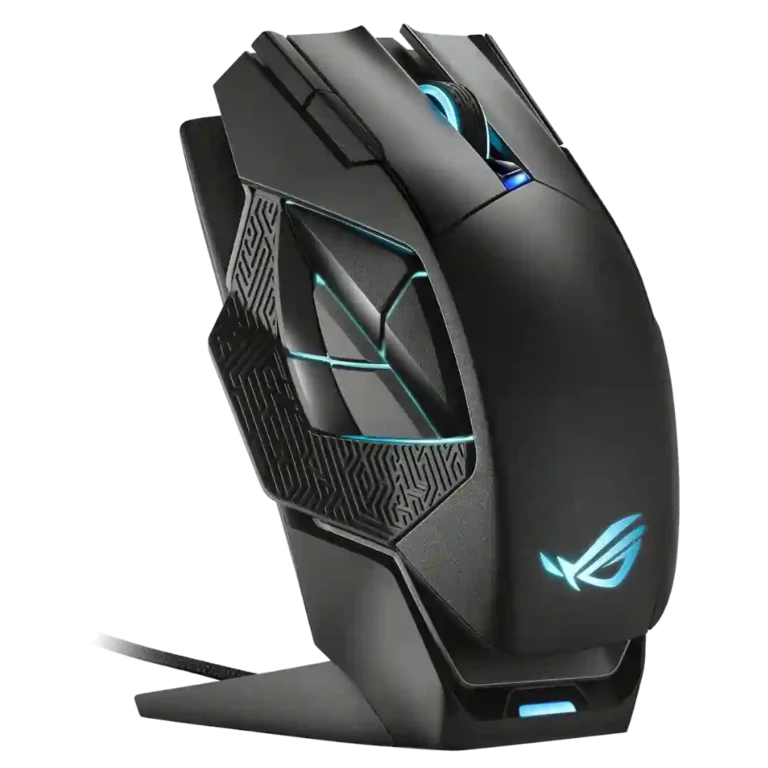
Choose the ASUS ROG Spatha X for a large, premium MMO-style mouse with dock charging, RGB, and many programmable buttons. Skip it if you want a lightweight FPS mouse, Mac software support, or easy-to-feel side buttons.
Best for large-handed palm-grip users, MMO players, and productivity users who value many programmable buttons, dock charging, RGB, and a premium-feeling build.
Not for users who prefer lightweight FPS mice, fingertip grip, Mac software customization, or a simple side-button layout that is easy to distinguish instantly.
The ASUS ROG Spatha X comes across as a feature-heavy, premium wireless gaming mouse built around size, dock charging, RGB, and extensive button customization. Reviewers repeatedly liked the sturdy construction, magnetic charging convenience, strong wireless performance, accurate tracking, and palm-grip comfort for larger hands. The tradeoff is that the same oversized design makes it heavy, niche, and less appealing for FPS play or medium/smaller hands. The six-button side cluster is the most divisive functional choice: it gives MMO and productivity flexibility, but several reviewers found it awkward, cramped, or hard to distinguish by touch. Software impressions also ranged from easy to glitchy, so the hardware impressed more consistently than the configuration experience.
Compared with other Gaming Mice, this product is above average in RGB features, durability over time, dock compatibility, near average in build quality, software usability, below average in FPS gaming suitability, long-session comfort, cross-platform compatibility.
| Attribute | This product | Category average | Difference |
|---|---|---|---|
| FPS gaming suitability | 2.3 | 4.2 | -1.9 |
| long-session comfort | 2.5 | 4.4 | -1.9 |
| cross-platform compatibility | 2.0 | 4.0 | -2.0 |
| weight | 2.5 | 4.1 | -1.6 |
| fingertip grip comfort | 2.0 | 3.7 | -1.7 |
| button responsiveness | 3.0 | 4.5 | -1.5 |
| side button quality | 2.5 | 3.8 | -1.3 |
| tilt gesture controls | 2.0 | 3.2 | -1.2 |
Choose Razer Naga V2 Pro. It scores 4.7 vs 2.0 for tilt gesture controls, with a 4.2 overall score.
Choose Corsair Darkstar RGB. It scores 4.8 vs 2.5 for long-session comfort, with a 3.9 overall score.
Choose Corsair Katar Elite Wireless. It scores 4.6 vs 2.3 for FPS gaming suitability, with a 4.0 overall score.
Choose Logitech G502 X Lightspeed. It scores 4.9 vs 3.0 for button responsiveness, with a 4.2 overall score.
Products reviewers directly compared with this model, grouped into quick takeaways.
Yes, reviewers generally found it well suited to MMO-style use because of its many programmable buttons. The caveat is that the six-button thumb cluster can take practice and was awkward for some reviewers.
It can track accurately, but several reviewers said its heavy weight makes it a poor fit for fast FPS movement. Lightweight mouse users were especially critical.
Wireless performance was one of the stronger areas. Reviewers reported flawless connectivity, no dropouts, and latency that was not noticeable in use.
Yes, the charging dock was repeatedly praised as convenient and easy to use. A few notes were mixed around dock stability or portability, but the charging experience itself was a highlight.
Not always. Reviewers liked the flexibility of the programmable buttons, but many criticized the side cluster as cramped, awkward, mushy, or hard to tell apart by touch.
One reviewer said the mouse could plug in and function, but criticized the lack of native Mac/iOS software for changing assignments. The best-supported configuration evidence is on Windows.
Large-handed palm-grip users were the most positive about comfort. Medium-handed, fingertip, claw, and lightweight-mouse users were more likely to find it too large or too heavy.
These are a few of the reviews included in our analysis.




Choose the ROG Harpe II Ace for ultralight FPS play, precise tracking, smooth glide, and web-based tuning. Skip it if you need palm-grip support, MMO buttons, onboard profiles, or long...
Pros: glide smoothness, weight
Cons: handedness options

Best for ultra-light, competition-focused speed, precise tracking, stable wireless, and long battery life. Skip it if you need quieter clicks, left-handed support, Bluetooth, more buttons, or better value for casual...
Pros: value for money, weight
Cons: click noise, RGB features

Choose it if you want a premium MMO/productivity mouse with 12 adjustable side buttons, strong battery life, and Stream Deck integration. Skip it if you need an ultralight FPS mouse,...
Pros: button customization, MMO gaming suitability
Cons: FPS gaming suitability

Best for precise wireless tracking, smooth glide, strong battery life, and unusually good 8K value. Skip it if you need polished software, quiet snappy clicks, true left-handed controls, or gentle...
Pros: software usability, sensor performance
Cons: RGB features, scroll wheel quality