If you want better button label visibility
Choose Turtle Beach Rematch. It scores 5.0 vs 1.5 for button label visibility, with a 4.2 overall score.

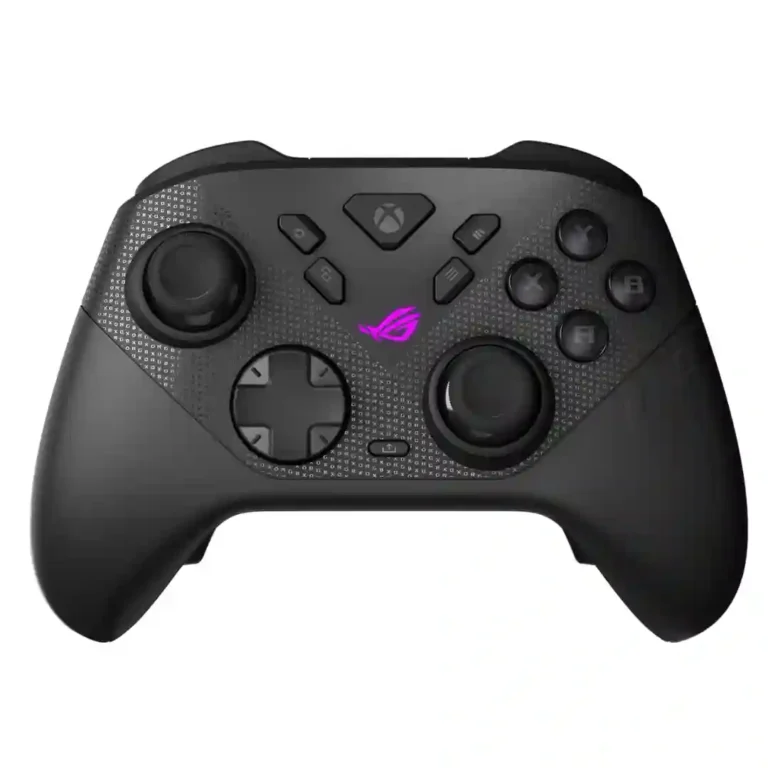
Choose it for precise TMR sticks, fast trigger stops, low-latency 2.4GHz play, and deep tuning. Skip it if you want a cheaper all-rounder, softer buttons for long sessions, or painless console-only configuration.
Competitive PC and Xbox players who value low latency, fast trigger stops, TMR precision, and deep per-game tuning get the most from it. It also suits players who switch between shooters and racing games.
Budget buyers, console-only players who want effortless configuration, and anyone who prefers soft, quiet buttons for long single-player sessions should look elsewhere. Mobile-first users also face inconsistent support.
The Raikiri II earns its premium positioning with exceptionally fast controls, precise TMR hardware, low-latency 2.4GHz performance, and unusually deep tuning. Its Xbox-style shape and textured grips are comfortable for most testers, while full-range triggers make racing control as convincing as the short micro-switch mode is for shooters. The tradeoff is refinement around the edges. Gear Link is powerful but its browser-based, PC-dependent setup frustrates some console users, the charging dock can feel cheap, and default stick tuning is not universally ideal. The very crisp buttons also divide long-session players: some love their immediacy, while others find them tiring. At its premium price, the controller makes the strongest case for performance-focused PC and Xbox players who will actually use its tuning and rear controls.
Compared with other Video Game Controller, this product is above average in brand software support, firmware update support, included accessories, near average in back button placement, overall comfort, below average in button label visibility, onboard audio controls, accessibility features.
| Attribute | This product | Category average | Difference |
|---|---|---|---|
| button label visibility | 1.5 | 4.0 | -2.5 |
| onboard audio controls | 2.0 | 4.4 | -2.4 |
| brand software support | 5.0 | 2.8 | +2.2 |
| accessibility features | 2.5 | 4.7 | -2.2 |
| mobile compatibility | 2.3 | 4.3 | -1.9 |
| Start and Select button design | 1.3 | 3.1 | -1.8 |
| repairability | 2.0 | 3.7 | -1.7 |
| firmware update support | 4.4 | 2.9 | +1.5 |
Choose Turtle Beach Rematch. It scores 5.0 vs 1.5 for button label visibility, with a 4.2 overall score.
Choose Hyperkin The Competitor. It scores 4.5 vs 2.0 for repairability, with a 4.3 overall score.
Choose GameSir Cyclone 2 Wireless Controller. It scores 5.0 vs 2.0 for macro support, with a 4.2 overall score.
Choose GameSir G8 Plus MFi. It scores 4.8 vs 2.3 for mobile compatibility, with a 4.2 overall score.
Products reviewers directly compared with this model, grouped into quick takeaways.
Yes. Reviewers repeatedly praise its short-travel trigger mode, fast micro-switch buttons, rear controls, and low-latency 2.4GHz connection, though several recommend tuning the default stick deadzones.
Most testing supports strong endurance, roughly 30–50 hours depending on how much RGB, vibration, and audio are enabled. The charging dock and play-and-charge USB-C help reduce downtime.
The hardware connection is generally reliable, including 2.4GHz wireless via the dongle. The bigger limitation is configuration: some settings and profile workflows are more convenient on PC than on Xbox.
Its tuning range is excellent, covering sticks, triggers, vibration, lighting, mappings, and profiles. Reviewers split on the browser-based approach because it can require internet access and a PC.
Most reviewers found them smooth, precise, and strongly resistant to traditional stick drift. A few reported default deadzone or calibration issues, so fine tuning may be necessary.
The premium price is the broadest concern, followed by the charging dock’s inconsistent build quality and the hard, clicky buttons that can tire some hands.
These are a few of the reviews included in our analysis.


ASUS's ROG Raikiri II is an impressive premium wireless controller that pairs a lightweight build with excellent hardware and deep customization.
Asus just unveiled the ROG Raikiri II Pro, a PC controller with an 8000Hz polling rate, hot-swappable TMR sticks, a full-color screen, and 79...
After having used the Asus ROG Raikiri II for over a week, I wonder why anyone would spend more on the Xbox Elite Series 2 when Asus'...
The Asus ROG Raikiri II features great TMR sticks and triggers as well as 1,000Hz polling to give you a competitive edge, and there aren't...
Review of the ASUS ROG Raikiri II Xbox Wireless controller: specifications, price, ergonomics, build quality, Gear Link app, battery life

Best for precise TMR sticks, fast trigger stops, low-latency 2.4GHz play, and deep tuning. Skip it if you want a cheaper all-rounder, softer buttons for long sessions, or painless console-only...
Pros: overall satisfaction, button quality
Cons: d-pad accuracy, charging dock support

Best for a comfortable, affordable Xbox/PC pad with precise Hall sticks, a PlayStation-style layout, and useful rear buttons. Skip it if wireless play, deep software tuning, or consistently top-tier D-pad...
Pros: overall satisfaction, value for money
Cons: wired performance, vibration quality
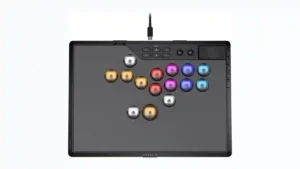
Choose it if you want a premium, tournament-ready leverless controller with excellent 2.4GHz wireless, deep actuation tuning, and sturdy construction. Skip it if loud, tall buttons, a heavy chassis, or...
Pros: overall satisfaction, button quality
Cons: control placement, button noise

Choose the GameSir Cyclone 2 if you want a low-cost PC/Switch/mobile controller with precise sticks, deep customization, and a dock. Skip it if Xbox/PS5 support, premium buttons, or flawless dock/battery...
Pros: value for money, charging dock support
Cons: d-pad feel, compatibility with Xbox