If you want better connection stability
Choose ASUS ROG Keris II Ace. It scores 5.0 vs 3.3 for connection stability, with a 4.2 overall score.

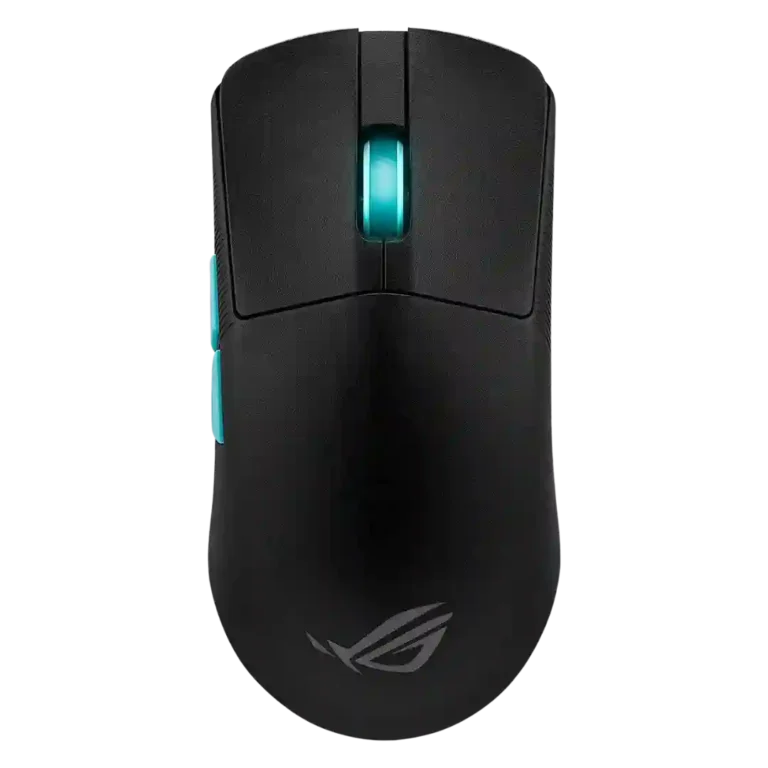
Choose it for a featherweight FPS mouse with precise tracking, long battery life, and deep tuning. Skip it if you need lots of buttons, top-side DPI switching, or Armoury Crate-free simplicity.
Best for competitive FPS players who want a very light wireless mouse with precise tracking, strong battery life, smooth glide, and deep sensitivity or lift-off tuning. It also fits users who value tri-mode connectivity and a single ROG receiver for multiple devices.
Not for users who need many thumb buttons, easy top-side DPI switching, or a mouse tailored to MMO/MOBA command density. It may also disappoint large-hand palm grippers or anyone who dislikes Armoury Crate.
Reviewers largely frame the ASUS ROG Harpe Ace Aim Lab as a serious esports mouse built around extreme lightness, precise tracking, strong wireless performance, and unusually deep tuning through Aim Lab and Armoury Crate. Its best qualities are consistent: the 54g body, 36,000 DPI sensor, smooth PTFE glide, responsive switches, and long battery life repeatedly impressed reviewers. The tradeoff is that its minimalist FPS-first design will not suit everyone. Several reviewers disliked the underside DPI button, sparse inputs, software friction, and shape quirks such as the pronounced hump, narrow body, or long shell. It is strongest when judged as a competitive FPS tool, less convincing as a universal mouse for large hands, input-heavy games, or users who want frictionless software.
Compared with other Gaming Mice, this product is above average in cable flexibility, handedness options, Bluetooth support, near average in sensor performance, grip texture, below average in programmable buttons, MMO gaming suitability, connection stability.
| Attribute | This product | Category average | Difference |
|---|---|---|---|
| programmable buttons | 2.5 | 4.1 | -1.6 |
| MMO gaming suitability | 2.0 | 3.5 | -1.5 |
| cable flexibility | 5.0 | 3.6 | +1.4 |
| handedness options | 3.9 | 2.6 | +1.3 |
| connection stability | 3.3 | 4.5 | -1.3 |
| Bluetooth support | 4.7 | 3.5 | +1.1 |
| weight | 5.0 | 4.1 | +0.9 |
| profile switching | 2.8 | 3.8 | -1.0 |
Choose ASUS ROG Keris II Ace. It scores 5.0 vs 3.3 for connection stability, with a 4.2 overall score.
Choose ASUS ROG Gladius III Wireless. It scores 4.7 vs 2.8 for profile switching, with a 4.3 overall score.
Choose Logitech G Pro X2 Superstrike. It scores 4.8 vs 3.1 for palm grip comfort, with a 4.0 overall score.
Choose Corsair Katar Elite Wireless. It scores 5.0 vs 2.2 for software stability, with a 4.0 overall score.
Products reviewers directly compared with this model, grouped into quick takeaways.
Yes. Reviewers repeatedly praised its light weight, accurate sensor, smooth glide, and responsiveness for FPS and esports play.
No. Some reviewers found it comfortable and precise, while others disliked the pronounced hump, narrow frame, or longer body depending on grip and hand size.
Battery life was a strong point. Reviewers described multi-day to multi-week use, and several found the runtime close to the long official claims.
It can help with practice and tuning, and some reviewers liked the personalized recommendations. Others found the suggestions imperfect, so it is best treated as a guide rather than a guaranteed aim upgrade.
The most common drawbacks are the underside DPI button, limited button count, Armoury Crate friction, and shape fit issues for some grips or hand sizes.
Reviewers were generally positive on value for serious FPS players because of the weight, sensor, wireless performance, and tuning tools. Casual gamers or MMO players may find the price harder to justify.
These are a few of the reviews included in our analysis.




Choose the ROG Harpe II Ace for ultralight FPS play, precise tracking, smooth glide, and web-based tuning. Skip it if you need palm-grip support, MMO buttons, onboard profiles, or long...
Pros: glide smoothness, weight
Cons: handedness options

Best for ultra-light, competition-focused speed, precise tracking, stable wireless, and long battery life. Skip it if you need quieter clicks, left-handed support, Bluetooth, more buttons, or better value for casual...
Pros: value for money, weight
Cons: click noise, RGB features

Choose it if you want a premium MMO/productivity mouse with 12 adjustable side buttons, strong battery life, and Stream Deck integration. Skip it if you need an ultralight FPS mouse,...
Pros: button customization, MMO gaming suitability
Cons: FPS gaming suitability

Best for precise wireless tracking, smooth glide, strong battery life, and unusually good 8K value. Skip it if you need polished software, quiet snappy clicks, true left-handed controls, or gentle...
Pros: software usability, sensor performance
Cons: RGB features, scroll wheel quality