
If you want better guest network
Choose TP-Link Archer BE900. It scores 4.8 vs 2.0 for guest network, with a 4.1 overall score.

Fast Wi-Fi 7 and an integrated cable modem make this a compelling rental-equipment replacement. The single multi-gigabit Ethernet port, lack of native mesh expansion and firmware-dependent setup quirks are its biggest compromises.
Cable subscribers replacing rented equipment, especially households with Wi-Fi 7 devices or approved high-speed internet plans. It also suits small to medium homes that can rely on one centrally located gateway.
Buyers who need native mesh expansion or several multi-gigabit wired connections without an additional switch. Advanced users who need flexible configuration or support for older security protocols should also weigh the limitations.
The ARRIS SURFboard G54 is most compelling for cable internet subscribers who want to replace rented equipment with a single high-speed gateway. Its strongest performance comes at short range and on newer 6 GHz devices, and wired broadband testing demonstrated excellent speeds on a gigabit-class plan. Coverage can be good across multiple floors, but distant 5 GHz performance is less impressive and native mesh expansion is unavailable. The 10 Gbps Ethernet port is useful, although four additional gigabit-only ports limit multi-gig wired flexibility. Setup experiences vary widely: some found the app intuitive, while early testing encountered restrictive password rules and app recognition problems. Subsequent Comcast firmware removed those password requirements. The upfront cost can be justified by rental savings, but confirm provider approval, speed tiers and firmware before purchasing.
Compared with other Routers, this product is above average in 10 GbE support, ISP compatibility, Wi-Fi 7 support, near average in value for money, floor-to-floor coverage, below average in network migration ease, expandability, security features.
| Attribute | This product | Category average | Difference |
|---|---|---|---|
| network migration ease | 1.5 | 4.8 | -3.3 |
| expandability | 1.8 | 4.5 | -2.7 |
| security features | 1.5 | 4.0 | -2.5 |
| guest network | 2.0 | 4.4 | -2.4 |
| mesh scalability | 1.8 | 4.1 | -2.4 |
| dual-WAN support | 1.5 | 3.6 | -2.1 |
| web interface setup | 2.5 | 4.3 | -1.8 |
| Multi-Link Operation | 2.0 | 3.8 | -1.8 |
Choose TP-Link Archer BE900. It scores 4.8 vs 2.0 for guest network, with a 4.1 overall score.
Choose TP-Link Archer AX55. It scores 5.0 vs 2.5 for LAN port speed, with a 4.0 overall score.
Choose ASUS ROG Strix GS-BE18000. It scores 5.0 vs 1.5 for dual-WAN support, with a 4.3 overall score.
Choose TP-Link Archer BE230. It scores 4.6 vs 1.8 for expandability, with a 4.1 overall score.
Compared with ARRIS SURFboard G54
Yes. It combines a DOCSIS 3.1 cable modem and Wi-Fi 7 router in one enclosure, which can eliminate equipment rental fees if your provider approves the model.
Its 10 Gbps Ethernet port rating is not a guarantee of 10 Gbps cable service. Confirm the exact approved upload and download tiers with your ISP.
It can provide good coverage across multiple floors, but long-distance 5 GHz speeds fall off and native mesh expansion is unavailable. Layout and placement matter.
It offers strong Wi-Fi 7 performance, particularly on 6 GHz, but Multi-Link Operation was unavailable on the tested unit. Firmware or regional variations may affect availability.
It has one 10 Gbps Ethernet port and four additional 1 Gbps ports. A suitable multi-gig switch may be needed to connect several fast wired devices.
Experiences differ. The app can make setup straightforward, but launch-era Android recognition and security restrictions caused problems; a later Comcast firmware update removed the Wi-Fi password requirements.
Yes, it provides website and app filtering, device blocking and scheduled internet access. Daily individual-device time limits are not available in the tested controls.
These are a few of the reviews included in our analysis.
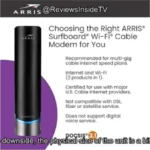
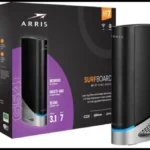
Choose a cable modem router combo by ISP approval, upload tier and Ethernet ports. Compare ARRIS G54, Netgear CAX80 and CAX30S, including...
The ARRIS SURFboard G54 is a quad-band, two-in-one DOCSIS 3.1 modem and Wi-Fi 7 router with 2.4GHz, 6GHz, and two 5GHz bands. It features a...
Get a modem-router combo and maximize your savings and space, plus enjoy an easy setup.
CommScope's first Quad-band Wi-Fi 7 device, the ARRIS SURFboard G54, is a reliable gateway stunted by its frustratingly ill-thought-out...

Choose the R95 for a busy home that needs fast Wi-Fi 7, strong range, multi-gig ports, and low-lag gaming. Skip it for a small, lightly connected space or if advanced...
Pros: Wi-Fi 7 support, Wi-Fi speed

Best for frequent travel, fast VPNs, dual 2.5GbE and resilient multi-WAN. Skip it if you need full 6GHz/320MHz Wi‑Fi 7, mesh, or desktop-class USB storage and long-range indoor coverage.
Pros: VPN client support, value for money
Cons: 6 GHz performance, USB storage sharing

Exceptional VPN speeds, strong Wi-Fi 6 coverage and extensive OpenWrt controls make the Flint 2 a compelling value. Its advanced setup, missing 6GHz band and firmware-specific caveats matter if you...
Pros: setup ease, configuration flexibility
Cons: Wi-Fi 7 support, USB storage sharing

Best for affordable tri-band Wi-Fi 7, abundant 2.5GbE ports, and deep free controls. Skip it if you need consistently strong garden coverage, foolproof app setup, or proven top-tier speeds across...
Pros: value for money, design and appearance
Cons: node pairing ease, outdoor coverage