Samsung QN990F 8K TV Review

Brand: Samsung
Released: January 6, 2025
Updated: 11 hours ago
3.8
Overall review score
381
Review insights
134
Scored features
16
Expert reviews

Bottom Line

Exceptional glare control, rich brightness, crisp upscaling and a beautifully thin wireless setup distinguish the QN990F. High input lag, uneven picture accuracy and a steep price make it a specialized luxury rather than an all-round bargain.

Bright living rooms and minimalist wall installations where hiding source components matters most; technology enthusiasts prepared to explore high-end 8K playback also benefit.

Competitive or multi-console gamers needing consistently low latency, bargain-focused TV buyers, and people expecting plentiful native 8K entertainment.

Verdict

The Samsung QN990F is most convincing as a minimalist, premium-screen centerpiece: its matte finish suppresses reflections brilliantly, its thin body looks striking on a wall, and its wireless input box keeps connected equipment out of sight. Bright HDR scenes and well-upscaled 4K movies can look spectacular, while the built-in audio is stronger than expected. The compromises are harder to overlook at this price. Wireless connections introduce input lag that is poorly suited to competitive games and desktop mouse use; the single direct Micro HDMI input is the workaround. Color accuracy needs attention, blooming and motion artifacts can appear, and Dolby Vision is missing. Most content also remains below 8K. It is an appealing specialty purchase for glare-prone, design-focused rooms, not the best-value all-purpose flagship.

Feature Scorecards

Summary

134 reviewed features
  • Very positive 4.5-5.0
    34 (25%)
  • Positive 3.5-4.4
    44 (33%)
  • Neutral 2.5-3.4
    23 (17%)
  • Negative 1.5-2.4
    31 (23%)
  • Very negative below 1.5
    2 (1%)

Pros highlights

  • 4.8
    12 reviews strong consensus
    glare resistance: 4.8, 12 reviews, strong consensus
    The matte Glare Free panel dramatically cuts reflections from windows and lamps. That advantage is substantial in bright spaces, though scattered light can make dark scenes look grayer.
  • 3.7
    12 reviews low consensus
    overall satisfaction: 3.7, 12 reviews, low consensus
    This is a striking flagship with unusually ambitious features, but the enthusiastic reactions are tempered by input lag, picture-processing flaws and premium pricing. Its appeal depends heavily on installation priorities.
  • 4.5
    11 reviews moderate consensus
    Wireless One Connect placement flexibility: 4.5, 11 reviews, moderate consensus
    The wireless input box lets consoles and streaming devices sit well away from the ultra-slim screen, making minimalist layouts possible. Distance, obstacles and the need for an external power supply still matter.
  • 4.1
    9 reviews strong consensus
    picture quality: 4.1, 9 reviews, strong consensus
    The QN990F can look crisp, colorful and impactful, especially with good sources. Color accuracy, motion artifacts and occasional backlight halos prevent an unqualified flagship-level verdict.
  • 4.1
    9 reviews moderate consensus
    sound quality: 4.1, 9 reviews, moderate consensus
    The built-in speakers sound clearer, fuller and louder than many TV systems, making everyday viewing pleasant without a soundbar. Deep bass and full cinematic impact remain limited.
  • 3.9
    9 reviews moderate consensus
    peak brightness: 3.9, 9 reviews, moderate consensus
    Highlights can look dazzling and the screen handles plenty of daylight. Some picture presets are surprisingly dim for an expensive Mini LED flagship, and several alternatives measure brighter.

Cons highlights

  • 1.6
    9 reviews low consensus
    input lag: 1.6, 9 reviews, low consensus
    The Wireless One Connect box introduces a conspicuous delay for gaming and mouse movement. A direct Micro HDMI connection substantially improves responsiveness, but there is only one such input.
  • 1.8
    9 reviews strong consensus
    value for money: 1.8, 9 reviews, strong consensus
    The substantial price is difficult to justify with so little native 8K content and strong 4K rivals. Its value is strongest when cable-free source placement or 8K experimentation is a priority.
  • 2.7
    9 reviews moderate consensus
    blooming control: 2.7, 9 reviews, moderate consensus
    Mini LED dimming delivers convincing blacks in many scenes but can show halos around subtitles, bright objects and challenging night sequences. Moving highlights may also reveal distracting backlight transitions.
  • 2.3
    8 reviews moderate consensus
    gaming performance: 2.3, 8 reviews, moderate consensus
    Strong 8K and high-refresh-rate capabilities promise impressive gaming visuals, but wireless latency and occasional severe motion artifacts undermine the experience. Direct HDMI helps, with only one low-lag input available.
  • 3.4
    8 reviews low consensus
    Wireless One Connect compatibility: 3.4, 8 reviews, low consensus
    The separate wireless input box can deliver a clean, detailed signal and remove a wall of cables. Its added latency and extra hardware make the implementation polarizing.
  • 1.7
    6 reviews strong consensus
    8K content availability: 1.7, 6 reviews, strong consensus
    There is little native 8K entertainment to make full use of the panel. A handful of demos and compatible games stand out, but almost everything else must be upscaled.

Use Cases

Best for

  • 4.6
    11 reviews strong consensus
    Bright-room viewing: 4.6, 11 reviews, strong consensus
    High light output and excellent direct-glare suppression make this a compelling daytime TV. Under some lighting, the matte surface also lifts blacks and reduces color richness.
  • 4.7
    3 reviews strong consensus
    4K Blu-ray movie watching: 4.7, 3 reviews, strong consensus
    High-quality 4K discs look particularly detailed after upscaling and can be impressively colorful. Backlight blooming in dark films is a caveat.
  • 4.7
    3 reviews strong consensus
    Sports watching: 4.7, 3 reviews, strong consensus
    Brightness, punchy colors and strong reflection control make live sports satisfying, with settings that can smooth movement. Some motion issues remain visible in tougher scenes.

Not ideal for

  • FPS gaming
    1.3
    3 reviews strong consensus
    FPS gaming: 1.3, 3 reviews, strong consensus
    Fast shooters demand lower input delay than the wireless box supplies. This is a poor fit for serious competitive play unless the direct input can be used.
  • PC gaming
    2.0
    3 reviews strong consensus
    PC gaming: 2.0, 3 reviews, strong consensus
    Gaming PCs can exploit sharp 8K graphics, but the wireless connection adds lag and motion flaws. A wired Micro HDMI connection is preferable for responsiveness.

Compared With Category Average

Compared with other TVs, this product is above average in USB media playback, Near-black uniformity, glare resistance, near average in overall satisfaction, peak brightness, below average in input lag, Mac integration, HGiG game HDR calibration.

Comparison summary

125 compared features
  • Above average 0.4+ pts higher
    48 (38%)
  • Same as average within 0.3 pts
    29 (23%)
  • Below average 0.4+ pts lower
    48 (38%)

Largest category differences

Attribute This product Category average Difference
input lag 1.6 4.5 -2.9
Mac integration 2.0 4.9 -2.9
HGiG game HDR calibration 1.0 3.2 -2.2
HDR format support 1.5 3.6 -2.1
setup ease 2.0 4.1 -2.1
USB media playback 5.0 2.9 +2.1
Near-black uniformity 5.0 2.9 +2.1
value for money 1.8 3.6 -1.8

Consider This Instead

If you want better input lag

Choose Samsung QN900F 8K. It scores 5.0 vs 1.6 for input lag, with a 4.2 overall score.

Compare

If you want better gaming performance

Choose Samsung S95F OLED. It scores 4.7 vs 2.3 for gaming performance, with a 4.0 overall score.

Compare

If you want better blooming control

Choose Samsung S90F OLED. It scores 5.0 vs 2.7 for blooming control, with a 3.9 overall score.

Compare

If you want better overall satisfaction

Choose Samsung QN80H. It scores 4.8 vs 3.7 for overall satisfaction, with a 3.8 overall score.

Compare

Compared in Reviews

Products reviewers directly compared with this model, grouped into quick takeaways.

  • Better: Image quality and value The U8QG reportedly delivers stronger performance for far less money.
  • Similar: Overall picture versus wireless layout The QN900F is similarly capable but avoids the QN990F wireless-input delay.

FAQ

Is the QN990F good in a bright room?

Yes. Its matte screen strongly suppresses direct reflections and it reaches high brightness, although some daylight can raise blacks and flatten colors.

Does the Wireless One Connect box affect gaming?

Yes. Multiple testers found significant additional input lag over wireless HDMI. A single Micro HDMI port on the TV offers much lower delay.

Can I watch native 8K content?

Yes, with suitable sources, but native 8K films and streams are still scarce. Most viewing relies on the TV’s generally excellent upscaling.

How good is the built-in sound?

The speakers are clear and surprisingly capable for daily watching. Compatible Samsung Q-Symphony soundbars can add room-filling impact.

Does it support Dolby Vision or DTS?

No. The television supports HDR10+ but lacks Dolby Vision and DTS compatibility, which may matter with some streaming titles and Blu-rays.

Is it worth paying extra over a premium 4K TV?

Mostly if you specifically want the wireless, low-clutter installation or native 8K experimentation. Many premium 4K TVs offer better gaming responsiveness or accuracy for less.

Sample Expert Reviews We Analyzed

These are a few of the reviews included in our analysis.

Video Reviews

Article Reviews

forbes.com

Our team tested 15 of the latest models to find the best TVs. Here are the displays that made the cut from brands that include Samsung, LG...

Review score
3.3

Top TVs to Consider

#1 Samsung S90H
4.5

Choose the S90H for bright-room OLED viewing, deep blacks and top-tier gaming without flagship pricing. Skip it if you want Dolby Vision, a glossy screen or the simplest smart-TV software.

Pros: glare resistance, black levels

Cons: Dolby Vision support, color gamut
#2 Roku Pro Series (2025)
4.4

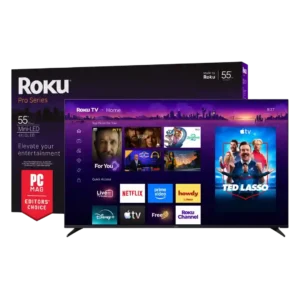
Best for bright Mini-LED picture, excellent built-in audio, easy Roku navigation, and responsive 4K/120 gaming. Skip it if you want ad-free menus, premium motion consistency, or stronger confidence in long-term...

Pros: overall satisfaction, picture quality

Cons: reliability, portability and versatility

#3 TCL QM8L
4.4

Choose the QM8L for a big, brilliantly bright TV with vivid HDR, deep mini-LED blacks, low input lag, and four HDMI 2.1 ports. Skip it if you need OLED-clean motion,...

Pros: picture quality, value for money

Cons: stand quality, judder handling

#4 LG G6
4.4

Choose the G6 for class-leading bright-room OLED picture, rich color, deep blacks and elite gaming. Skip it if you want strong built-in audio, polished launch firmware, no account sign-in, or...

Pros: picture quality, peak brightness

Cons: value for money, sound quality