If you want better customization options
Choose HyperX Alloy Origins. It scores 5.0 vs 1.7 for customization options, with a 4.1 overall score.

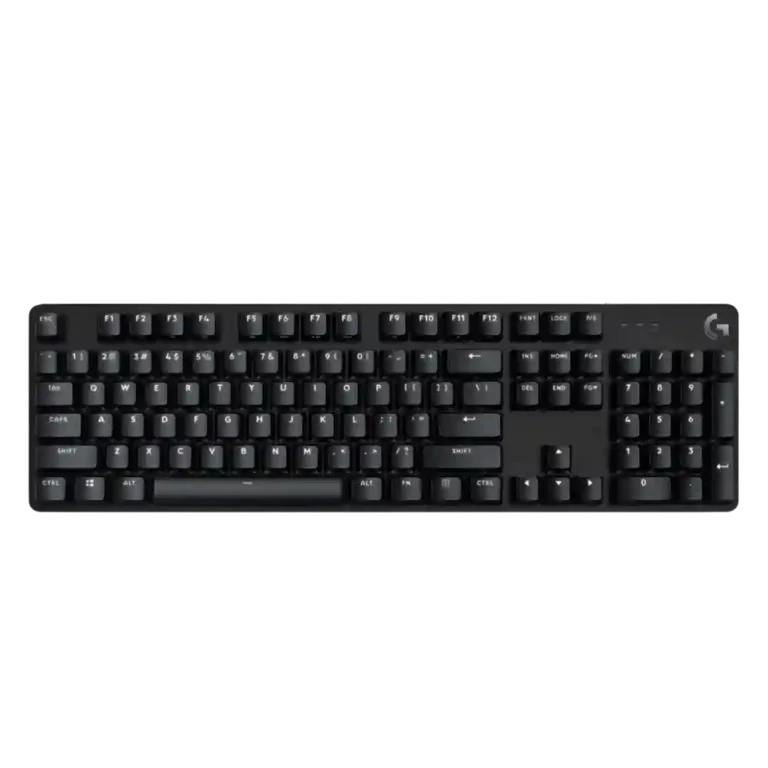
Choose the Logitech G413 SE if you want a simple, sturdy, compact mechanical keyboard with PBT caps and white lighting. Skip it if you need smooth switches, macros, software, RGB, USB passthrough, or stronger value.
Best for users who want a simple, sturdy, compact mechanical keyboard with a clean black-and-white look, PBT keycaps, and minimal software fuss. It fits people who value build and desk space more than customization.
Not for gamers or keyboard enthusiasts who want smooth premium switches, macros, RGB control, hot-swapping, USB passthrough, a wrist rest, dedicated media hardware, or stronger value against competitors.
Across the reviews, the Logitech G413 SE comes across as a sturdy, minimalist mechanical keyboard with a clean black-and-white look, compact footprint, and unusually welcome PBT keycaps for the price. Its best evidence is physical: reviewers repeatedly praise the aluminum-topped body, limited flex, and desk-friendly sizing. The tradeoff is that Logitech stripped away many gaming conveniences while leaving a switch experience that several reviewers found stiff, mushy, scratchy, or inconsistent. A few reviewers liked the tactile response and said the board kept up in games, but the repeated complaints about no G Hub support, no macros, limited lighting, no USB passthrough, modest rollover, and spotty value make it feel more like a durable basic board than a fully competitive gaming keyboard.
Compared with other Gaming Keyboards, this product is above average in reliability, desk space efficiency, key spacing, near average in design aesthetics, latency, below average in onboard memory, macro customization, customization options.
| Attribute | This product | Category average | Difference |
|---|---|---|---|
| onboard memory | 1.0 | 4.1 | -3.1 |
| macro customization | 1.3 | 4.2 | -2.9 |
| customization options | 1.7 | 4.5 | -2.8 |
| per-key lighting control | 1.3 | 4.2 | -2.9 |
| RGB customization | 1.6 | 4.3 | -2.7 |
| compatibility | 1.3 | 3.9 | -2.6 |
| ease of switch replacement | 1.3 | 3.8 | -2.5 |
| profile management | 1.5 | 4.0 | -2.5 |
Choose HyperX Alloy Origins. It scores 5.0 vs 1.7 for customization options, with a 4.1 overall score.
Choose Corsair K65 PRO Mini. It scores 4.8 vs 1.6 for RGB customization, with a 4.2 overall score.
Choose Corsair K100 RGB. It scores 4.6 vs 1.7 for wrist rest quality, with a 4.1 overall score.
Choose Glorious GMMK 2. It scores 4.8 vs 1.3 for compatibility, with a 4.3 overall score.
Products reviewers directly compared with this model, grouped into quick takeaways.
Reviewers say it can keep up in ordinary gameplay and registers inputs well, but several criticize its basic rollover, missing macros, no software support, and lack of extra gaming features.
Build quality is one of the strongest areas. Reviewers repeatedly praise the sturdy aluminum-topped frame, low flex, and durable-feeling PBT keycaps.
Opinions are split, but the negative evidence is frequent. Some reviewers liked the tactile feel, while many described the switches as stiff, mushy, clunky, scratchy, or inconsistent.
No reviewer evidence supports full RGB customization. The keyboard has white backlighting, which some reviewers like for its clean look and brightness, but the lighting options are limited.
No. Multiple reviewers call out the lack of G Hub support, which means no software-based remapping, macro setup, or deeper lighting control.
Yes, reviewers praise the compact TKL footprint and extra mouse space. The attached non-detachable cable is the main portability drawback.
The evidence is mixed but leans negative. Some reviewers call it affordable and solid, while many argue that better-featured alternatives cost the same, less, or only slightly more.
These are a few of the reviews included in our analysis.


Good if you want a premium 96% Hall Effect keyboard for work and gaming with excellent build, sound, and customization. Skip it if you need cheaper esports-first speed, 8,000Hz polling,...
Pros: size and form factor, typing feel
Cons: switch options, portability

Choose it if competitive gaming speed, Rapid Trigger, and deep per-key customization matter more than extras. Skip it if you need wireless, dedicated arrows/media keys, adjustable height, or a lower-cost...
Pros: overall satisfaction, customization options
Cons: value for money, switch options

Good if you want a premium, quiet TKL Hall Effect keyboard for typing and gaming. Skip it if price, portability, 8,000Hz polling, or broad switch choice matters most.
Pros: build quality, switch feel
Cons: switch options

Good if you want a premium full-size Hall Effect keyboard with smooth switches, quiet sound, and deep customization. Skip it if you need a portable, budget-friendly board or broad switch...
Pros: build quality, keycap quality
Cons: switch options, portability