If you want better legend visibility
Choose HyperX Alloy Origins. It scores 5.0 vs 2.0 for legend visibility, with a 4.1 overall score.

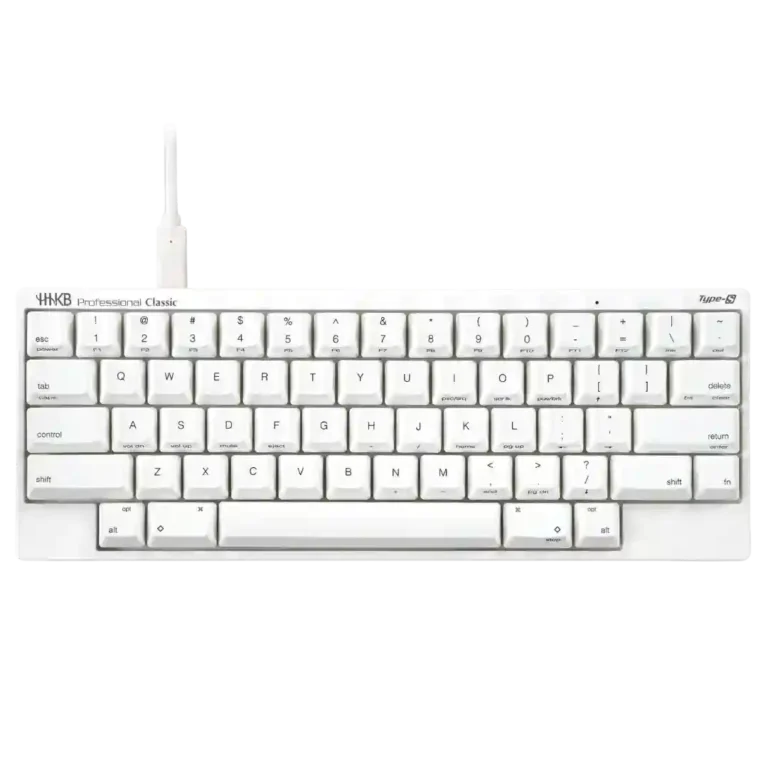
Choose it for refined, quiet Topre typing in a compact, travel-friendly layout. Skip it if you need conventional arrows, gaming-speed features, wireless connectivity, or strong value.
Developers, programmers, and touch typists who value quiet Topre tactility, minimal hand travel, and a compact board that is easy to carry or fit on a crowded desk.
Buyers who want dedicated arrow keys, competitive-gaming responsiveness, wireless connectivity, extensive modern customization, or the most features for the money.
The HHKB Professional Classic Type-S delivers an unusually refined typing experience built around quiet Topre switches, a compact 60% footprint, durable PBT keycaps, and a layout designed to minimize hand travel. Reviewers who adapt to the Control, Backspace, and Fn-layer placement often find it fast, comfortable, and hard to give up. The tradeoffs are substantial: the arrow implementation frustrates many users, the wired-only Classic lacks modern extras, customization is more limited than on enthusiast boards, and the 125 Hz polling rate makes it a weak gaming choice. Its premium price amplifies every compromise, so its appeal depends heavily on valuing Topre feel and the HHKB layout above feature count.
Compared with other Gaming Keyboards, this product is above average in portability, ergonomics, key spacing, near average in switch feel, key responsiveness, below average in macro customization, onboard memory, ease of switch replacement.
| Attribute | This product | Category average | Difference |
|---|---|---|---|
| macro customization | 1.5 | 4.2 | -2.7 |
| onboard memory | 1.5 | 4.1 | -2.6 |
| ease of switch replacement | 1.3 | 3.8 | -2.5 |
| gaming performance | 2.2 | 4.5 | -2.3 |
| polling rate | 2.0 | 3.9 | -1.9 |
| connectivity | 2.0 | 3.9 | -1.9 |
| value for money | 2.1 | 3.7 | -1.5 |
| legend visibility | 2.0 | 3.6 | -1.6 |
Choose HyperX Alloy Origins. It scores 5.0 vs 2.0 for legend visibility, with a 4.1 overall score.
Choose Razer BlackWidow V3. It scores 4.7 vs 1.5 for onboard memory, with a 4.0 overall score.
Choose Corsair K65 PRO Mini. It scores 4.9 vs 2.2 for gaming performance, with a 4.2 overall score.
Choose Razer Huntsman V2 TKL. It scores 5.0 vs 3.3 for layout options, with a 4.0 overall score.
Products reviewers directly compared with this model, grouped into quick takeaways.
Most reviewers describe the Topre action as smooth, cushioned, tactile, and refined, with a softer bottom-out than many mechanical boards. A few find it too soft or abrupt, so switch preference still matters.
Yes, reviewers consistently find it quieter than standard Topre and many mechanical keyboards. The bottom-out is still audible, so Type-S reduces noise rather than making the board silent.
The learning curve is real, especially for the Fn-layer arrow keys and relocated Control and Backspace/Delete functions. Some reviewers adapt within days or weeks and then prefer it, while others never accept the arrow arrangement.
It is usable for casual gaming, but reviewers criticize the 125 Hz polling rate, slower tactile response, and missing dedicated cursor cluster. Serious or competitive gamers have better-suited options.
No. This model is wired-only over USB-C; HHKB’s Hybrid Type-S is the wireless alternative mentioned in the supplied coverage.
That depends on how highly you value Topre feel and the HHKB layout. Enthusiasts often consider the typing experience special enough to justify the cost, while many reviewers say the price is hard to defend for mainstream buyers.
These are a few of the reviews included in our analysis.
HHKB Professional Classic Type-S keyboards are the newest generation of the original HHKB, featuring electrostatic capacitive switches, high...
The HHKB Professional Hybrid is a compact 60-key keyboard with a very particular audience in mind. Here's my review.
The keyboard for someone who wishes they could buy a ’97 Tacoma off the lot today.
The news blog specialized in Japanese culture, odd news, gadgets and all other funny stuffs. Updated everyday.
The HHKB Professional Classic Type-S is a radically deconstructed keyboard design that focuses on compact layout rather than easy adaptability.

Good if you want a premium 96% Hall Effect keyboard for work and gaming with excellent build, sound, and customization. Skip it if you need cheaper esports-first speed, 8,000Hz polling,...
Pros: cable quality, typing comfort
Cons: portability, switch options

Choose it if competitive gaming speed, Rapid Trigger, and deep per-key customization matter more than extras. Skip it if you need wireless, dedicated arrows/media keys, adjustable height, or a lower-cost...
Pros: actuation consistency, rapid trigger support
Cons: wireless performance, media controls

Good if you want a premium, quiet TKL Hall Effect keyboard for typing and gaming. Skip it if price, portability, 8,000Hz polling, or broad switch choice matters most.
Pros: build quality, extra gaming features
Cons: switch options, hot-swappable switches

Good if you want a premium full-size Hall Effect keyboard with smooth switches, quiet sound, and deep customization. Skip it if you need a portable, budget-friendly board or broad switch...
Pros: key stability, frame rigidity
Cons: portability, switch options