If you want better desk space efficiency
Choose be quiet! Dark Mount. It scores 4.9 vs 2.5 for desk space efficiency, with a 4.3 overall score.

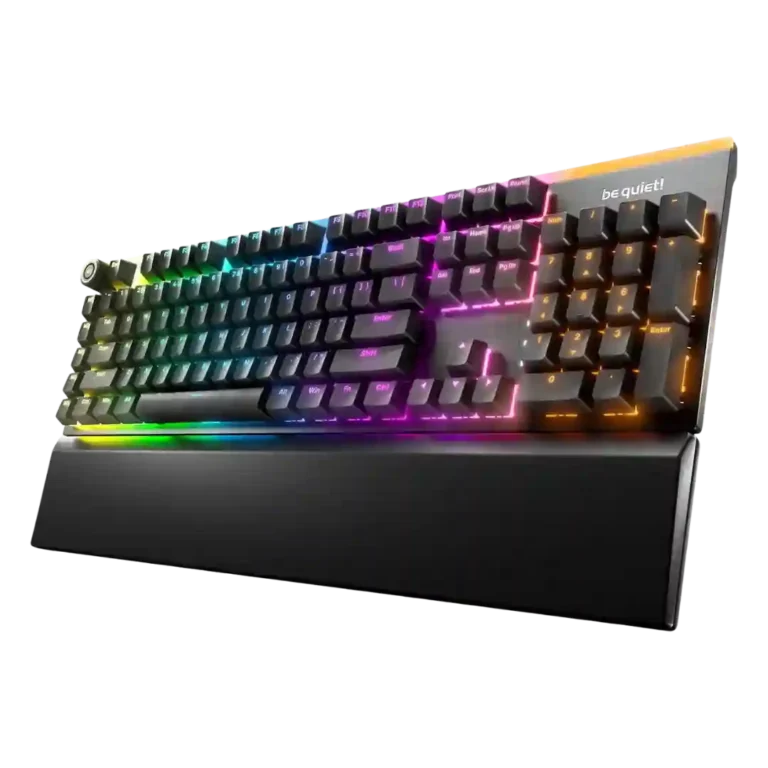
Choose the Light Mount for quiet mechanical typing, vivid RGB, and comfortable full-size use. Skip it if you need wireless, compact layouts, or esports features like rapid trigger and adjustable actuation.
Best for writers, productivity users, casual gamers, and shared-space setups where quiet mechanical typing, vivid RGB, and a full-size layout matter more than wireless or esports tuning.
Not for competitive gamers chasing analog switches, rapid trigger, SOCD, or adjustable actuation, and not for users who need a compact or wireless keyboard.
Reviewers portray the be quiet! Light Mount as a focused silent mechanical keyboard rather than an esports-first board. Its strongest wins are the cushioned, quiet typing feel, effective multilayer dampening, stable large keys, vivid RGB, approachable IO Center software, and comfortable wrist support. The tradeoff is that its full-size wired design and high price compete with boards that offer wireless, compact layouts, Hall Effect or analog switches, rapid trigger, and deeper gaming controls. Several reviewers still find it responsive enough for normal gaming, writing, and productivity, but the consensus is that its premium mainly pays for acoustics, lighting, and comfort rather than cutting-edge competitive features.
Compared with other Gaming Keyboards, this product is above average in wrist rest quality, hot-swappable switches, switch options, near average in media controls, design aesthetics, below average in rapid trigger support, analog input support, desk space efficiency.
| Attribute | This product | Category average | Difference |
|---|---|---|---|
| rapid trigger support | 1.3 | 3.6 | -2.3 |
| analog input support | 1.4 | 3.2 | -1.9 |
| desk space efficiency | 2.5 | 4.2 | -1.7 |
| extra gaming features | 2.6 | 4.0 | -1.4 |
| size and form factor | 3.0 | 4.1 | -1.2 |
| wrist rest quality | 4.3 | 3.3 | +1.0 |
| hot-swappable switches | 4.6 | 3.5 | +1.1 |
| switch options | 4.1 | 3.2 | +0.9 |
Choose be quiet! Dark Mount. It scores 4.9 vs 2.5 for desk space efficiency, with a 4.3 overall score.
Choose Razer Huntsman V3 Pro. It scores 4.7 vs 2.6 for extra gaming features, with a 3.9 overall score.
Choose NZXT Function Elite MiniTKL. It scores 4.7 vs 1.4 for analog input support, with a 3.9 overall score.
Choose ASUS ROG Falchion Ace 75 HE. It scores 4.7 vs 1.3 for rapid trigger support, with a 4.2 overall score.
Products reviewers directly compared with this model, grouped into quick takeaways.
Yes. Reviewers repeatedly call it one of the quietest or most muted mechanical keyboards they have used, though several note it is not completely silent.
The typing feel is generally praised as soft, cushioned, smooth, and satisfying without becoming mushy. Long-session comfort is helped by stable keys and the magnetic wrist rest.
It is responsive enough for mainstream gaming, with 1,000Hz polling and N-key rollover. Reviewers do not treat it as an esports-focused board because it lacks rapid trigger, analog sensing, and adjustable actuation.
Yes. Reviews praise the bright per-key RGB, top light bar, side or underglow effects, and strong software customization, although a few found the top bar too prominent or the underside lighting not bright enough.
Yes. Reviews describe remapping, macro recording, programmable M keys, FN-layer commands, profiles, and extensive lighting controls through IO Center or its web version.
Most reviewers call IO Center simple, polished, responsive, and useful, especially because of the browser-based option. One review reports profile confusion and calls the software underdeveloped.
The main drawbacks are wired-only connectivity, full-size desk footprint, a premium price, limited switch/layout options, and missing competitive gaming features.
These are a few of the reviews included in our analysis.


Good if you want a premium 96% Hall Effect keyboard for work and gaming with excellent build, sound, and customization. Skip it if you need cheaper esports-first speed, 8,000Hz polling,...
Pros: size and form factor, typing feel
Cons: switch options, portability

Choose it if competitive gaming speed, Rapid Trigger, and deep per-key customization matter more than extras. Skip it if you need wireless, dedicated arrows/media keys, adjustable height, or a lower-cost...
Pros: overall satisfaction, customization options
Cons: value for money, switch options

Good if you want a premium, quiet TKL Hall Effect keyboard for typing and gaming. Skip it if price, portability, 8,000Hz polling, or broad switch choice matters most.
Pros: build quality, switch feel
Cons: switch options

Good if you want a premium full-size Hall Effect keyboard with smooth switches, quiet sound, and deep customization. Skip it if you need a portable, budget-friendly board or broad switch...
Pros: build quality, keycap quality
Cons: switch options, portability