
Reviewers who discussed the 2.4GHz link found it responsive, with solid signal behavior and wired-like performance when using the dongle.
Pros: value for money, weight
Cons: Bluetooth support, cable flexibility

Reviewers who discussed the 2.4GHz link found it responsive, with solid signal behavior and wired-like performance when using the dongle.
Pros: value for money, weight
Cons: Bluetooth support, cable flexibility

The 2.4GHz connection was praised directly as fast and reliable in competitive use.
Pros: build quality, shape comfort
Cons: value for money, charging convenience

The 2.4GHz connection was praised for higher performance, lower latency, and a much higher polling rate than Bluetooth.
Pros: value for money, button customization
Cons: fingertip grip comfort, portability

2.4GHz connectivity was praised as the preferred low-latency, high-performance wireless mode for gaming.
Pros: battery life, software usability
Cons: weight, FPS gaming suitability

2.4GHz connectivity was praised for stable, speedy Lightspeed/2.4GHz operation and high polling without a bulky receiver.
Pros: weight, shape comfort
Cons: side button quality, value for money

The 2.4GHz connection was praised in one review as both fast and reliable.
Pros: build quality, weight
Cons: value for money, charging convenience

2.4GHz connectivity is praised for stable SpeedNova/Omni performance, a strong signal, and responsive operation.
Pros: Accuracy and tracking precision, shape comfort
Cons: long-session comfort

Reviewers liked the included HyperSpeed or 2.4GHz path for low-latency wireless use, with multi-device dongle convenience also mentioned.
Pros: scroll wheel quality, battery life
Cons: value for money, weight

2.4GHz connectivity was praised for easy setup, low-latency use, and stronger gaming-oriented signal behavior.
Pros: weight, battery life
Cons: polling rate, RGB features

2.4GHz connectivity was praised for easy setup, SpeedNova precision, reliable performance, and top-notch wireless behavior.
Pros: shape comfort, value for money
Cons: handedness options

Reviewers discussed the 2.4GHz receiver mainly as part of the broader wireless setup, with praise for low-latency use when paired with the booster.
Pros: value for money, sensor performance
Cons: software usability, grip texture

The dongle-based wireless connection drew positive feedback for avoiding connection drops, though the evidence is about stable 2.4GHz use rather than broader wireless flexibility.
Pros: value for money, glide smoothness
Cons: fingertip grip comfort, surface compatibility
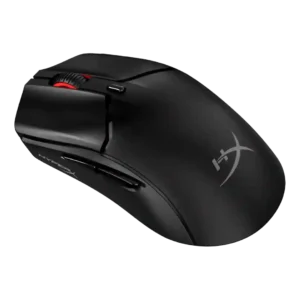
The 2.4GHz connection received direct praise as the best-feeling mode in one review.
Pros: side button quality, scroll wheel quality
Cons: weight, FPS gaming suitability

2.4GHz connectivity was praised for speed, responsiveness, and practical wireless switching.
Pros: battery life, glide smoothness
Cons: side button quality, value for money

2.4GHz connectivity was useful for low-latency performance, though one reviewer disliked needing separate Lightspeed receivers.
Pros: value for money, weight
Cons: premium feel, polling rate
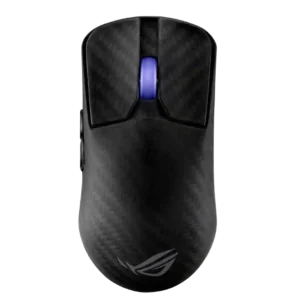
Reviewers liked that 2.4 GHz mode unlocked the mouse’s strongest gaming performance, though one reviewer reported a connection issue.
Pros: sensor performance, build quality
Cons: value for money, battery life

The HyperPolling receiver supports elite wireless performance, but lack of a simpler 2.4GHz USB dongle was criticized as inconvenient.
Pros: build quality, software usability
Cons: value for money, polling rate