If you want better premium feel
Choose Logitech G Pro X2 Superstrike. It scores 4.8 vs 2.8 for premium feel, with a 4.0 overall score.

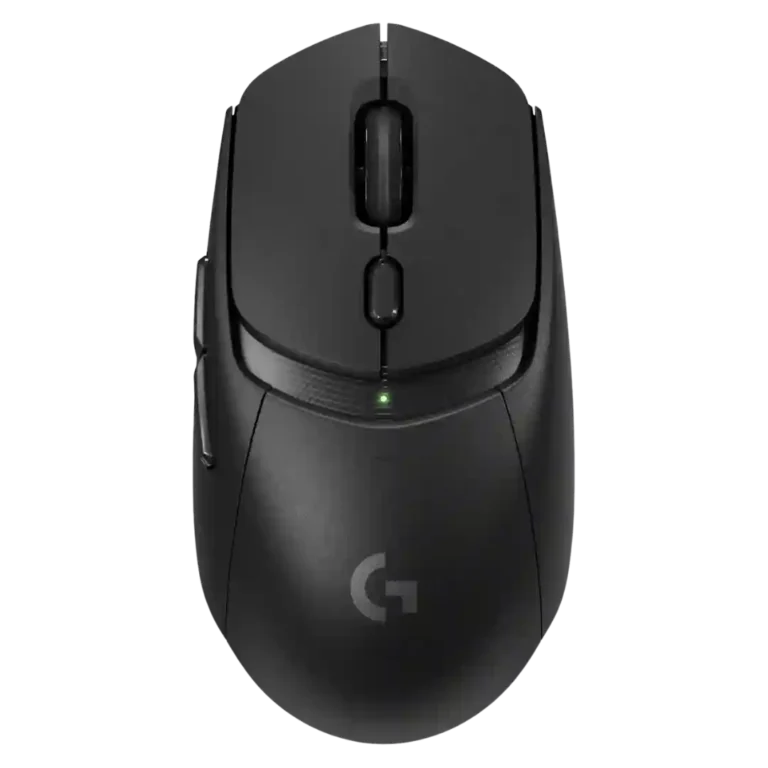
Choose the Logitech G309 Lightspeed for accurate wireless tracking, strong battery life, responsive clicks, and PowerPlay-friendly lightweight use. Skip it if you want standout value without PowerPlay, higher polling rates, richer ergonomics, RGB, or a lighter default AA setup.
Best for casual to mainstream gamers who want accurate wireless performance, long battery life, Bluetooth flexibility, and useful G Hub customization. It is especially attractive for reviewers who already use or plan to use PowerPlay.
Not ideal for buyers who want the lightest default setup, higher polling rates, rich RGB, premium ergonomics, or lots of MMO buttons. Several reviewers also questioned its value without PowerPlay.
Across the reviews, the G309 Lightspeed comes across as a capable but context-dependent wireless gaming mouse. Reviewers repeatedly praised its precise Hero 25K tracking, responsive Lightforce clicks, long battery life, and useful Bluetooth/Lightspeed flexibility. The tradeoff is that its best version depends on PowerPlay: without the AA battery it becomes much lighter and effectively battery-free, but that adds cost. With the default AA setup, several reviewers found the weight or rear balance less impressive, and some called the design generic or boring. Software, profiles, and button remapping are useful, though advanced tweaks and high polling rates are limited. It lands strongest as a practical everyday gaming mouse, not as a top esports or feature-packed MMO option.
Compared with other Gaming Mice, this product is above average in weight tuning, skate durability, Bluetooth support, near average in switch feel, software usability, below average in debounce customization, lift-off distance, balance and weight distribution.
| Attribute | This product | Category average | Difference |
|---|---|---|---|
| debounce customization | 2.0 | 3.9 | -1.9 |
| lift-off distance | 2.0 | 3.9 | -1.9 |
| weight tuning | 4.4 | 2.8 | +1.7 |
| balance and weight distribution | 2.5 | 4.1 | -1.6 |
| skate durability | 5.0 | 3.5 | +1.5 |
| premium feel | 2.8 | 4.0 | -1.2 |
| Bluetooth support | 4.5 | 3.6 | +0.9 |
| profile switching | 4.8 | 3.8 | +1.0 |
Choose Logitech G Pro X2 Superstrike. It scores 4.8 vs 2.8 for premium feel, with a 4.0 overall score.
Choose Corsair M75 AIR Wireless. It scores 4.7 vs 3.5 for weight, with a 3.8 overall score.
Choose ASUS ROG Gladius III Wireless. It scores 4.6 vs 4.2 for side button quality, with a 4.3 overall score.
Choose Logitech G Pro Wireless. It scores 4.6 vs 2.0 for lift-off distance, with a 4.3 overall score.
Compared with Logitech G309 Lightspeed
Yes. Multiple reviewers praised its tracking, responsiveness, and FPS performance, though some noted it does not stand out like higher-end esports mice.
No, it can run on a single AA battery. However, several reviewers felt it is most compelling with PowerPlay because that drops weight and removes battery worries.
Battery life was one of the strongest points. Reviews repeatedly cited long AA runtime, strong Bluetooth endurance, and effectively unlimited use with PowerPlay.
It depends on setup. Reviewers liked the 68g PowerPlay configuration, but many found the default AA setup heavier or back-heavy.
Generally yes. Reviewers liked profiles, DPI settings, remapping, and macros, but some criticized the lack of advanced tweaks and called remapping only basic.
It can work for MOBA play, but reviewers were mixed. For MMORPGs and button-heavy play, the six-button layout was repeatedly seen as limited.
These are a few of the reviews included in our analysis.




Choose the ROG Harpe II Ace for ultralight FPS play, precise tracking, smooth glide, and web-based tuning. Skip it if you need palm-grip support, MMO buttons, onboard profiles, or long...
Pros: glide smoothness, weight
Cons: handedness options

Excellent tracking, comfortable right-handed ergonomics and a versatile scroll wheel make the Basilisk V3 a strong gaming and productivity mouse. Its substantial weight, fixed cable and sometimes over-sensitive automatic scrolling...
Pros: scroll wheel quality, RGB features
Cons: weight, handedness options

The L7 Pro delivers remarkably light handling, precise aiming and a grippy shell at a budget price. Stock skates are less impressive, and conflicting click-latency measurements warrant caution for latency-sensitive...
Pros: value for money, weight
Cons: wired connectivity

Best for ultra-light, competition-focused speed, precise tracking, stable wireless, and long battery life. Skip it if you need quieter clicks, left-handed support, Bluetooth, more buttons, or better value for casual...
Pros: value for money, weight
Cons: click noise, RGB features